
Why Does My Internet Speed Fluctuate?
Internet speed fluctuation refers to inconsistent internet speeds that can rapidly change from fast to slow. Having a…

The 2.4GHz and 5GHz bands are commonly used frequencies for Wi-Fi networks. Many modern wireless routers support both 2.4GHz and 5GHz signals to provide more options and potentially faster speeds. This leads some users to wonder if turning off the 2.4GHz band will improve the speed and performance of the 5GHz network.
There are a few key factors to consider when evaluating if disabling 2.4GHz makes 5GHz faster. Understanding how the two bands work and interact provides context on the trade-offs involved.
Wi-Fi networks utilize radio signals in specific frequency ranges to transmit data. 2.4GHz operates between 2.400 and 2.483GHz while 5GHz uses frequencies between 5.150 and 5.825GHz. Key differences between these bands include:
| Frequency | Speed | Range | Interference |
|---|---|---|---|
| 2.4GHz | Up to 600Mbps | Farther | More |
| 5GHz | Over 1Gbps | Less | Less |
So in an ideal environment, 5GHz is better for performance while 2.4GHz reaches more places. Routers broadcast both signals to serve different user needs balancing speed and range.
There are a few scenarios where turning off 2.4GHz may provide some benefit to 5GHz performance:
If the 2.4GHz network is overloaded with connected devices while 5GHz has capacity, disabling 2.4GHz reduces congestion and airtime contention. Too many devices on one band can create a traffic jam. Segmenting devices to 5GHz with more capacity can moderately improve 5GHz throughput.
Some routers allow configuring 40MHz-wide channels on 2.4GHz which uses two standard 20MHz channels. This can cause interference for adjacent 20MHz channels in the 5GHz band. Turning 2.4GHz off eliminates this potential adjacent channel interference. Eliminating sources of interference typically improves signal quality.
A few router chipsets share transmit power between the 2.4GHz and 5GHz radios. Turning 2.4GHz off allows the router to allocate more transmit power to the 5GHz radio which could extend range and performance. More power means stronger data signals.
However, in many home environments, simply disabling the 2.4GHz radio often does not dramatically improve 5GHz Wi-Fi speeds. Further, it comes with some downsides:
While turning off 2.4GHz can provide small performance gains to 5GHz in some cases, it also introduces some potential problems:
Many older Wi-Fi devices like some smart home gadgets only work on the 2.4GHz band. Disabling this radio cuts connectivity for those legacy IoT devices. Those devices were built before 5GHz support was widespread. Forcing them to 5GHz could cause a loss of functionality.
Since 5GHz does not penetrate walls as well as 2.4GHz, clients connecting wirelessly from far rooms or the yard may lose Wi-Fi access if 2.4GHz is disabled. This leads to dead zones in the home forcing users to move closer to the router for a signal. This diminishes the convenience of Wi-Fi.
Some router features like band steering, client isolation, and mesh rely on having both radios active. Turning one band off can disable advanced networking functionality that utilizes both bands to work properly. Losing features may impact network management.
While disabling 2.4GHz can provide minor 5GHz speed boosts in some cases, many other factors usually play a bigger role in Wi-Fi network performance:
Upgrading hardware, optimizing the environment, and managing network demands usually have more impact than simply disabling 2.4GHz in most homes.
While turning off 2.4GHz has some limitations, it can provide a good Wi-Fi speed boost in these situations:
If you meet all those conditions, disabling 2.4GHz is unlikely to cause issues while giving 5GHz more available airtime and reduced interference.
There are some scenarios where turning off 2.4GHz can slightly improve 5GHz Wi-Fi speeds:
Potential Benefits
Potential Drawbacks
Generally, the speed gains are modest, while the loss of functionality, range, and legacy device access is more impactful. However, in some optimized environments with all 5GHz-capable devices, disabling 2.4GHz can provide a good overall speed boost.
The key takeaways on whether disabling 2.4GHz Wi-Fi improves 5GHz performance are:
So weigh the pros and cons for your environment before disabling 2.4GHz. Often the loss of functionality outweighs the minor speed gains from this Wi-Fi band switching. Consider other optimization techniques for the best network performance.
Hand-picked articles you might also find useful.
 Internet & ISP
 Internet speed fluctuation refers to inconsistent internet speeds that can rapidly change from fast to slow. Having a…
 Internet & ISP
 Is 1 Gbps (gigabit) internet fast? Yes — it's among the fastest available. Learn what you can do…
 Internet & ISP
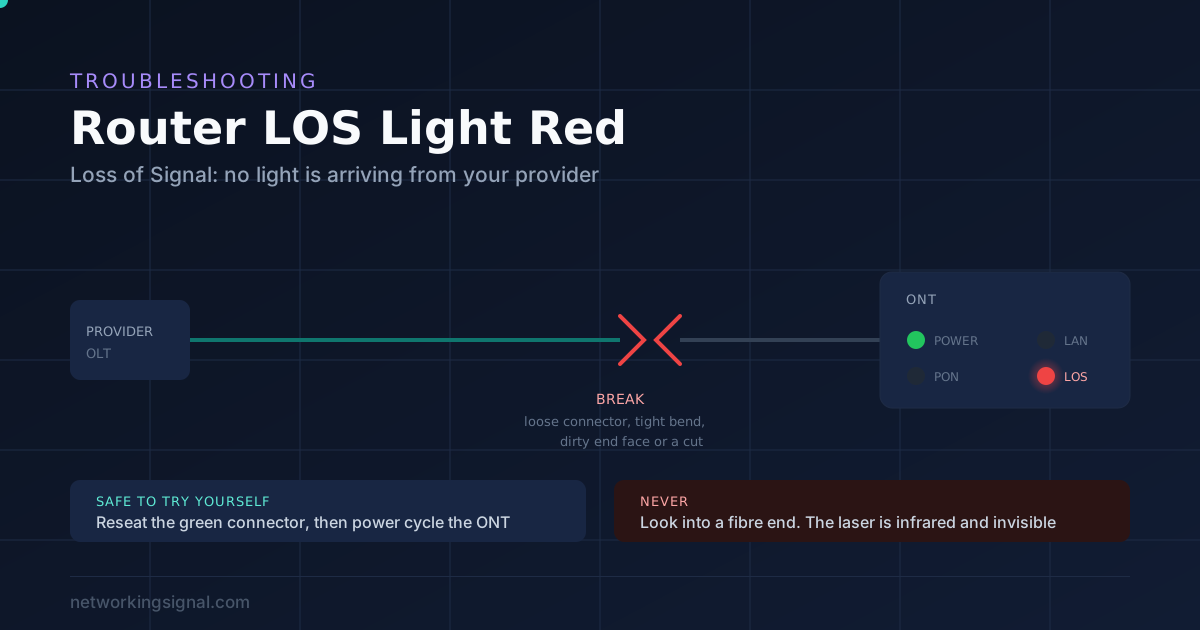
 A red LOS light means your fibre box is receiving no light from your provider. Two things are…