
Why Does My Laptop Keep Disconnecting From Wifi?
Having your laptop repeatedly lose connection to Wi-Fi can be incredibly frustrating. You're in the middle of an…

The Lenovo ThinkPad E16 Gen 3 ($1,249.99) is the best laptop for a network engineer, because it still has the two things this job needs and most modern laptops have dropped: a physical RJ-45 Ethernet port and USB-A.
You cannot console into a switch over WiFi. You cannot plug into an isolated management VLAN over WiFi. And your USB to serial console adapter is USB-A, as is every spare one in the van.
Buy the ports first. A network engineer’s laptop spends its life running SSH, a browser and a few lab VMs, none of which need a fast processor. It spends its life plugged into things, which needs sockets.
Need serious lab capacity instead? The ThinkPad L16 ($899.99) can be configured to 64GB and keeps the Ethernet port.
| Product | Laptop | RJ-45 | RAM | USB-A | Price |
|---|---|---|---|---|---|
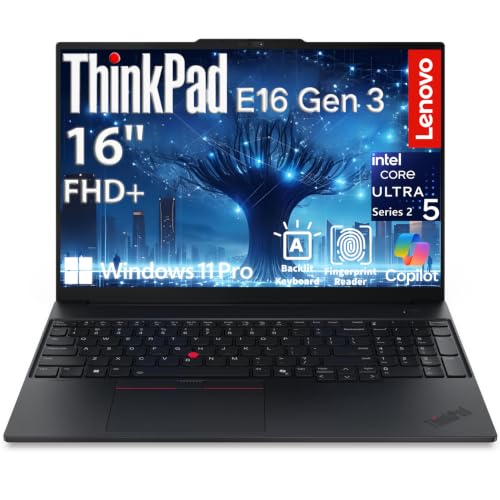 | ThinkPad E16 Gen 3Best overall | Yes, gigabit | 16GB | Yes | $1,249.99 |
 | ThinkPad L16Best for labs | Yes, gigabit | Up to 64GB | 3 ports | $899.99 |
 | Lenovo V15Budget pick | Yes, gigabit | 16GB | 2 ports | $699.98 |
 | ASUS V16 RTX 5070Heaviest labs | No | 32GB | Yes | $1,849.00 |
 | Dell 16 Plus, Ultra 9Best portable | No | 32GB | 1 port | $1,344.00 |
 | HP OmniBook 7 Flip 16Best screen | No | 32GB | 2 ports | $1,349.99 |
 | MacBook Air M5Best battery | No | 16GB | No | $1,259.99 |
Look at what a network engineer’s laptop actually does in a day. SSH sessions. A browser with a dozen management interfaces open. A terminal emulator. Maybe a few lab VMs. Occasionally a vendor configuration tool.
None of that is demanding. A five year old i5 handles all of it.
What the job does demand is connecting to things, and that is where modern laptops have quietly gone backwards.
Three situations need a physical Ethernet port and none of them have a wireless alternative.
An isolated management VLAN. Out of band management networks have no wireless access by design. That is the point of them.
A switch with no configuration. A new switch out of the box has no IP address and no WiFi. You reach it by console cable or by plugging directly into a port.
Testing a link. When someone reports a dead port, you plug your laptop into it. A USB adapter works, but adapters get left behind, and the moment you need one is the moment it is in the other bag.
The three Lenovo machines here have built in gigabit Ethernet. The rest need an adapter.
Serial console access uses a USB to serial adapter, and after twenty years those are still USB-A. So are USB drives with firmware images, and most vendor supplied cables.
Every USB-C only laptop means a dongle in the bag, and a dongle in the bag means a dongle eventually lost. On a call at two in the morning, that matters more than it sounds.
This is the one specification worth spending on.
16GB covers daily work and a couple of small virtual routers.
32GB is right if you run GNS3 or EVE-NG regularly. A virtual IOS node wants roughly 512MB to 1GB, and a virtual CSR router wants around 4GB, so a modest topology consumes memory quickly.
64GB is for building full lab topologies or studying for an expert level certification with a dozen nodes running.
SSH and terminal work is identical on all three, and macOS has a first class Unix shell.
The difference is vendor tooling. Configuration utilities, firmware flashers and some management clients are still Windows only, and some serial drivers ship for Windows first. On a Mac that means a virtual machine, which on Apple Silicon means an ARM Windows VM with its own limitations.
If you are certain you only ever need a terminal and a browser, macOS is fine. If you touch vendor hardware tools, buy Windows.
This has the port list the job needs, in a chassis light enough to carry between sites all day.
Built in gigabit Ethernet is the headline. No adapter for the management VLAN, no adapter for a new switch, no adapter to leave behind.
The processor is more than enough. An Ultra 5 225H with 14 cores to 4.9 GHz and a 13 TOPS NPU, paired with 16GB of DDR5 and a 1TB SSD. That runs a browser full of management interfaces, a stack of SSH sessions and a couple of virtual routers without complaint.
Three 4K displays simultaneously through Thunderbolt 4, USB-C DisplayPort 2.1 and HDMI 2.1. For anyone who works at a desk between site visits, that is the difference between one cable and a docking station.
Security is properly specified: fingerprint reader in the power button, IR camera with Windows Hello, physical privacy shutter, firmware TPM 2.0, Kensington slot, and Windows 11 Pro with BitLocker.
At 3.59 lbs and 0.67 inches it is genuinely portable for a 16 inch machine, with 65W USB-C charging so one charger covers laptop and phone.
The 16 inch WUXGA at 300 nits is the weak point. Fine indoors, dim in a bright room or a sunlit plant room.
Wi-Fi 6E rather than Wi-Fi 7, which is worth noting if you are testing Wi-Fi 7 deployments and want a client that can use them.
MIL-STD tested, with a backlit keyboard for working in a dark comms room.
Buy this for daily network engineering where you plug into things and carry the machine.
Cheaper than the E16 and better for anyone building lab topologies, because the memory can be configured all the way to 64GB.
That is the number that matters if you run GNS3 or EVE-NG seriously. Virtual routers eat RAM, and 64GB is the difference between a six node topology and a twenty node one. Storage goes to 2TB, useful for keeping a library of images locally.
The port list is the best here. Gigabit Ethernet, two Thunderbolt 4, two USB-A 3.2, one USB-A 2.0, and HDMI 2.1. Three USB-A ports means a console adapter, a USB drive and a mouse at once with nothing unplugged.
The display is a genuine upgrade over the E16: 16 inch WUXGA IPS at 400 nits anti glare, which stays readable in a bright room rather than washing out. Supports three external displays, up to 8K at 60 Hz over Thunderbolt 4.
An Ultra 5 225U with 12 cores to 4.8 GHz. A U series chip, so lower power than the E16’s H series part, which suits long battery life more than sustained heavy load. Around 10 hours with 80 percent charge in an hour.
Wi-Fi 6E, Bluetooth 5.3, fingerprint reader, backlit keyboard, numeric keypad and MIL-STD-810H certification.
Two caveats. The webcam is 720p rather than 1080p, noticeable on video calls. And this unit is opened by a third party to fit the memory and storage before shipping, with a one year warranty from that reseller rather than the standard Lenovo warranty.
Buy this if you build lab topologies and want ports and memory over raw speed.
Seven hundred dollars, with the Ethernet port and USB-A ports intact. For a junior engineer or a machine that lives in the van, this is the sensible buy.
Lenovo positions it as the budget replacement for the ThinkPad E16, and it is MIL-SPEC 810H tested, which is not a given at this price and matters for a laptop that gets carried into plant rooms and dropped on racks.
Ports cover the job: gigabit Ethernet, two USB-A 3.2, one USB-C 3.2 with DisplayPort and Power Delivery, HDMI 1.4b and an audio jack. Two external 4K displays at 60 Hz without a dock.
A Ryzen 5 7520U with Radeon 610M graphics, 16GB of DDR5 and a 512GB NVMe SSD. Modest, and entirely adequate for SSH, browsers and documentation.
Windows 11 Pro with Copilot, so BitLocker, Remote Desktop and domain join are all present. That is important, because plenty of cheap laptops ship Home and cannot join a corporate domain.
The 15.6 inch FHD anti glare panel is TUV certified low blue light, and there is a full size keyboard with a numeric keypad.
Be clear on the limits. The 7520U is a low power four core part and will feel slow with many browser tabs and a VM running. HDMI is 1.4b, so 4K over HDMI caps at 30 Hz; use USB-C for a 4K display. Five hundred and twelve gigabytes fills quickly with firmware images.
Wi-Fi 6 rather than 6E or 7.
Buy this as a site laptop or a junior engineer’s machine where ports matter and budget is tight.
Thirty two gigabytes and strong cooling, for running a lot of virtual routers at once. It has no Ethernet port, and that is a real cost for this job.
Thirty two gigabytes of DDR5 comfortably runs a dozen virtual nodes, and the gaming chassis has the cooling to keep them running for hours without throttling. A thin business laptop under the same load gets hot and slows down.
The RTX 5070 is largely wasted on network work, though it is genuinely useful if you are learning machine learning for network analytics or running local models. Otherwise you are paying for a GPU you will not use.
USB-C, USB-A and HDMI are present, but no RJ-45. Add a USB to Ethernet adapter, and accept that it is one more thing to carry and lose.
The 16 inch FHD+ at 1920 by 1200 and 144 Hz is fine. The refresh rate does nothing for terminal work.
The 47Wh battery is small for a machine this size, so treat it as a desk laptop that occasionally travels rather than one you carry all day.
Windows 11 Home rather than Pro, which is a genuine problem here: no BitLocker, no domain join, no Remote Desktop host. For a corporate network engineer that alone can rule it out. Upgrading to Pro costs extra.
Buy this as a lab machine that stays on a desk, not as the laptop you take to site.
Buy this as a desk based lab machine for heavy virtual topologies, not a site laptop.
Thirty two gigabytes, vPro and Wi-Fi 7 in a thin 16 inch chassis. No Ethernet port, and one USB-A.
Wi-Fi 7 with 2×2 at 160 MHz is genuinely relevant here. If you deploy or troubleshoot Wi-Fi 7 networks, you need a client that can actually connect at Wi-Fi 7 to test them. Most business laptops still ship Wi-Fi 6E.
Intel vPro gives out of band remote management and hardware level security, which is a feature network engineers configure for other people and rarely have themselves.
Thirty two gigabytes of LPDDR5X at 8533 MT/s and a 1TB SSD run several virtual routers alongside everything else.
Ports: one USB-A 3.2, one USB-C 3.2 with DisplayPort 1.4, one Thunderbolt 4 with DisplayPort 2.1, HDMI 2.1 and an audio jack. One USB-A is the constraint. A console adapter and a USB drive at once means a hub.
No RJ-45, so a USB Ethernet adapter is mandatory. Given the Thunderbolt 4 port, a dock at the desk covers it, but on site you are carrying dongles.
The 16 inch FHD+ touch display at 300 nits is bright enough indoors, and AI noise cancellation genuinely helps on calls from a noisy comms room.
An Ultra 9 288V reaching 5.3 GHz, more processor than this job needs, which is fine but not what the money should have gone on.
Buy this if you work on Wi-Fi 7 deployments and mostly dock at a desk.
A 16 inch 3K OLED that folds flat, with 32GB and a pen. Useful for a specific part of this job that gets overlooked.
The 2880 by 1800 OLED at 120 Hz with 500 nits and 100 percent DCI-P3 is the best display here by a wide margin. For reading dense configuration output, packet captures and log files, resolution and contrast reduce eye strain measurably over an eight hour day.
The 2-in-1 hinge and rechargeable pen are the reason to consider it over the Dell. Network engineers draw. Topology diagrams, rack layouts, cable routes, sketches on a whiteboard photo. Folding the screen flat and drawing directly on a diagram is genuinely faster than a mouse.
Thirty two gigabytes and a 1TB SSD with an Ultra 7 258V, plenty for daily work and a few virtual routers.
Ports are better than the Dell: two USB-A 3.2, one Thunderbolt 4, one USB-C and HDMI 2.1, plus an included USB-C hub. Two USB-A means a console adapter and a drive without a dongle. Still no RJ-45.
Wi-Fi 7 and a 5MP IR camera with Poly Studio processing, which produces a noticeably better image on calls than most business laptops.
OLED has two known costs. Static interface elements can cause burn in over years, and a terminal window with a fixed prompt is exactly that kind of static element. And OLED uses more power showing bright content, so a day of white background documentation drains faster than on an LCD.
Buy this if you read dense output all day and draw diagrams, and can live with a dongle.
Eighteen hours of battery and a proper Unix shell. Right for some network engineers and wrong for others, and the dividing line is clear.
Battery life is the argument. Eighteen hours means a full day in a data centre or on a site with no power, without hunting for a socket. Nothing else here comes close, and the M5 delivers the same performance on battery as plugged in, which x86 laptops do not.
macOS gives you a first class Unix terminal out of the box. SSH, scp, netcat, tcpdump, Python and every network automation tool run natively without WSL or a VM.
Fanless, so it is completely silent, which is pleasant in a quiet office and irrelevant in a data hall.
Now the reasons it may not suit. No Ethernet port and no USB-A, so both a network adapter and a USB-A adapter are needed. That is two dongles, on a machine bought partly for convenience.
Windows only vendor tools do not run. Configuration utilities, firmware flashers and some serial drivers are Windows first. On Apple Silicon that means an ARM Windows VM, which does not run every x86 tool.
Sixteen gigabytes of unified memory is shared with graphics and is not upgradeable, so lab capacity is limited and fixed at purchase.
The 13.6 inch Liquid Retina display is excellent but small for reading wide configuration output, and the 12MP Center Stage camera is the best on this page for video calls.
Buy this if your work is terminal, browser and automation and never a Windows only tool.
Yes, in practice. Out of band management VLANs have no wireless access by design, an unconfigured switch has no IP or WiFi, and testing a suspect port means plugging into it. A USB adapter works, but it is one more thing to leave behind.
Sixteen gigabytes runs a couple of small virtual routers alongside daily work. Thirty two gigabytes suits regular lab use, since a virtual IOS node wants 512MB to 1GB and a virtual CSR router around 4GB. Sixty four gigabytes is for full topologies or expert level study.
For terminal work, automation and browsers, yes, and macOS has an excellent Unix shell. The limitation is Windows only vendor tools such as firmware flashers and some serial drivers, which need an ARM Windows virtual machine on Apple Silicon.
No. SSH sessions, browsers and documentation are undemanding, and a modest current processor handles them easily. Spend the money on RAM if you lab, and on ports and battery life if you work on site.
Yes. Serial console adapters are still USB-A after twenty years, along with most USB drives holding firmware images and many vendor supplied cables. A USB-C only laptop means carrying a hub everywhere.
Pro, if the laptop touches a corporate network. Home cannot join a domain, has no BitLocker drive encryption and cannot host Remote Desktop. Upgrading later costs more than choosing correctly at purchase.
Buy the ThinkPad E16 Gen 3 at $1,249.99. Built in gigabit Ethernet, USB-A, three external 4K displays, full security features and 3.59 lbs to carry. It gets the ports right, which is what this job actually needs.
If you lab seriously, the ThinkPad L16 at $899.99 is the better buy: cheaper, configurable to 64GB, three USB-A ports, Ethernet and a brighter 400 nit screen. On a budget, the Lenovo V15 at $699.98 keeps the Ethernet port and Windows 11 Pro.
Consider the port free machines only for what they uniquely do. The Dell 16 Plus for a Wi-Fi 7 client, the HP OmniBook Flip for its OLED and pen, the MacBook Air for eighteen hours of battery. All three mean carrying adapters, which is a daily cost in this job.
Disclosure: Networking Signal is a participant in the Amazon Services LLC Associates Program. We earn a commission on qualifying purchases made through links on this page, at no additional cost to you. Prices shown were accurate at the time of writing and may change. Configurations vary by seller, so confirm the exact memory, storage and port list before ordering.
Hand-picked articles you might also find useful.
 Laptops
 Having your laptop repeatedly lose connection to Wi-Fi can be incredibly frustrating. You're in the middle of an…
 Laptops
 The best laptops for working from home in 2026. The HP OmniBook 7 Flip at $1,350 is the…
 Laptops
 The best laptops for SolidWorks in 2026. The ThinkPad P16v at $2,899 is the pick. SolidWorks modelling is…