
7 Best Laptops for Network Engineers in 2026 (Ports First)
The best laptops for network engineers in 2026. The ThinkPad E16 Gen 3 at $1,250 is the pick,…
The ASUS V16 ($1,849.00) is the best laptop for cyber security study: 32GB of RAM, a 1TB SSD and an RTX 5070 that genuinely accelerates password cracking coursework.
Three things decide this purchase.
RAM, above everything. A realistic lab is Kali plus a Windows target plus a domain controller, all running together. That is 12 to 16GB of guests before the host operating system has anything. 16GB is the floor and 32GB is the right answer.
USB-A, because WiFi auditing needs an external adapter. Built in Intel and MediaTek cards do not reliably support monitor mode and packet injection on Linux. You will buy an Alfa or similar, and it plugs into USB-A.
Not a MacBook. Apple Silicon cannot run x86 virtual machines, and most of the course material assumes x86 targets.
| Product | Laptop | RAM | Storage | GPU | Price |
|---|---|---|---|---|---|
 | ASUS V16 RTX 5070Best overall | 32GB DDR5 | 1TB | RTX 5070 | $1,849.00 |
 | ThinkPad L16Best value | Up to 64GB | Up to 2TB | Integrated | $899.99 |
 | Alienware 16X AuroraMost VMs at once | 32GB, 24 cores | 2TB | RTX 5070 | $2,399.00 |
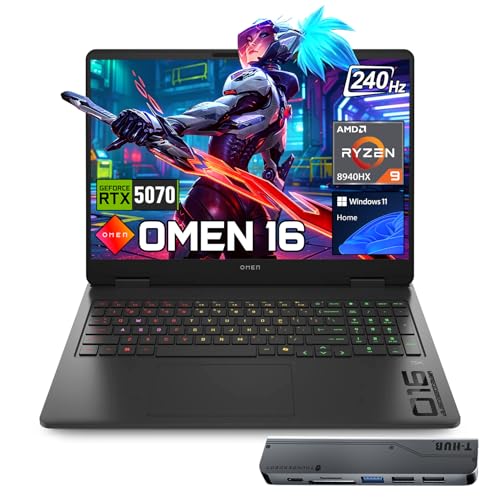 | HP OMEN 16Best display | 32GB, 16 cores | 1TB | RTX 5070 | $2,089.00 |
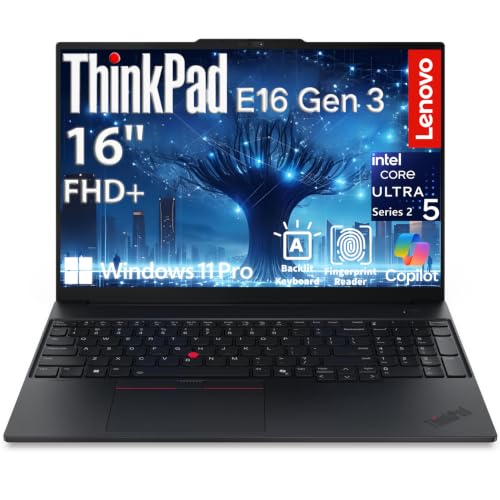 | ThinkPad E16 Gen 3Most portable | 16GB DDR5 | 1TB | Integrated | $1,249.99 |
 | Lenovo V15Budget pick | 16GB DDR5 | 512GB | Integrated | $699.98 |
Almost every practical exercise runs in virtual machines, and they run at the same time rather than one after another.
A typical setup: Kali Linux needs 2 to 4GB, a Windows 10 or 11 target needs 4GB, a Windows Server domain controller for Active Directory exercises needs 4GB, and Metasploitable or a vulnerable Linux target needs 1 to 2GB.
That is 11 to 14GB of guests. Windows itself uses 4 to 6GB with a browser open.
On a 16GB machine you are already over budget and the system starts swapping to disk, at which point everything crawls. 32GB gives room for that lab plus a browser full of documentation.
If a machine’s memory is soldered, as it is on most thin laptops, you cannot fix this later. Check before buying.
Wireless security is on every syllabus, and it needs a card that supports monitor mode and packet injection.
Built in Intel and MediaTek cards are not reliable for this on Linux. Intel drivers support monitor mode inconsistently and injection poorly, and the card is soldered so it cannot be swapped.
Everyone doing this work buys an external USB adapter with an Atheros or Realtek chipset, an Alfa AWUS036 or similar. These are USB-A.
So a USB-C only laptop means a hub for the one piece of hardware the course specifically requires.
This is the mistake worth avoiding. A MacBook is a fine student laptop and a poor cyber security student laptop.
Apple Silicon is ARM. It cannot run x86 virtual machines at usable speed. Virtualisation on an M series chip runs ARM guests only.
Kali exists for ARM, but most course material assumes x86 targets, most vulnerable practice machines are x86 images, and malware analysis samples are x86 by definition.
Emulating x86 on ARM works and is slow enough to be painful for a whole course.
Cloud lab environments are a real alternative and many universities provide them. If yours does, a MacBook becomes viable. Check before deciding.
Virtual machine disk images are large. A Kali install is 20 to 30GB, a Windows guest 40 to 60GB, and snapshots, which you will use constantly to roll back after breaking something, each add more.
Four or five VMs with snapshots comfortably exceed 300GB. 512GB is tight and 1TB is the sensible minimum.
Most security work does not need a graphics card. One thing does: password cracking with hashcat, which is standard coursework and runs enormously faster on a GPU than a CPU.
An RTX 5070 turns an exercise that would take hours on a processor into minutes. That is the honest reason gaming laptops appear on this list, alongside their better cooling under sustained load.
Thirty two gigabytes, a terabyte of storage and a capable GPU, at the lowest price that combination is available.
The memory detail matters more than the number. It is DDR5 SODIMM, which means removable modules in slots rather than soldered chips. You can upgrade to 64GB later for the price of memory alone, which none of the thin laptops here allow.
One terabyte handles four or five virtual machines with snapshots without constant housekeeping.
The RTX 5070 is the piece that pays off in coursework. Hashcat exercises that take hours on a processor finish in minutes on this. It is also useful for the machine learning modules appearing on more security courses.
The gaming chassis is the unglamorous advantage. Running four VMs for three hours generates real sustained heat, and a chassis built for gaming loads handles that without throttling. A thin business laptop under the same load slows down.
USB-A is present for the WiFi adapter, along with USB-C and HDMI.
The 16 inch 1920 by 1200 display is a comfortable size for several terminal windows side by side.
Two real limits. The 47Wh battery is small, so plan on mains power in the library. And it ships Windows 11 Home, so no BitLocker and no Hyper-V, though VirtualBox and VMware Workstation both work fine on Home.
Buy this as the default cyber security student laptop. It gets RAM, storage and GPU right.
Nine hundred dollars, configurable to 64GB of RAM and 2TB of storage. For a student building large lab environments, this is the most memory per dollar available.
Sixty four gigabytes changes what is possible. A full Active Directory environment with a domain controller, two workstations, a Kali box and a monitoring server all running together, which is what a red team or blue team module actually asks for.
Three USB-A ports is the practical advantage. WiFi adapter, USB drive with images and a mouse, all connected, with nothing swapped out.
Windows 11 Pro is included, which matters here more than on a general purpose laptop. Pro gives you Hyper-V, BitLocker and Windows Sandbox, all of which appear in coursework. Home has none of them.
Gigabit Ethernet is present, useful for network security exercises that need a wired connection.
The 16 inch WUXGA IPS at 400 nits anti glare is brighter than most laptops at this price and stays readable near a window. Around 10 hours of battery with 80 percent charge in an hour.
The compromises are clear. The Ultra 5 225U is a low power U series chip, so running six VMs will feel slower than on the H or HX machines here. Integrated graphics mean hashcat runs on the processor, which is far slower. And the 720p webcam is poor for online classes.
Note this is a third party upgraded unit with a one year reseller warranty rather than Lenovo’s standard cover.
Buy this if you need maximum RAM per dollar for large lab environments.
Twenty four cores and two terabytes. Where the other machines run out of headroom, this does not.
Core count matters for virtual machines in a way it does not for most software. Each VM is assigned virtual processors, and with 24 physical cores you can give four VMs four cores each and still leave the host eight. On an eight core laptop the same setup means everything contending for the same cores.
Two terabytes is the largest storage here, and it is the difference between deleting old VMs to make room and keeping a library of images and snapshots.
Thirty two gigabytes of RAM and an RTX 5070 for hashcat work.
Windows 11 Pro is included, which the ASUS lacks, so Hyper-V, BitLocker and Windows Sandbox are available out of the box.
An RJ-45 Ethernet port is present, useful for network exercises and unusual on a machine this thin.
The display is 16 inch WQXGA at 2560 by 1600, 100 percent DCI-P3 with G-SYNC. The higher resolution is genuinely useful for several terminal windows at once. The 240 Hz refresh rate is not.
The cost is the price. At $2,399 this is $550 more than the ASUS for more cores, more storage and Windows Pro. For a student on a budget the ASUS is the better value; for someone running large simulated environments, the extra cores earn it.
Buy this if you run large simulated environments and want cores and storage to spare.
Sixteen cores, 32 threads and the best screen of the high performance machines here.
The Ryzen 9 8940HX has 16 cores and 32 threads with 64MB of L3 cache, reaching 5.3 GHz. The large cache is genuinely relevant with several VMs running, because each one competes for cache and a bigger pool means less thrashing between them.
The display is the reason to pick this over the ASUS: 16 inch WQXGA at 2560 by 1600, 500 nits, 100 percent sRGB, anti glare with low blue light. Five hundred nits stays readable in a bright library, and the higher resolution fits more terminal output on screen. For a course involving long hours of reading logs and code, that matters daily.
Thirty two gigabytes of DDR5 and a 1TB SSD, with an RTX 5070 carrying 8GB of GDDR7 for hashcat work.
Ports are good: three USB-A, one USB-C, HDMI and an RJ-45 Ethernet port. Three USB-A means the WiFi adapter, a drive and a mouse without a hub, which no thin laptop here manages.
A seven in one USB-C hub is bundled, which covers most remaining gaps.
Two things count against it. It ships Windows 11 Home, so no Hyper-V or BitLocker without upgrading. And Wi-Fi 6 rather than 6E or 7, which is a modest limitation on a course covering current wireless standards, though the external audit adapter is what you use for that work anyway.
Buy this if you read logs and code for hours and want the brightest, sharpest screen.
Three and a half pounds with a real Ethernet port, USB-A and Windows 11 Pro. The right choice if you carry it to campus every day and lab at moderate scale.
Windows 11 Pro gives Hyper-V, BitLocker and Windows Sandbox without an upgrade, and full disk encryption on a machine that leaves the house with coursework on it is worth having.
An Ultra 5 225H with 14 cores to 4.9 GHz and a 1TB SSD. Sixteen gigabytes is the honest limitation: two VMs plus a browser is comfortable, three is tight, four is not realistic.
Two options if you need more. Use cloud labs, which many universities provide, or run VMs one at a time and design exercises around that. Neither is ideal, both work.
Gigabit Ethernet is useful for network security exercises where you want a wired connection you control, and USB-A takes the WiFi audit adapter.
Security features are the strongest here: fingerprint reader, IR camera with Windows Hello, physical privacy shutter, firmware TPM 2.0, Kensington slot. As a cyber security student you will be expected to demonstrate good practice on your own machine, and TPM 2.0 in particular appears in coursework on secure boot and measured boot.
Three 4K displays at once through Thunderbolt 4, USB-C DisplayPort and HDMI, which is genuinely useful when working across several VMs.
The 300 nit screen is dim in bright rooms, and Wi-Fi 6E rather than 7.
Buy this if you carry it daily and can lab at moderate scale or use cloud labs.
Seven hundred dollars with 16GB, Windows 11 Pro, an Ethernet port and two USB-A ports. If money is the constraint, this is the honest entry point.
Windows 11 Pro at this price is unusual and important. Most laptops under a thousand dollars ship Home, which has no Hyper-V, no BitLocker and no Windows Sandbox. Getting Pro on a $700 machine means the security features your course uses are all present.
Sixteen gigabytes of DDR5 runs Kali plus one Windows target. Not a full lab, but enough to work through most individual exercises.
MIL-SPEC 810H tested, which matters for a laptop carried in a rucksack for three years.
Gigabit Ethernet and two USB-A ports cover the WiFi adapter and a drive.
Be realistic about the limits, because they are significant. The Ryzen 5 7520U is a low power four core chip, so two VMs plus a browser will feel slow. 512GB is genuinely tight: a Kali install and one Windows guest with snapshots can use half of it, so plan on an external SSD, which is cheap and works well over USB-C.
Integrated Radeon 610M graphics mean hashcat exercises run on the processor, taking hours where a GPU takes minutes.
The 15.6 inch FHD panel with TUV low blue light certification is easy on the eyes over long sessions, and Wi-Fi 6 rather than 6E.
This gets you through the course. It will not be enjoyable during the heaviest modules.
Buy this if budget is the deciding factor, and add an external SSD from day one.
Thirty two gigabytes. A realistic lab is Kali at 2 to 4GB, a Windows target at 4GB, a domain controller at 4GB and a vulnerable Linux box at 1 to 2GB, all running together, which is 11 to 14GB before Windows itself uses 4 to 6GB. Sixteen gigabytes forces you to swap to disk.
Not well. Apple Silicon is ARM and cannot run x86 virtual machines at usable speed, while most course material assumes x86 targets and malware samples are x86 by definition. If your university provides cloud labs, a MacBook becomes viable; otherwise buy x86.
Not for most work, but the GPU genuinely accelerates hashcat password cracking, turning hours of processor time into minutes. Gaming laptops also cool better under the sustained load of several VMs. The RAM matters more than the GPU.
Usually not. Built in Intel and MediaTek cards support monitor mode inconsistently on Linux and inject poorly, and the card is soldered. Everyone doing wireless work buys an external USB adapter with an Atheros or Realtek chipset, and those are USB-A.
Pro. It includes Hyper-V, BitLocker and Windows Sandbox, all of which appear in coursework. Home has none of them. VirtualBox and VMware Workstation do run on Home, so it is workable, but Pro is worth the difference.
One terabyte minimum. A Kali install is 20 to 30GB, a Windows guest 40 to 60GB, and snapshots add more each time you roll back after breaking something. Four or five VMs with snapshots exceed 300GB comfortably.
Buy the ASUS V16 at $1,849.00. Thirty two gigabytes in upgradeable slots, a terabyte of storage, an RTX 5070 for hashcat, and the cooling to run several VMs for hours. It is the cheapest machine that gets all four right.
If you need more memory for less money, the ThinkPad L16 at $899.99 configures to 64GB with three USB-A ports and Windows 11 Pro, at the cost of a slower processor and no discrete GPU.
On a tight budget the Lenovo V15 at $699.98 gets you Windows 11 Pro and an Ethernet port, and will get you through the course with an external SSD attached. Whatever you buy, budget separately for an external WiFi adapter, because the built in card will not do the wireless module.
Disclosure: Networking Signal is a participant in the Amazon Services LLC Associates Program. We earn a commission on qualifying purchases made through links on this page, at no additional cost to you. Prices shown were accurate at the time of writing and may change. Security testing tools should only be used against systems you own or have written permission to test; check your institution’s acceptable use policy and applicable law before running any exercise outside a lab environment.
Hand-picked articles you might also find useful.
 Laptops
 The best laptops for network engineers in 2026. The ThinkPad E16 Gen 3 at $1,250 is the pick,…
 Laptops
 The best laptops for SolidWorks in 2026. The ThinkPad P16v at $2,899 is the pick. SolidWorks modelling is…
 Laptops
 Having your laptop repeatedly lose connection to Wi-Fi can be incredibly frustrating. You're in the middle of an…
3 responses to “6 Best Laptops for Cyber Security Students in 2026 (RAM First)”
About to start taking a cybersecurity course and these are the minimum requirements for laptops:
Windows or Mac OS
● Memory: 8 GB RAM required (16 GB preferred)
● Disk space: 256 GB free disk space (512 GB preferred).
● Processor: Intel i5 or i7 8th gen or newer processor or AMD Ryzen 5 or 7.
● Webcam and microphone are required for online classes.
● Both PCs and Macs require full administrator (“root”) privileges to operating systems and
software.
It also specifies that MacBook Pros cannot have the M1 or M2, I am a Mac user. What are your thoughts on the Asus ProArt StudioBook 16 OLED W7600Z3A 16″ 4K UHD Notebook Computer, Intel Core i9-12900H 2.5GHz, 32GB RAM, 2TB SSD, NVIDIA RTX A3000 12GB, Windows 11 Pro unit?
Would this meet the requirements needed for the course? Also, are there any MacBook Pro models that would work that do not have the M1 or M2?
Thank you
This is an amazing for Cyber Security Course because in it every specs is up to date.
This is an informative and helpful blog post for cyber security students looking to purchase a laptop that meets their needs. It’s great to see the latest models and specifications being discussed, as well as the importance of considering budget and personal preferences when making a decision. Thanks for sharing!