
What is Star Topology? Characteristics, Advantages and Uses
Star topology explained — how it works, why it is the standard for every modern LAN, its real…

A server rack is a standardised steel frame for mounting network and computing equipment. The standard is EIA-310, and it fixes two numbers that everything else follows.
19 inches is the front panel width of the equipment. 1U is 1.75 inches, or 44.45 mm, of vertical height. A 12U rack has 21 inches of usable height.
Because those are standard, a switch from one manufacturer fits a rack from another.
The mistake almost everyone makes is depth. Rack height is advertised loudly and depth is buried. A typical wall mount rack is 18 to 24 inches deep. A typical 1U server is 26 to 30 inches deep. Order the wrong one and the equipment physically will not fit.
Measure your deepest device, add four inches for cables, and buy at least that depth.
| Product | Rack | Type | Depth | Load | Price | |
|---|---|---|---|---|---|---|
 | Tecmojo 12U Open FrameBest starter | Open frame | Floor or wall | 2 shelves inc. | 260 lbs floor | $89.90 |
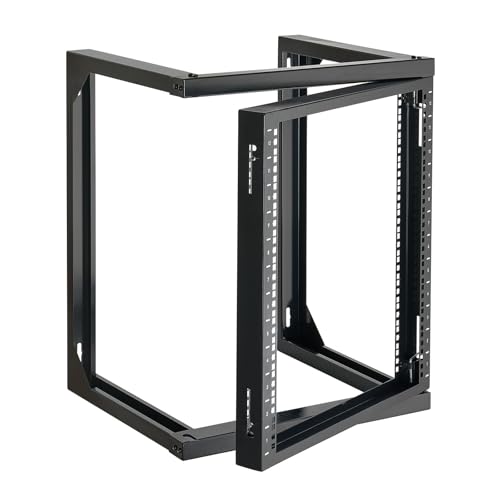 | VEVOR 12U Open FrameCheapest | Open frame | 18 inch | 150 lbs | Q235 steel | $58.49 |
 | Tecmojo 12U, 24in DeepDeepest wall rack | Open frame | 24 inch | 110 lbs static | Swing gate | $129.90 |
 | VEVOR 9U CabinetBest value cabinet | Enclosed | 15.5 inch | 200 lbs floor | Locking glass | $109.90 |
 | Tecmojo 9U CabinetReversible door | Enclosed | 17.7 inch | 110 lbs | Cooling fan | $149.90 |
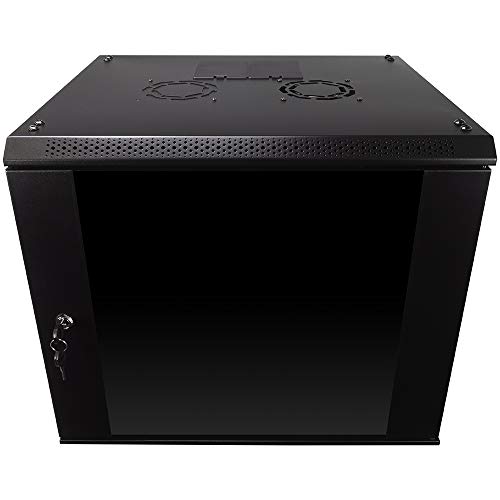 | NavePoint 9U EnclosureBest built | Enclosed | 17.7 inch | 110 lbs | Removable sides | $170.99 |
Nineteen inches is the width of the equipment’s front panel, including the mounting ears on each side. The rack posts sit behind those ears, and the usable space between them is roughly 17.75 inches.
The mounting holes themselves are 18.312 inches apart, centre to centre, and that figure is fixed by EIA-310. It is why any 19 inch device fits any 19 inch rack.
1U equals 1.75 inches, or 44.45 mm. Equipment is described by how many units it occupies.
A network switch is usually 1U. A patch panel is 1U or 2U. A small server is 1U or 2U. A rack mount UPS is 1U to 3U. A power distribution unit is 1U, or zero if it mounts vertically on the side.
Common sizes run 6U, 9U, 12U, 15U, 18U for wall mounts, and 42U for a full height floor cabinet.
Buy roughly double the space you need today. Racks fill up, and a cable manager between devices is worth a unit of height on its own.
Height is advertised in the product title. Depth is in the fifth bullet point, and it is the one that ruins orders.
The examples above range from 15.5 to 24 inches. Meanwhile a 1U rack server is typically 26 to 30 inches deep, so most wall mount racks physically cannot take one.
What does fit a shallow wall rack: switches, patch panels, routers, small firewalls, and network video recorders. All of those are typically 10 to 16 inches deep.
What does not: rack mount servers, large UPS units, and disk shelves.
Measure the deepest device you own, add four inches for cables and connectors at the back, and treat that as your minimum. Power connectors and cable bend radius take more room than people expect.
A distinction that decides what you can mount.
Two post racks have a single pair of vertical rails. Equipment is bolted at the front only, and the whole weight cantilevers off those ears. Fine for switches and patch panels, which are light and shallow. Not suitable for servers, which are heavy and long.
Four post racks have front and rear rails, so equipment is supported at both ends. Required for servers, and required for any sliding rail kit. Every open frame rack in the table above is four post.
The rule: if it needs rails, you need four posts.
Three exist and they are not interchangeable.
Square holes are the modern standard and what you should prefer. They take cage nuts, small square nuts that clip into the hole and provide a thread. If you strip one, you replace a fifty cent nut rather than the rail.
Round threaded holes, usually 10-32 or 12-24, take screws directly. Simpler, but strip one and the rail is permanently damaged in that position.
Round unthreaded holes need clip nuts, and are found mostly on older equipment.
Some racks, including two above, offer both square and tapped holes so you can switch. That flexibility is worth having if you mix old and new equipment.
The choice is between cooling and access on one side, and security and noise on the other.
Open frame is a bare skeleton. Better cooling with no doors to trap heat, easier access to cabling from every side, cheaper, and lighter. No security, no dust protection, and no noise reduction.
Enclosed cabinets have doors and side panels, usually lockable, often with a glass front and a fan. Better security, less dust, noticeably quieter, and better looking in a room people use.
The cost is heat. A closed cabinet needs deliberate airflow, which is why several here ship with a fan and ventilation holes.
Choose open frame for a garage, loft, basement or dedicated comms room. Choose enclosed for an office, a shop, a classroom or anywhere the public can reach it.
Listings often quote two figures and the difference matters.
Static load is what the rack holds while stationary. Dynamic or sliding load is what it holds while equipment is pulled out on rails, which shifts the centre of gravity forward.
One rack above quotes 110 lbs static and 55 lbs sliding. That halving is normal and it is the number that matters if you use rail kits.
Wall mounted capacity is always lower than floor standing. One example holds 130 lbs on a wall and 260 lbs on the floor.
And a wall mount rack is only as strong as what it is fixed to. It must be bolted into studs or masonry, never plasterboard alone. A 12U rack loaded with equipment is a serious weight above head height.
Blanking panels. Empty U spaces let hot exhaust air from the back of the rack flow forward through the gap and get sucked straight back into the equipment intakes. That recirculation raises intake temperature measurably. Blanking panels are a few dollars each and are the cheapest cooling improvement available.
Cable management. Horizontal managers between devices and vertical managers down the sides. Beyond tidiness, cables draped across the back of equipment block the exhaust airflow the cooling design depends on.
Power. A rack mount power distribution unit gives you a row of switched outlets, and a rack mount UPS keeps things running through a cut. Both consume rack units, so allow for them when choosing height.
The right first rack for a home lab or small office, mostly because of the flexibility.
It mounts on the floor or on a wall, which matters when you do not yet know where the equipment will end up. Floor standing gives 260 lbs of capacity; wall mounted gives 130 lbs.
Two ventilated shelves are included, and that is more useful than it sounds. Plenty of home lab equipment is not rack mountable at all: a consumer router, a NAS, a mini PC. A shelf lets them live in the rack tidily instead of stacked on top of it.
Four anti slip shelf stops and four hook and loop straps are included for holding devices and cables in place.
Cold rolled steel construction, and racks can be stacked to expand vertically as the setup grows.
The open frame layout means good airflow with no doors to trap heat, and access to cabling from every side, which is genuinely easier to work on than a cabinet.
What it does not give you is security or dust protection. Anything in it is exposed and reachable. Fine in a loft or garage, wrong in a shop or a classroom.
For a full comparison of rack options, see our best server racks guide.
Buy this for a home lab or small office in a space the public cannot reach.
The cheapest enclosed cabinet worth buying, and the right choice anywhere the equipment is in a shared space.
The locking glass door and side panels are the point. In an office, a shop or a classroom, a rack that anyone can reach into is a genuine risk, and not always a malicious one. Most accidental outages come from someone unplugging the wrong thing.
Glass rather than solid steel means you can see status lights without opening it, which saves a lot of unlocking.
Ventilation holes in the top, bottom and rear panels handle the heat that any enclosure traps. Switches and patch panels generate little heat and are fine. A server in a sealed 15.5 inch cabinet is not, and would not fit anyway.
Two hundred pounds floor mounted, 100 lbs wall mounted, on a welded frame.
Fully adjustable square hole mounting rails, with cable routing holes on the top, bottom and rear.
Watch the depth. At 15.5 inches this is the shallowest here. It takes switches, patch panels, routers and small firewalls, and nothing larger. Measure before ordering.
Buy this for an office, shop or classroom where people can reach the equipment.
The one to buy when depth is your constraint. Twenty four inches is 8.5 more than the shallowest cabinet here, which is the difference between fitting a device and returning it.
It still will not take a 30 inch server, but it comfortably handles deeper network appliances, larger firewalls and network video recorders that a 15 inch cabinet cannot.
The 180 degree swing gate is the feature that makes it pleasant to work on. The whole frame hinges away from the wall, giving access to the back of every device without unmounting anything. Anyone who has tried to reach a cable behind a fixed wall rack will understand why that is worth paying for.
Square and tapped holes can be switched, so it takes cage nuts or direct screws depending on what your equipment expects. Useful when mixing old and new gear.
Cold rolled steel with an electrostatic powder coat, rated at 110 lbs static and 55 lbs sliding. That sliding figure is the one to plan around if you use rail kits, and it is low.
Mounting holes 16 inches apart, which matches standard US stud spacing, so it bolts into two studs without extra bracing. That is a genuinely thoughtful detail.
Compliant with EIA/ECA-310-E, with a drilling template and installation video provided.
Buy this when depth is the constraint and rear access matters.
One rack unit equals 1.75 inches, or 44.45 mm, of vertical space. It is fixed by the EIA-310 standard. A 12U rack has 21 inches of usable mounting height. Most switches and patch panels are 1U; small servers are 1U or 2U.
Add up the units your equipment occupies and roughly double it, allowing space for cable managers, a power distribution unit and future additions. For a home network with a switch, patch panel and router, 6U to 9U is enough. For a small office, 12U to 15U.
Usually not. A 1U rack server is typically 26 to 30 inches deep, while most wall mount racks are 15 to 24 inches. Wall racks are designed for switches, patch panels, routers and small firewalls. Check the rack’s depth specification before ordering.
A two post rack supports equipment at the front only, which suits light shallow devices like switches and patch panels. A four post rack supports front and rear, which servers and any sliding rail kit require. If it needs rails, you need four posts.
Open frame for a loft, garage, basement or dedicated comms room, since it cools better, costs less and is easier to work on. Enclosed for an office, shop or classroom, where locking doors prevent accidental unplugging and reduce noise and dust.
They fill empty rack units so hot exhaust air cannot flow forward through the gap and get drawn back into equipment intakes. That recirculation raises intake temperature measurably. Blanking panels cost a few dollars each and are the cheapest cooling improvement available.
Get the two numbers right and everything else follows. 1U is 1.75 inches, so count your units and double them. Depth is the specification that ruins orders, so measure your deepest device and add four inches.
For a home lab or a comms room, the Tecmojo 12U open frame at $89.90 mounts on a floor or a wall and includes shelves for the equipment that has no rack ears. If depth is your problem, the 24 inch Tecmojo at $129.90 with its swing gate is the one.
Anywhere people can reach the equipment, buy an enclosed cabinet. The VEVOR 9U at $109.90 locks, ventilates properly and lets you read status lights through the glass.
Then spend a few more dollars on blanking panels and cable management. They do more for reliability than the next rack size up.
Disclosure: Networking Signal is a participant in the Amazon Services LLC Associates Program. We earn a commission on qualifying purchases made through links on this page, at no additional cost to you. Prices shown were accurate at the time of writing and may change. Wall mounted racks must be fixed into structural studs or masonry and never into plasterboard alone; if you are unsure of the fixing, consult a qualified installer.
Hand-picked articles you might also find useful.
 Routing & Switching
 Star topology explained — how it works, why it is the standard for every modern LAN, its real…
 Routing & Switching
 In today's world, businesses are continuously striving to increase their efficiency and agility while keeping up with the…
 Routing & Switching
 What is Layer 4 Transport Layer? The Layer 4 Transport Layer is the fourth layer of the Open…