
How to Check Network Bandwidth Usage on Windows
Built-in ways to see network usage on Windows — Task Manager, Resource Monitor, Settings data usage and PowerShell…
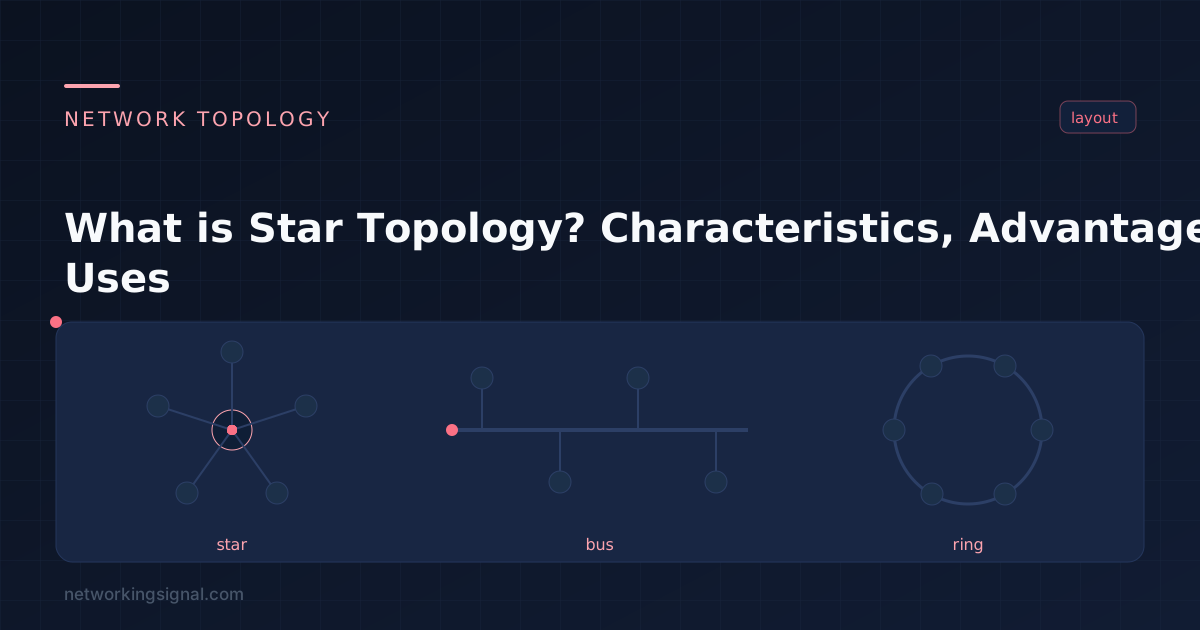
Star topology connects every device on the network to one central device with its own dedicated cable. That central device is a switch in any modern network (it was a hub in older ones), not a server. All traffic between two devices passes through it.
This is the topology virtually every home, office and campus access network uses today. When you plug a laptop into a wall port and that port runs back to a switch in a comms cabinet, you are looking at a star.
It is one of the five layouts covered in our network topology guide.
Each device has a point-to-point link to the central switch. When Device A sends a frame to Device D:
That third step is what separates a switch from a hub. A hub simply repeats the signal out of every port, so every device sees every frame and the whole network shares one collision domain. A switch gives each port its own collision domain and full bandwidth. Physically both are a star; logically they behave completely differently. See hub vs switch vs router and collision and broadcast domains.
Fault isolation. This is the real reason star won. A damaged cable or a failed NIC takes out one device. On a bus, the same fault takes down the entire segment.
Easy to troubleshoot. Each link is independent, so you can test one device at a time. A managed switch also gives you per-port error counters, link speed and duplex, and traffic statistics, you can often identify a bad cable without leaving your desk.
Simple to expand. Adding a device means plugging into a free port. Out of ports? Add another switch and uplink it. No reconfiguration of existing devices is needed.
Full bandwidth per device. With a switch, every port gets a dedicated collision domain, so devices do not compete for a shared medium.
Easy to secure and monitor. Because all traffic passes through one point, you can apply port security, 802.1X authentication, VLANs and port mirroring at the switch. See port security and VLANs.
The central switch is a single point of failure. This is the genuine weakness. If the switch dies, everything connected to it goes offline. It is also the only disadvantage that matters in practice, and it is solvable, as the next section shows.
More cabling than a bus or ring. Every device needs its own run back to the switch, which means more cable and structured cabling infrastructure, patch panels, trunking, a comms cabinet. In a building this is a one-off installation cost, and it is why star was expensive in the 1980s and is simply normal today.
Port count limits a single switch. A 24-port switch supports 24 devices. Beyond that you add switches and uplinks, which introduces a hierarchy to design and manage.
Performance depends on the switch. An underpowered switch with a low backplane capacity can become a bottleneck when many ports are busy at once.
Removing the single point of failure is routine in production networks, not difficult or exotic:
Once you add these, the network is technically a hybrid, a star at the access layer with a partially meshed core. That is what nearly every enterprise network actually is.
| Device | OSI layer | Behaviour | Used today? |
|---|---|---|---|
| Hub | 1 | Repeats signals to all ports; one collision domain | Obsolete |
| Switch | 2 | Forwards by MAC address; collision domain per port | Standard |
| Layer 3 switch | 2 and 3 | Switches within VLANs, routes between them | Common in distribution |
| Wireless access point | 2 | Wireless star, clients talk to the AP, not each other | Standard |
| Router | 3 | Connects the star to other networks | At the edge |
| Star | Bus | Ring | Mesh | |
|---|---|---|---|---|
| One cable fails | One device down | Whole segment down | Ring split | Traffic reroutes |
| Adding a device | Plug into a port | Tap the backbone | Break the ring | Cable to several nodes |
| Cabling needed | One run per device | Minimal | Low | Very high |
| Scalability | Excellent | Poor | Poor | Poor at full mesh |
| Troubleshooting | Easy | Hard | Hard | Complex |
Yes, it is the most scalable of the classic topologies. You add devices by adding ports, and you add ports by adding switches and uplinking them into a hierarchy. Campus networks with thousands of ports are built this way.
The central switch being a single point of failure. Everything else people list, extra cabling, cost, is minor by modern standards. Stacking, redundant uplinks and dual power supplies address the SPOF directly.
It needs more cable than a bus or ring because every device gets its own run, but switches are inexpensive and structured cabling is standard in any building. Mesh is by far the most expensive topology; star is not.
Yes. Clients associate with an access point and all traffic goes through it, even between two clients on the same AP. That is a star with the AP at the centre. A wireless mesh network is different, there, APs relay for each other.
An extended star, or star-of-stars, connects several star networks together through a higher-level switch. Each floor of an office might be its own star, with all floor switches uplinked to a building distribution switch. This is the standard hierarchical campus design.
No. The central device is a switch, a Layer 2 forwarding device. Older texts sometimes say “central server”, which is a source of confusion. Servers are endpoints on the network like any other device.
Compare the alternatives in our network topology guide, or read about bus, ring and mesh topology. For the hardware, see hub vs switch vs router and network devices explained.
Hand-picked articles you might also find useful.
 Routing & Switching
 Built-in ways to see network usage on Windows — Task Manager, Resource Monitor, Settings data usage and PowerShell…
 Routing & Switching
 What are the Ports on Cisco Devices? The Ports on Cisco Devices are physical connection points, used to…
 Routing & Switching
 What is Network Administrator? A Network Administrator is a professional responsible for the maintenance, configuration, and reliable operation…