
What is an Internet Protocol IP Address? Detailed Explained
What is Internet Protocol ? Internet Protocol, or IP, is the main communications protocol used on the Internet.…
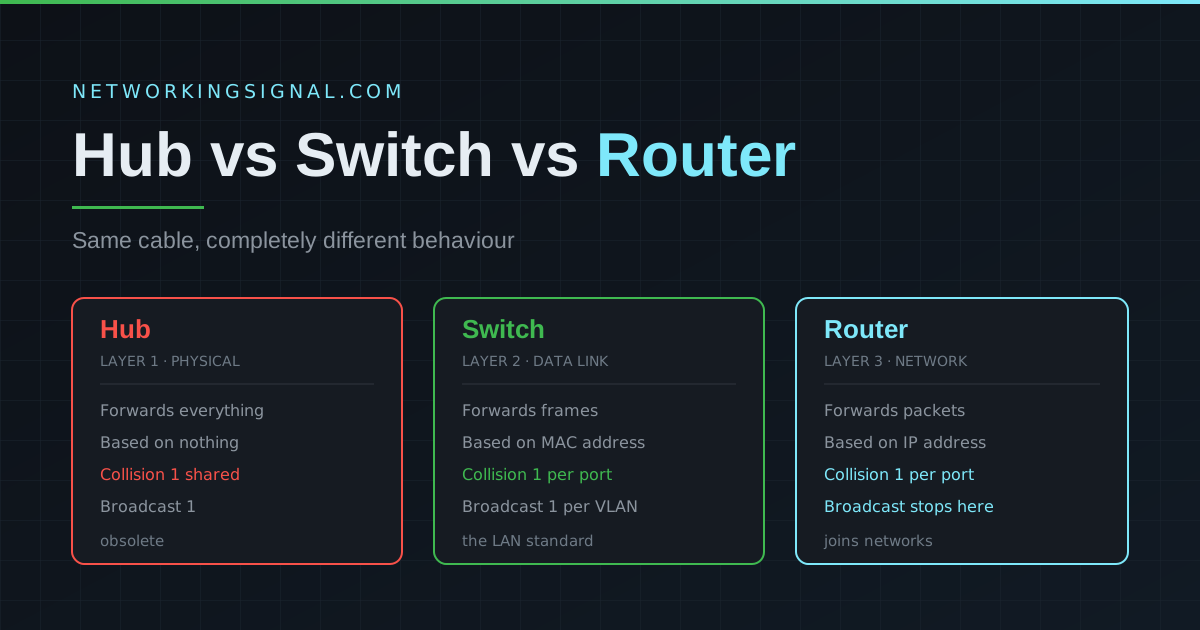
Quick answer: A hub broadcasts every frame to all connected devices (Layer 1). A switch forwards frames only to the correct device using MAC addresses (Layer 2). A router forwards packets between different networks using IP addresses (Layer 3). Hubs are obsolete, switches and routers do all the work in modern networks.
| Feature | Hub | Switch | Router |
|---|---|---|---|
| OSI Layer | Layer 1 (Physical) | Layer 2 (Data Link) | Layer 3 (Network) |
| Addressing | None | MAC address | IP address |
| Forwarding | Broadcast to all ports | Unicast to specific port | Routes between networks |
| Collision domain | One (shared) | One per port | One per port |
| Broadcast domain | One | One per VLAN | One per interface, stops broadcasts |
| Intelligence | None | MAC address table | Routing table |
| Typical port count | 4 to 24 | 8 to 48+ | Few (2 to 8) |
| Duplex | Half-duplex only | Full-duplex | Full-duplex |
| Used today? | Obsolete | Every LAN | Between networks, internet edge |
A hub is the simplest network device, it has no intelligence at all. Every frame received on any port is immediately retransmitted out every other port. It operates at OSI Layer 1 and has no awareness of MAC or IP addresses.
Hubs have not been manufactured for mainstream use since the early 2000s. If you find one in a rack, replacing it with a switch is almost always an instant performance win.
A network switch is an intelligent Layer 2 device. When a frame arrives, the switch reads the source MAC address and records which port it came from in its MAC address table (also called the CAM table). When forwarding, it sends the frame only to the port where the destination MAC lives, not to every port like a hub.
AA:AA:AA:AA:AA:AA)AA:AA:AA:AA:AA:AABB:BB:BB:BB:BB:BBA router operates at Layer 3 and connects different networks together. A switch works with MAC addresses inside one network; a router works with IP addresses and decides which network to send a packet toward next.
Your home router connects your local network (192.168.x.x) to your ISP’s network and onward to the internet. Without it your devices could talk to each other but nothing beyond.
This is the pairing people actually compare, since hubs are gone. The difference comes down to which OSI layer the device works at, and that single fact explains everything else.
| Parameter | Switch | Router |
|---|---|---|
| Operates at | Layer 2 (Data Link) | Layer 3 (Network) |
| Decides using | MAC address | IP address / subnet |
| Connects | Devices within one network | Separate networks to each other |
| Lookup table | MAC address table, learned automatically | Routing table, static or learned by protocol |
| Broadcasts | Forwards them within the VLAN | Blocks them, each interface is its own broadcast domain |
| Port count | High, 8 to 48 and beyond | Low, usually a WAN port and a few LAN ports |
| Port types | LAN ports of the same type | WAN and LAN, often different media |
| Forwarding speed | Faster, done in hardware ASICs | Slower per packet, more processing per hop |
| Segmentation | VLANs | Subnets and VRFs |
| Cost per port | Lower | Higher |
| Use case | Device |
|---|---|
| Connect PCs on the same floor or office | Switch |
| Connect the office to the internet | Router |
| Connect two separate sites | Router plus a WAN link |
| Split an office into departments | Managed switch with VLANs |
| Route between VLANs without a separate router | Layer 3 switch |
| Power IP phones, cameras or access points | PoE switch |
| Home network | Home router, router, switch and access point in one box |
What people call a home “router” is really three devices sharing an enclosure: a router between your LAN and the internet, a switch providing the LAN ports on the back, and a wireless access point providing the Wi-Fi. Enterprise networks split these into separate dedicated devices for performance, redundancy and manageability.
A switch forwards frames within a single network using MAC addresses at Layer 2. A router forwards packets between different networks using IP addresses at Layer 3. Everything else, port count, cost, speed, how broadcasts are handled, follows from that.
A Layer 2 switch cannot, it has no way to route between IP networks. A Layer 3 switch can route between VLANs inside your organisation, but you still need a router or firewall to reach the internet.
No, fewer. Routers usually have a small number of interfaces, often one WAN and a few LAN. Switches are designed for port density and commonly have 24 or 48.
Yes. Every router interface has both a MAC address for Layer 2 communication and an IP address for Layer 3 routing. When your PC sends traffic to its default gateway, it addresses the frame to the router’s MAC.
The router IP address that devices send traffic to when the destination is outside their own network. If your PC is 192.168.1.10 and the router is 192.168.1.1, then 192.168.1.1 is the default gateway.
A firewall can route, but its purpose is filtering and security enforcement. A router’s purpose is path selection and forwarding. In enterprise networks the firewall usually sits between the router and the internal network.
A hub puts every device in one collision domain and lets every device see every frame, bad for both performance and security. Switches solved both problems and cost no more, so hubs disappeared.
Read network devices explained, what a network switch is, what a router is and which OSI layer a router operates at. For segmentation see what a VLAN is and collision and broadcast domains, or start with the OSI model complete guide. Shopping for hardware? See our best PoE switches guide.
Hand-picked articles you might also find useful.
 IPv4
IPv4 What is Internet Protocol ? Internet Protocol, or IP, is the main communications protocol used on the Internet.…
 Networking Fundamentals
 What is an SD-WAN Controller? SDWAN Controller is a software-defined wide area network ( SD-WAN ) solution that…
 Networking Fundamentals
 Ring topology links each device to two neighbours in a closed loop. Here is how token passing worked,…