
Best Stackable Switches (2026): 7 Picks & Alternatives
Compare the best stackable switches for SMB networks, including 10GbE, PoE, stack size and when cloud-managed switches are…
For most homes the NETGEAR GS308PP at around $85 is the right buy, eight gigabit ports, an 83 W budget, and dynamic power allocation that shifts unused wattage to the ports that need it. If you only need to power two or three cameras, the TP-Link LS108GP does the same job for $54.
Running VLANs or 802.1X, or powering WiFi 7 access points? Step up to the Omada SG2428LP, 24 managed PoE+ ports for $178, which is remarkable value for a switch with a real CLI.
Power over Ethernet sends electrical power and data down the same cable, so a camera, access point or IP phone needs one cable instead of two. That removes the hardest part of most installations, getting mains power to an awkward location.
The mistake people make when buying is looking at port count and ignoring the power budget, which is the number that actually determines whether the switch can run your devices. The picks below are grouped by what you are powering rather than by price.
| Switch | Ports | PoE budget | Managed | Price | |
|---|---|---|---|---|---|
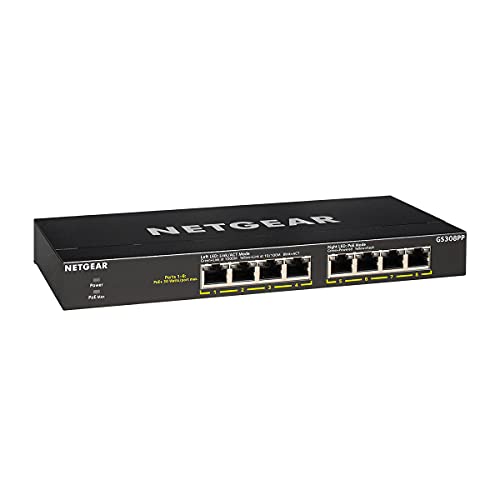 | NETGEAR GS308PPBest choice | 8 × 1G | 83 W | No | $84.99 |
 | TP-Link LS108GPBudget friendly | 8 × 1G | 65 W | No | $53.99 |
 | TP-Link Omada SG2428LPBest managed | 24 × 1G | 250 W | Yes · CLI | $177.99 |
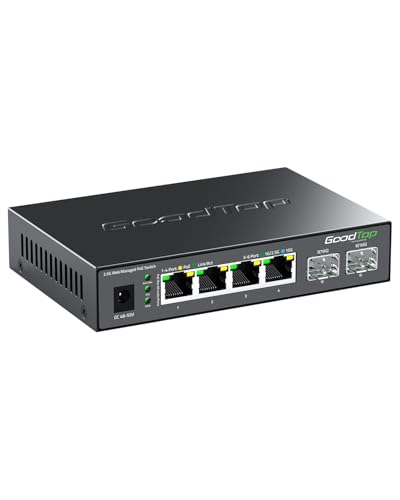 | 2.5G PoE++ 4-Port + 10G SFP+Best for WiFi 7 APs | 4 × 2.5G | 105 W · 90 W/port | Yes · web | $69.99 |
 | NETGEAR GS108PPHighest 8-port budget | 8 × 1G | 123 W | No | $133.51 |
 | TP-Link TL-SG1428PESimplest 24-port | 24 × 1G + 2 SFP | 250 W | Easy Smart | $229.00 |
Eight PoE+ ports and 83 W is the configuration that suits the largest number of homes, and the reason to pick this over the cheaper TP-Link is dynamic PoE allocation. Rather than reserving a fixed 30 W per port, it redistributes whatever the connected devices are not drawing. In practice that means you can run six cameras pulling 8 W each and still have headroom for an access point that spikes to 25 W, a fixed-allocation switch would refuse.
Fanless in a metal case, so it is silent and can sit in a living room or a cupboard without a temperature problem. Wall-mountable, which matters more than it sounds when the switch has to live near where the cables run.
Unmanaged means no VLANs, every device sits in one flat network. If you are powering cameras, that is a real consideration, because cheap IP cameras are among the most frequently compromised devices on home networks. If you want them isolated, you want the Omada instead.
Buy it if you are powering four to eight cameras or access points and do not need network segmentation.
At $54 this is the cheapest way to add PoE properly, and it has two features the NETGEAR does not. Extend Mode pushes PoE up to 820 feet, well beyond Ethernet’s normal 100 m limit, by dropping the affected ports to 10 Mbps. For a camera at the end of a long driveway that trade is usually worth making, and it saves running mains power.
PoE Auto Recovery is the other one: the switch pings powered devices and power-cycles any that stop responding. Anyone who has walked out to a frozen camera in the rain will understand why that matters.
The limit is the 65 W budget. That is fine for four to six typical cameras, but tight if you add a modern access point. Do the arithmetic before buying rather than after.
Buy it if you are powering a handful of cameras, especially any at awkward distances.
This is the value pick of the whole list. 24 managed PoE+ ports with a real CLI over SSH for $178 is pricing that used to buy an eight-port unmanaged switch. For a home lab it is close to unbeatable.
The security feature set is what separates it: 802.1X, DHCP snooping and Dynamic ARP Inspection, IP-MAC-port binding, ACLs, storm control and STP. Those are the exact controls covered in our port security guide, and having them means you can put cameras on their own VLAN with no route to your main network, which is the correct way to run untrusted devices.
Omada cloud management lets you administer it remotely, but it is optional, the switch works standalone through its web GUI or CLI. Fanless, so it stays silent even at full PoE load, which is unusual at 24 ports.
Worth knowing this is a Layer 2 switch. It segments with VLANs but cannot route between them; you will need a router or Layer 3 device for inter-VLAN traffic.
Buy it if you want cameras and IoT genuinely isolated, or you are building a home lab and want CLI practice.
This is the switch that solves a specific 2026 problem: a WiFi 7 access point can exceed a gigabit, so feeding it from a gigabit PoE port throttles it. Four 2.5 Gbps PoE ports plus two 10G SFP+ uplinks for $70 is the cheapest fix available.
It also supports 802.3bt (PoE++) at up to 90 W per port, against the 30 W of standard PoE+. That covers heavy PTZ cameras, PoE lighting and the higher-draw WiFi 7 access points that a 30 W port cannot start. Note the total budget is 105 W, so you can run one device at 90 W or spread it, you cannot run four at 90 W.
The web interface gives VLANs, link aggregation, QoS, IGMP snooping and per-port power monitoring with remote reboot, which is a genuinely good feature set at this price.
One honest caveat: this is a generic marketplace-brand unit rather than NETGEAR or TP-Link. The hardware specification is excellent for the money, but you are not getting a three-year warranty or a long firmware support record. For a home lab that is usually an acceptable trade; for a business installation, buy the branded equivalent.
Buy it if you are feeding WiFi 6E or 7 access points and gigabit PoE is the bottleneck.
Same eight ports as the GS308PP but with 123 W instead of 83 W, which is the difference between running eight modest devices and running eight demanding ones. At 15.4 W per device (standard 802.3af) the 83 W model is already close to its limit with six; this one has genuine headroom.
It also adds rack mounting, so it fits a server rack rather than sitting on a shelf. Fanless like the rest of the range.
The question is whether the extra $49 is worth it against simply buying the Omada, which gives 24 managed ports and 250 W for $44 more. Unless you specifically want unmanaged simplicity in eight ports, the Omada is better value.
Buy it if you need high PoE power in exactly eight ports with no configuration.
Same port count and power budget as the Omada, but with TP-Link’s Easy Smart firmware rather than full Omada management. You get VLANs, QoS, IGMP snooping and PoE Auto Recovery through a simple web interface, but no CLI, no SSH and no 802.1X.
That is a reasonable trade for a small office where somebody needs to segment the network occasionally without learning switch administration. For a home lab or anyone wanting the security features, the Omada is both cheaper and more capable, which makes this a harder recommendation than the price suggests.
The three-year warranty is worth noting if this is going into a business.
Buy it if a non-specialist will manage it and simplicity matters more than features.
Port count is the easy part. The power budget is what people get wrong. Our PoE power budget calculator adds your devices up and shows the worst case figure a switch may actually reserve.
| Standard | Name | Power at the port | Powers |
|---|---|---|---|
| 802.3af | PoE | 15.4 W | IP phones, basic cameras, older APs |
| 802.3at | PoE+ | 30 W | PTZ cameras, most modern APs |
| 802.3bt Type 3 | PoE++ | 60 W | WiFi 6E/7 APs, PoE lighting |
| 802.3bt Type 4 | PoE++ | 90 W | Heavy PTZ, displays, thin clients |
A PoE+ switch will power an 802.3af device happily. The reverse is not true, plug a 30 W access point into a 15.4 W port and it either refuses to start or reboots under load, which presents as a device that keeps dropping off the network.
Add up what your devices actually draw and leave roughly 20% headroom. A camera rated at 12 W draws more when the infrared illuminators come on at night; an access point draws more with many clients connected. Sizing to exactly the rated total is how you end up with devices that work all day and drop out after dark.
Note also that the quoted budget is what the switch delivers in total, not per port. An 83 W switch with eight ports cannot give 30 W to each, that would need 240 W.
PoE loses power to cable resistance over distance. At the full 100 m you can lose a meaningful fraction of what the switch sent, which is why the standard specifies less power at the device than at the port. Use Cat5e as a minimum and Cat6 or Cat6A for long high-power runs, the thicker conductors lose less and dissipate heat better in a bundle.
Isolate anything you did not build. Cheap IP cameras are among the most frequently compromised devices on home networks, and an unmanaged switch puts them on the same flat network as everything else. If you are buying PoE mainly for cameras, the extra spent on a managed switch buys you a VLAN that contains the problem.
The NETGEAR GS308PP at around $85 for most homes, eight gigabit PoE+ ports, an 83 W budget and dynamic power allocation. For network segmentation or WiFi 7 access points, the TP-Link Omada SG2428LP at $178 gives 24 managed ports with a full CLI.
Add up your devices and add about 20%. Typical draws are 4 to 8 W for a basic camera, 10 to 15 W for a PTZ camera, 15 to 25 W for a WiFi 6 access point, and up to 60 W for a WiFi 7 access point. An 83 W switch comfortably runs six cameras; it will not run eight access points.
The power delivered per port: 15.4 W for PoE (802.3af), 30 W for PoE+ (802.3at), and 60 W or 90 W for PoE++ (802.3bt Type 3 and Type 4). Higher-standard switches power lower-standard devices, but not the other way round.
Only if you want VLANs, 802.1X, monitoring or per-port power control. For four cameras on a home network, unmanaged is fine. If those cameras should not be able to reach your laptop, you need managed.
Yes. PoE switches negotiate before supplying power and will not send voltage to a device that does not request it, so plugging in a laptop or a printer is safe.
100 metres, the same as Ethernet, with power loss increasing over distance. Some switches offer an extend mode reaching several hundred metres by dropping to 10 Mbps on those ports, useful for a distant camera where bandwidth is not the priority.
Only if it supports 802.3bt. Many WiFi 6E and 7 access points draw more than the 30 W a PoE+ port supplies, and on an underpowered port they will either fail to boot or reboot under load.
Disclosure: we earn a commission on purchases made through the links above, at no extra cost to you. Prices are those shown at the time of writing and change frequently, check the current price on Amazon before buying. Specifications are taken from manufacturer listings.
Hand-picked articles you might also find useful.
 Networking Gears
 Compare the best stackable switches for SMB networks, including 10GbE, PoE, stack size and when cloud-managed switches are…
 Switching
 A managed switch gives you VLANs, STP, SNMP and port control; an unmanaged switch just forwards frames. Here…
 Switching
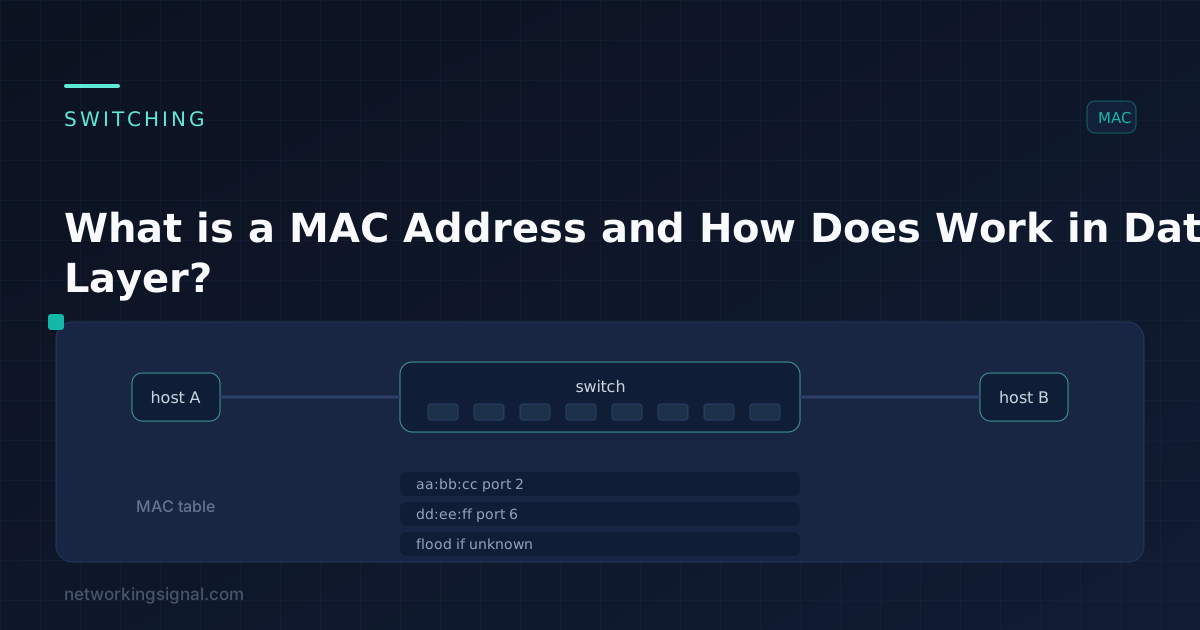
 A MAC address is a unique identifier for a network adapter. MAC addresses are used in the media…