
What are the Basic Issues of MAC Addresses and How To Troubleshoot Them?
What are the Basic Issues of MAC Addresses on Switch? A MAC address is a unique identifier assigned…
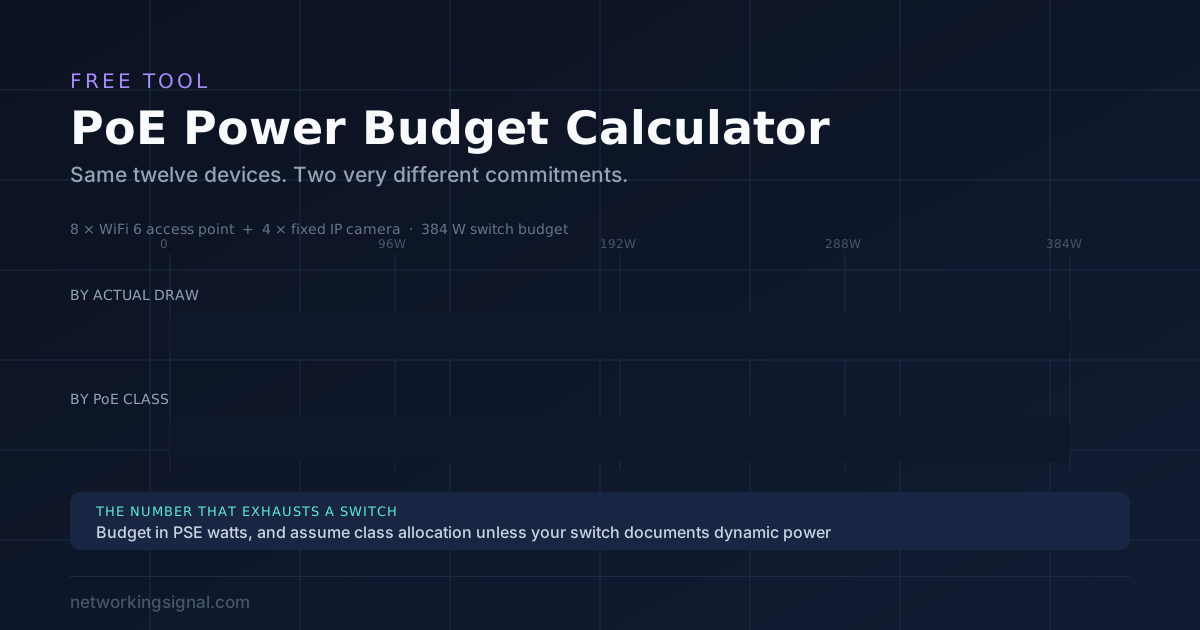
Enter your switch budget, add your devices, and see whether it fits. Tick the class allocation box to see the worst case figure your switch may actually reserve.
Almost everyone sizes a PoE switch by adding up what their devices draw. That number is often less than half what the switch actually commits.
Two separate things go wrong, and both push the real figure upward.
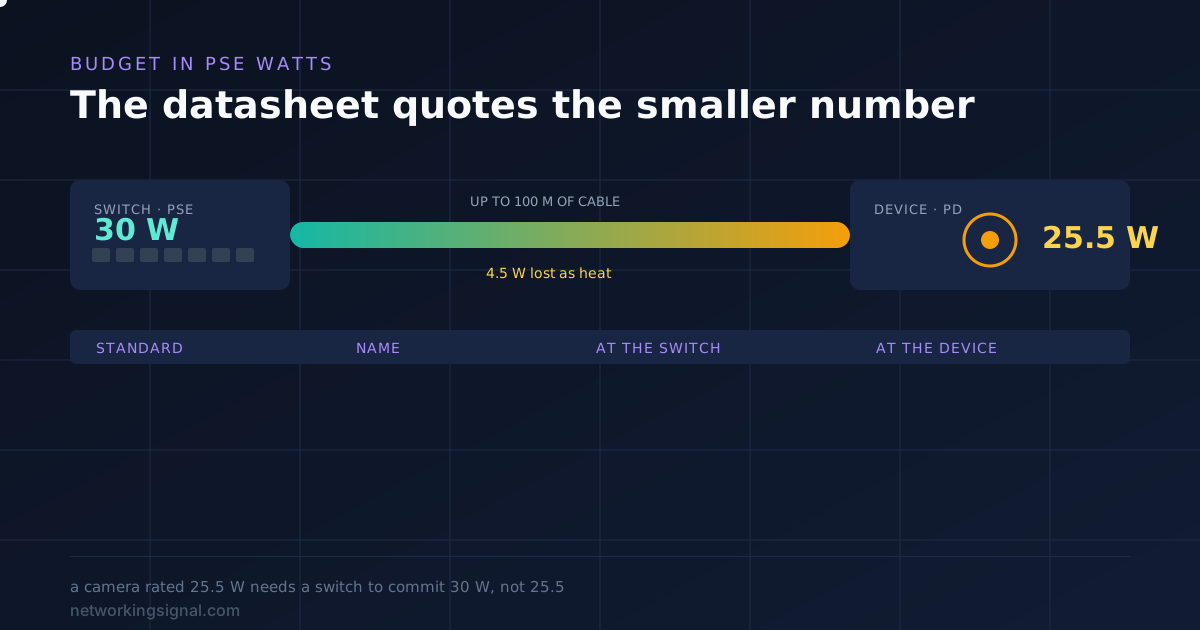
PoE is specified at two points. PSE is the power sourcing equipment, meaning the switch. PD is the powered device at the far end.
The standards allow for loss in the cable between them, so the two figures never match:
| Standard | Common name | At the switch (PSE) | Guaranteed at the device (PD) |
|---|---|---|---|
| 802.3af | PoE | 15.4 W | 12.95 W |
| 802.3at | PoE+ | 30 W | 25.5 W |
| 802.3bt Type 3 | PoE++ | 60 W | 51 W |
| 802.3bt Type 4 | PoE++ | 100 W | 71.3 W |
A camera datasheet quoting 25.5 W is quoting the PD figure. Your switch has to supply 30 W to deliver it. Budget in PSE watts, always, because that is the number the switch is counting.
This is the bigger trap, and it is why the checkbox above exists.
When a device connects, it announces a power class. Some switches then reserve the full maximum for that class and hold it, whether the device uses it or not. Others measure actual consumption, usually negotiated over LLDP, and only commit what is really drawn.
The difference is not small. Take twelve devices, eight WiFi 6 access points and four fixed cameras:
| Allocation method | Reserved | Of a 384 W budget |
|---|---|---|
| By actual draw | 136 W | 35% |
| By PoE class | 302 W | 79% |
Same hardware, more than double the commitment. A switch that looked a third full is now four fifths full and cannot take another access point.
Check your switch’s documentation for dynamic power allocation or LLDP power negotiation. If it supports them and they are enabled, use actual draw. If you cannot confirm it, tick the class box and size for that.
The switch does not fail, and nothing catches fire. It refuses power to ports, and which ports it refuses is the part worth understanding.
Most managed switches use port priority. Each port is set to critical, high or low, and when the budget runs out the lowest priority ports are dropped first. On many switches every port defaults to low, in which case the tiebreak is usually port number, and the highest numbered ports go dark.
The failure is confusing in practice, because the devices that stop working are not the ones you added. Plug in a twentieth access point and a camera on port 48 goes offline instead.
If you are running close to the limit, set priorities deliberately. Cameras and door controllers should outrank a desk phone.
Size for about 25 percent spare, which is what the recommendation figure above uses.
Three reasons, all of which show up in real installations.
Devices draw more at startup. Inrush current when a switch reboots and every device powers up at once is higher than steady state. A budget that fits in normal running can fail on power up, which is exactly when nobody is watching.
Cameras draw more in winter. A heated camera pulls its full rating in freezing weather and a fraction of it in summer. Size for January, not July.
You will add devices. Every network grows. Filling a switch to 95 percent means the next camera needs a new switch.
The standards assume 100 metres of cable and build the PSE to PD gap around that loss. Two things make it worse than the standard allows for.
Thin conductors. The slim patch cables sold as 28 AWG have noticeably higher resistance than the 23 AWG used in solid in-wall cable. Over a long run under load, that is real voltage drop and real heat.
Copper clad aluminium. CCA cable has higher resistance than pure copper and is not permitted under the TIA specifications. On a long PoE run it can leave the device short of power entirely.
For permanent runs powering anything, use 23 AWG solid bare copper. Our guide to Cat6 vs Cat6a vs Cat7 vs Cat8 covers why the gauge and the conductor matter more than the category number.
Use these if you do not have the datasheet to hand. They are the figures the calculator uses.
| Device | Typical draw | Usual class | Reserved by class |
|---|---|---|---|
| WiFi 6 access point | 13 W | 802.3at | 30 W |
| WiFi 7 access point | 22 W | 802.3bt Type 3 | 60 W |
| Fixed IP camera | 8 W | 802.3af | 15.4 W |
| PTZ camera | 25 W | 802.3at | 30 W |
| PTZ camera with heater | 50 W | 802.3bt Type 3 | 60 W |
| IP desk phone | 6 W | 802.3af | 15.4 W |
Choosing the switch itself is a separate question, and our guide to the best PoE switches compares budgets and port counts. If you are planning cameras specifically, outdoor camera systems with an NVR covers why PoE beats wireless for that job, and the office network guide puts the whole thing together with a real equipment list.
Add up the PSE watts each device requires, not the PD watts on its datasheet, then compare that to the switch’s total PoE budget. If your switch allocates by class rather than measuring actual draw, use the class maximum for each device, which is often more than double the real consumption.
PSE is what the switch supplies and PD is what the device receives, with the gap accounting for cable loss. 802.3at is 30 W at the switch but only 25.5 W guaranteed at the device. Datasheets usually quote the PD figure, so always budget using the higher PSE number.
The switch refuses power to ports rather than failing. Managed switches drop the lowest priority ports first, and where every port has the same priority the highest numbered ports usually go dark. The devices that stop working are often not the ones you just added.
About 25 percent. Devices draw more at startup than in steady running, heated cameras pull their full rating only in winter, and every network gains devices over time. A switch filled to 95 percent cannot take one more camera.
Yes. The standards assume up to 100 metres and build the PSE to PD gap around that loss, but thin 28 AWG patch cable and copper clad aluminium both have higher resistance than the 23 AWG solid copper the specification assumes, which means more voltage drop and more heat.
Yes, and below about ten powered devices they are usually cheaper. Each injector costs $15 to $30 and powers one device, but each also needs a mains socket near the run. Past roughly ten devices a PoE switch is both cheaper and far tidier.
More free tools: subnet calculator, CIDR to subnet mask converter and bandwidth calculator.
Hand-picked articles you might also find useful.
 Switching
 What are the Basic Issues of MAC Addresses on Switch? A MAC address is a unique identifier assigned…
 Switching
 Spanning Tree Modes Spanning Tree Modes are essential protocols used in computer networking to prevent loops and broadcast…
 Switching
 Layer 2 switching forwards frames using MAC addresses. Here are the three switch functions, the CAM table, and…