
What is WiFi 6 (802.11ax)? Speed, Range, and Benefits Explained
What is Wifi 6 Technology? Wifi 6 technology is the latest in wireless networking. It is based on…
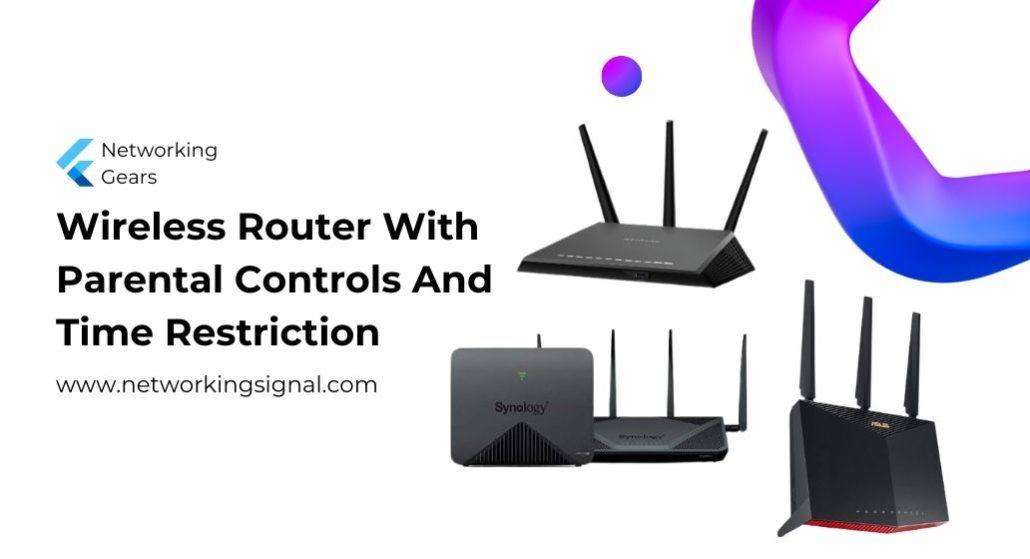
The ASUS RT-BE58U ($142.99) is the best router for parental controls because scheduling, site blocking and per device time limits are free for the life of the router. No subscription, ever.
That is the whole story in this category. Almost every router advertises parental controls, and most of them put the feature you actually want, a weekly schedule that cuts a child’s internet at a set time, behind a monthly fee. Netgear charges around $7.99 a month. eero charges $99 a year.
Check what is free before you buy, not after. The table below states it for every model.
| Product | Router | Time limits free? | Coverage | Price |
|---|---|---|---|---|
 | ASUS RT-BE58UBest overall | Yes, forever | Single router | $142.99 |
 | ASUS RT-AX1800SBudget pick | Yes, forever | Single router | $65.00 |
 | TP-Link Deco 7 BE25 (2-pack)Best mesh | Yes, basic tier | 4,600 sq ft | $159.98 |
 | Gryphon GuardianStrictest controls | Yes, core features | 1,800 sq ft | $114.95 |
 | Netgear Orbi 370 (3-pack)Best coverage | Basic only, rest paid | 6,000 sq ft | $299.99 |
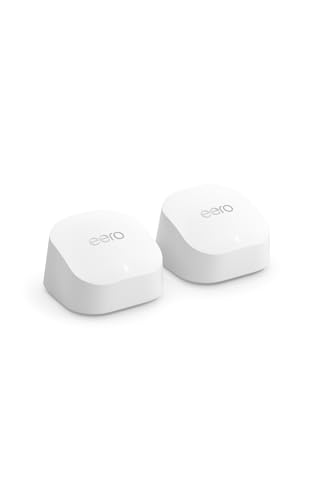 | Amazon eero 6+ (2-pack)Easiest to use | No, needs eero Plus | 3,000 sq ft | $239.99 |
Router boxes have said “parental controls” for fifteen years. What changed is that manufacturers worked out families will pay monthly for the part that matters, so the free tier now often stops exactly where a parent needs it to start.
Three features get separated this way.
Blocking a category of sites is usually free, or close to it. Adult content filtering is the giveaway feature.
A weekly schedule per child, internet off at 9pm on weeknights and 11pm at weekends, is the one that most often costs money. It is also the single most useful thing a router can do for a family, because it removes the nightly argument.
Reporting, showing what was visited and for how long, is almost always paid.
Here is where the major brands stand in 2026.
ASUS includes AiProtection and full parental controls, scheduling included, free for the life of the router. This is the reason two ASUS models lead this list despite neither being the fastest or the best looking.
TP-Link HomeShield has a free Basic tier that includes profiles, time limits and basic content filtering. HomeShield Pro adds detailed reports, more filter categories and app blocking. The free tier genuinely covers what most families need.
Netgear gives you a limited free version of Smart Parental Controls and charges a monthly premium fee for the scheduling and reporting most people are after. Netgear Armor security is a separate paid subscription again.
eero puts parental controls entirely inside eero Plus. Without it, you get device pausing and nothing else.
Gryphon is built around parental controls rather than adding them, and the core scheduling and filtering work without a subscription. Its premium tier adds off network protection on phones.
One thing to be honest about. No router controls a phone on mobile data. Router level controls only apply while the device is on your WiFi, and any teenager who works this out will simply turn WiFi off. Router controls are for the household, and they work best when the phone’s own screen time settings back them up.
The reason this wins is not the WiFi 7 radio. It is that ASUS has never charged for parental controls and shows no sign of starting.
You build a profile for each child, assign their devices to it, and set a weekly schedule. Weeknights off at nine, weekends at eleven, homework hours blocked from social media. All of it in the free app, all of it kept when the router is three years old.
Blocking is by category, with adult content, gambling, gaming and social networking as separate switches, plus your own blocklist for anything specific.
Smart Home Master is the feature worth understanding. It creates up to three separate network names on one router, so you can put children’s devices on their own SSID with its own rules, and IoT gear on a third that cannot reach either. That is proper network segmentation from a $143 consumer router.
Security comes from AiProtection Pro, built with Trend Micro, which blocks malicious sites and flags infected devices. Also free.
As a router it is dual band WiFi 7 at 3,600 Mbps with a 2.5G port and four gigabit LAN ports. Dual band, not tri band, so there is no 6 GHz. For a family router that is the right compromise, because 6 GHz barely passes through walls and almost nothing in a typical house uses it yet.
Buy this if you want proper controls with no monthly fee. It is the right answer for most families.
Sixty five dollars for a router with the same free parental control software as models costing four times as much. For a family on a budget this is the best value in the category by some distance.
The parental controls are identical to the RT-BE58U’s: per child profiles, weekly schedules, category blocking, custom blocklists. ASUS ships one app across the range, so the $65 router and the $300 router manage children the same way.
Security is AiProtection Classic rather than Pro. Classic blocks malicious sites and provides the parental controls. Pro adds two way intrusion prevention and infected device quarantine. For most homes Classic covers the threat that matters, which is a child clicking a bad link.
AX1800 gives 1,201 Mbps on 5 GHz and 574 Mbps on 2.4 GHz with four external antennas, comfortable for a family on a 200 to 500 Mbps plan across a normal sized house.
It is AiMesh compatible, so a second ASUS router later extends coverage without replacing this one or losing the settings.
The limits are real. Gigabit ports only, so a multi gigabit fibre plan will be capped at 1 Gbps, and there is no 160 MHz channel support, which halves peak 5 GHz throughput against pricier WiFi 6 models. Neither affects parental controls at all.
Buy this if you want free scheduling at the lowest price and a normal sized home.
If the house needs more than one unit, this is the one to buy. Two WiFi 7 nodes covering 4,600 sq ft for $160, with parental controls that work without paying.
HomeShield Basic, the free tier, gives you family profiles, device assignment, time limits and basic content filtering. That covers the two things parents actually configure: bedtime and adult content.
HomeShield Pro, the paid upgrade, adds detailed activity reports, more filter categories and individual app blocking. Useful, not essential.
The mesh matters for control as well as coverage. Rules follow the child rather than the location, so a tablet moving from the living room to a bedroom keeps the same schedule, because both nodes are one network.
BE5000 gives 4,324 Mbps on 5 GHz and 688 Mbps on 2.4 GHz, dual band, with a 2.5G Ethernet port on each unit and support for wired backhaul.
Setup through the Deco app is the easiest here after eero, roughly ten minutes from box to working network, and the app is built for people who do not want to think about networking.
Dual band means the backhaul between nodes shares the 5 GHz band with your devices. Wire the two units together if you can, and the compromise disappears.
Buy this if one router will not cover the house and you still want free time limits.
Every other router on this page is a router with parental controls added. Gryphon is a parental control system that happens to route, and the difference shows in what it can do.
Content filtering works by age band rather than category checkboxes. Set a child’s age and Gryphon applies a filter tuned to it, which is far quicker than deciding one by one whether a nine year old should reach forums.
It logs search terms and browsing history per child and shows them in the app. That is a real capability and a real decision. It can protect a young child effectively and it can damage trust with a teenager who finds out. Use it deliberately.
Scheduling goes further than the rest here, with homework mode blocking entertainment while leaving research sites open, and per app time budgets rather than one blanket cutoff.
The next generation firewall adds intrusion detection, malware blocking and phishing protection, and it applies to every device on the network including consoles and smart TVs.
The cost is speed and coverage. AC1200 is WiFi 5, so 867 Mbps on 5 GHz, and each unit covers 1,800 sq ft. On a gigabit plan you will notice. On a 200 to 300 Mbps plan you will not.
The unit listed here is Amazon Renewed, inspected and covered by the Renewed Guarantee, which is why it is $115 rather than the new price.
Buy this for young children where control matters more than speed.
Three WiFi 7 nodes covering 6,000 sq ft at $300 is genuinely good value for a large house, and if coverage is your main problem this is the right pick. Be clear about the subscription first.
Netgear’s free tier gives you device pausing and a limited version of Smart Parental Controls. The weekly per child schedules and the usage reporting sit behind a monthly premium fee, and Netgear Armor security is a separate subscription on top.
Over three years the fees can exceed what the hardware cost. Worth doing the arithmetic before you buy.
What you get for the money is coverage. Six thousand square feet from three nodes with Enhanced Backhaul, Netgear’s technique for keeping the node to node link fast on a dual band system, and support for up to 70 devices.
WiFi 7 at up to 5 Gbps and readiness for plans up to 2.5 Gbps mean it will not be the bottleneck on any home connection you can currently buy.
Setup through the Orbi app is straightforward, and Netgear enables its security features out of the box with automatic firmware updates, which is the right default.
Seventy devices is the ceiling to watch. A large modern home with a lot of smart lighting and sensors can approach it.
Buy this for a large house where coverage matters most and the monthly fee is acceptable.
The simplest network on this page to set up and live with, and the most expensive one to actually get parental controls out of.
Without eero Plus you can pause the internet for a device or a profile. That is it. Scheduling, content filtering, SafeSearch enforcement and activity insights are all inside the subscription, currently around $99 a year.
So the honest price is $239.99 plus $99 every year. Against the ASUS RT-BE58U at $142.99 with nothing further to pay, the gap after three years is substantial.
What the money buys is the best software experience in home networking. Setup takes minutes, TrueMesh routes traffic between nodes intelligently rather than always hopping to the nearest one, and the system is reliable in a way that needs no attention.
Where eero earns its place is a household that will otherwise not configure anything. A subscription that is actually used beats free controls nobody sets up, and eero Plus also bundles a password manager, a VPN and malware scanning, which softens the cost.
The 2-pack covers 3,000 sq ft and supports 75 or more devices on plans up to a gigabit, with 160 MHz channel support on the 5 GHz band.
It also stays compatible with older eero units, so an existing eero can be added as a third node.
Buy this if simplicity matters more than cost and you will pay yearly without minding.
ASUS is the clearest answer. Both the RT-BE58U and the RT-AX1800S include scheduling, category blocking and per child profiles free for the life of the router. TP-Link’s HomeShield Basic tier is also free and covers time limits and basic filtering.
Yes. You create a profile for the child, assign their phone, tablet and console to it, and set a weekly schedule. The router refuses those devices at the set time. It only applies on your WiFi, so a phone switched to mobile data still works.
No. Router controls only apply to traffic passing through the router. A phone on 4G or 5G bypasses them entirely. Pair router controls with the phone’s own screen time settings, which is Screen Time on iPhone and Family Link on Android.
A VPN on the child’s device encrypts its traffic, so category filtering stops working. Time schedules still apply, because those block the device by its MAC address regardless of what it sends. Blocking VPN apps at the router is a paid feature on most systems.
A single router covers most homes up to about 2,000 sq ft. Beyond that, or with thick walls or more than two floors, use mesh. Mesh also keeps rules consistent, because the whole house is one network and a child’s schedule applies wherever they sit.
Not from their own device, as long as the router’s admin password is changed from the default and is not one they know. What they can do is change the device’s MAC address or connect to a neighbour’s WiFi, both of which are worth checking if the controls suddenly seem to stop working.
Buy the ASUS RT-BE58U at $142.99. Its parental controls are complete and free forever, and over three years that saves more than the router costs against a subscription system.
On a tight budget the ASUS RT-AX1800S at $65 runs identical software. If one unit will not cover the house, the TP-Link Deco 7 BE25 two pack at $159.98 gives you 4,600 sq ft with free time limits.
Choose Gryphon Guardian only if you have young children and want age based filtering and detailed monitoring, and accept WiFi 5 speeds in exchange. And before buying any router in this category, check what its free tier actually includes, because the schedule is the feature that matters and it is the one most often sold separately.
Disclosure: Networking Signal is a participant in the Amazon Services LLC Associates Program. We earn a commission on qualifying purchases made through links on this page, at no additional cost to you. Prices shown were accurate at the time of writing and may change. Subscription pricing is set by each manufacturer and can change without notice, so verify current terms before buying.
Hand-picked articles you might also find useful.
 Wireless
 What is Wifi 6 Technology? Wifi 6 technology is the latest in wireless networking. It is based on…
 Routers
 The best mesh WiFi systems for Xfinity in 2026. The TP-Link Deco XE75 Pro has the 2.5 Gbps…
 Routers
 The world is on the brink of a technological revolution with 5g networks set to be rolled out…