
CAPWAP Tunnel — How APs Join a WLC and How to Troubleshoot It
CAPWAP carries control on UDP 5246 and data on UDP 5247 between a lightweight AP and its controller.…
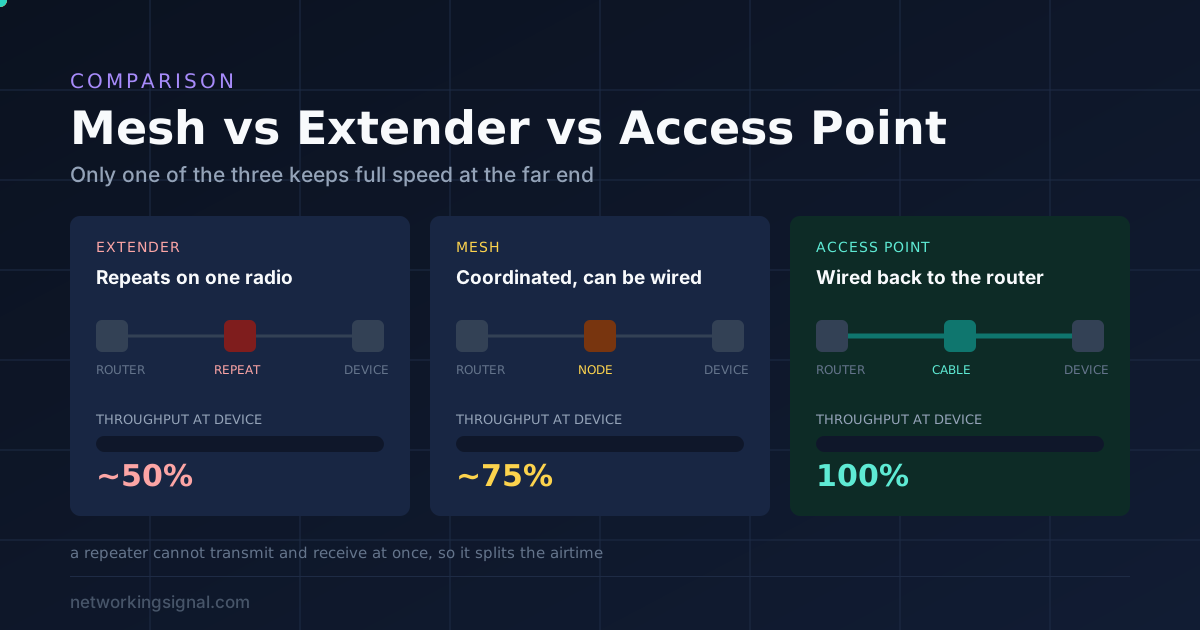
One question decides this: can you run an Ethernet cable to the dead zone?
Yes, you can run a cable. Use an access point. It is wired back to the router, so there is no speed penalty at all and the far end runs at full speed. Best result, lowest cost per square foot. From $69.99.
No, you cannot run a cable. Use a mesh system. Nodes coordinate properly, share one network name, and hand devices over cleanly. From $159.98 for two nodes.
One small dead spot and a tight budget. A range extender works, with a real cost: it roughly halves throughput, because it receives and rebroadcasts on the same radio and cannot do both at once. From $27.99.
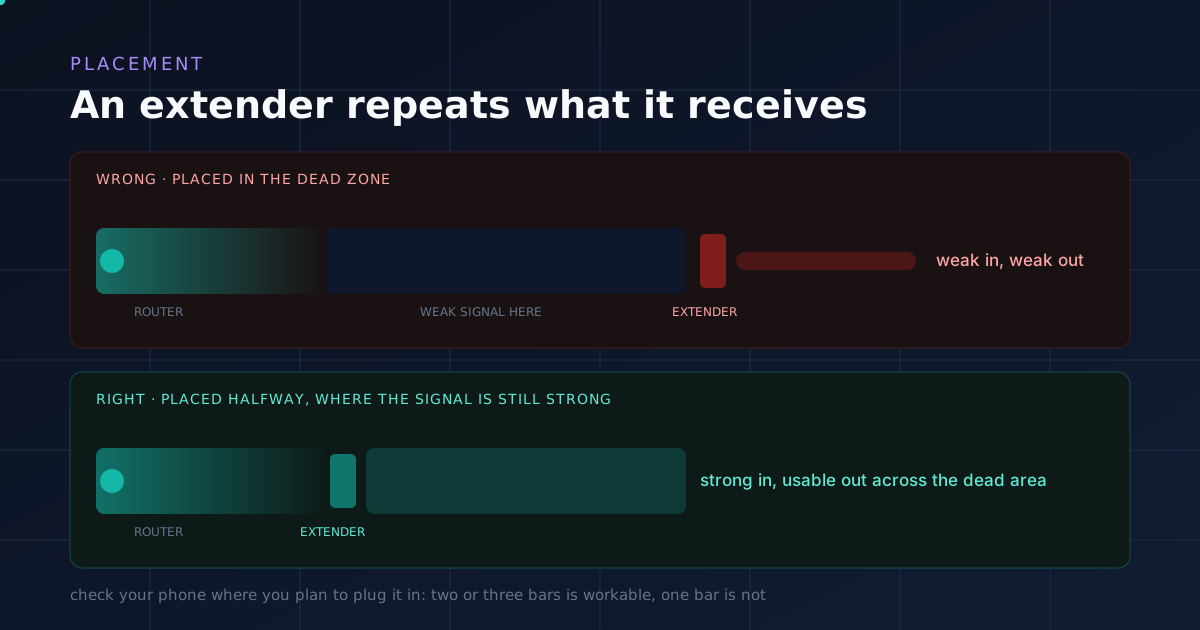
The reason people say extenders do not work is usually placement. An extender belongs halfway between the router and the dead zone, not in the dead zone.
| Approach | How it connects | Speed penalty | Network names | Roaming | From |
|---|---|---|---|---|---|
| Access pointBest result | Ethernet cable | None | One | Seamless | $69.99 |
| Mesh systemBest without cable | Wireless or wired | Some, if wireless | One | Seamless | $159.98 |
| Range extenderCheapest | Wireless only | Roughly half | Often two | Usually manual | $27.99 |
This is not a manufacturing shortcut. It is how radio works, and understanding it makes the whole decision obvious.
A range extender has one radio per band. To pass your traffic along, it has to do two things: receive a packet from the router, then transmit that same packet to your laptop.
It cannot do both at the same time on the same channel. So every packet is handled twice, and the available airtime is split between the two jobs. The result is roughly 50 percent of the original throughput, and that is before any other losses.
There is a second, worse problem. An extender can only rebroadcast the signal quality it receives. If it sits somewhere the signal is already weak, it amplifies a weak signal into a weak signal covering a slightly larger area. Nothing improves.
People plug the extender into the room with no signal. That is the exact wrong place.
An extender must sit where the router’s signal is still strong, roughly halfway between the router and the dead zone. It then projects that good signal forward into the dead area.
A practical test: stand where you plan to plug it in and check your phone. If you see two or three bars there, that is a workable position. One bar means the extender will only spread a one bar signal further.
Many extenders create a second network, often your name with “_EXT” added. That causes a specific and very common frustration.
Your phone connected to the main network in the living room. You walk to the bedroom. The main signal weakens to one bar, but your phone does not switch, because devices hold onto a connection until it fails completely rather than moving to a stronger one.
So you stand next to the extender, on the wrong network, with bad WiFi. Then you conclude the extender is faulty.
Some modern extenders solve this. EasyMesh compatible extenders join a compatible router as a proper mesh node with one shared network name and real handover. If you buy an extender, buy one of those.
A mesh node is also wireless, so why is it not subject to the same halving?
Partly it is. A dual band mesh with wireless backhaul does share airtime between node traffic and client traffic. Three things make it far better in practice.
One network name, with real roaming. Mesh systems implement the 802.11k, 802.11v and 802.11r standards, which let the network actively tell a device to move to a better node rather than waiting for it to decide. A video call survives the walk from one end of a house to the other.
Coordinated routing. Nodes know about each other and choose sensible paths, rather than each one blindly repeating whatever it hears.
Wired backhaul support. This is the big one. Connect two mesh nodes with an Ethernet cable and the wireless penalty disappears entirely. The far node performs like a second router.
Tri band and quad band systems go further by dedicating an entire radio to node to node traffic, so clients never share it. That is what the second 6 GHz band on a TP-Link Deco BE95 is for, and it is only worth paying for when running a cable is impossible.
An access point is wired to the router with Ethernet and broadcasts WiFi at the far end. Because the connection back to the router is a cable, there is no wireless penalty of any kind.
Three further advantages.
Full speed everywhere. A device standing next to a wired access point gets the same throughput it would standing next to the router.
No airtime consumed. A wireless mesh node uses some of the same spectrum your devices need. A wired access point uses none of it, which improves the whole network, not just the far room.
Cheaper per area covered. A pair of business access points costs less than most mesh systems and covers more, because each one is at full strength.
The cost is the cable. One Ethernet run to the far end of the house or office, which is a morning’s work or a small installer bill. For a business network, ceiling mounted access points are the standard approach for exactly this reason.
Power over Ethernet makes it neater still: the same cable carries data and power, so no socket is needed at the ceiling.
1. Can you run one Ethernet cable to the problem area? If yes, buy an access point, or a mesh system and wire the nodes together. Stop here. This is the best answer and usually the cheapest.
2. Is it more than one room? If the problem is the whole upstairs, a garden office or a converted loft, buy mesh. Extenders solve one spot, not a house.
3. Is your router old? If it is more than five years old, replacing it may fix everything for less than adding hardware to a weak network. See our best WiFi 7 routers and best routers under $200.
4. Is the router in a cupboard? Move it first. It is free. A router in a central, open position often removes the dead zone entirely, and our home network setup guide covers placement in detail.

Ninety dollars for an access point that gives full router speed at the far end of the house, with no wireless penalty at all.
WiFi 6 AX3000 reaching 2,976 Mbps across both bands, with free cloud management and no subscription. Scan the serial number in the Omada app and it is adopted, with no controller hardware to buy.
Seamless roaming across multiple units means one network name and proper handover, so a device moves between access points without dropping a call. That requires an Omada controller, which the free cloud option provides.
Band steering pushes capable devices to 5 GHz, load balancing spreads clients across units, and airtime fairness stops one slow old device holding up everyone else.
PoE powered, so one cable carries data and power to a ceiling mount with no socket needed. That needs a PoE switch or an injector, and our guide to the best PoE switches covers the options.
Mount it on the ceiling in the open. Above a tile or inside a cupboard, it loses much of its range before it starts.
The EAP613 at $69.99 is the cheaper AX1800 version, and is enough for corridors and lower density areas.
Buy this if a cable can reach the problem area. It is the best result for the money.

Two WiFi 7 nodes covering 4,600 sq ft for $160. When running a cable is not an option, this is the sensible answer for a normal house.
It replaces your router rather than adding to it, which matters: you get one network with one name and no second SSID for devices to cling to.
AI Roaming learns the layout of your home and hands devices over cleanly, which is the behaviour an extender cannot reproduce.
BE5000 gives 4,324 Mbps on 5 GHz and 688 Mbps on 2.4 GHz. Dual band with no 6 GHz, and at this price that is right: 6 GHz is fast and short ranged, while a stronger 5 GHz radio reaches further, which is what a dead zone problem actually needs.
Each unit has a 2.5G Ethernet port and supports simultaneous wired and wireless backhaul. If you can wire even one node, do it, and the system uses both paths.
Setup takes about ten minutes through the Deco app, and the free HomeShield tier includes basic parental controls with time limits. If those matter, our parental controls guide compares what each brand charges for.
For a larger or awkward house, the Deco 7 Pro three pack at $399.98 covers 7,600 sq ft.
Buy this when a cable is impossible and the problem is more than one room.

If budget rules and the problem is one small room, this is the extender to buy, for one specific reason.
It is EasyMesh compatible. Connect it to an EasyMesh capable router and it stops behaving like a repeater with its own network name and starts behaving like a mesh node: one network name, proper handover. That single feature removes the most common complaint about extenders.
Note the limit TP-Link states plainly: it is not compatible with Deco mesh systems. EasyMesh works with EasyMesh routers, not with a Deco network.
AC1200 gives 867 Mbps on 5 GHz and 300 Mbps on 2.4 GHz, covering up to 1,500 sq ft for 32 devices. Halve those figures in practice, because that is what repeating costs.
The Ethernet port is more useful than it looks. Plug a television or console into it and that device gets a wired connection in a room with no socket, which is more reliable than its WiFi would be.
Two adjustable external antennas, and one touch WPS setup.
Be sceptical of coverage claims in this category. Listings advertising 9,000 or 15,000 sq ft from a single plug in unit are not describing anything measurable. A realistic figure for any extender is a room or two beyond where the router already reaches.
For a rural property or an outbuilding, an extender is the wrong tool entirely. See our guides to outdoor WiFi extenders and extending Starlink WiFi.
Buy this for one small dead spot on a budget, and place it halfway, not in the dead zone.
Yes, in almost every case. A mesh system uses one network name with proper roaming so devices hand over cleanly, coordinates traffic between nodes, and supports a wired backhaul that removes the speed penalty entirely. An extender repeats on one radio, which roughly halves throughput.
Roughly, yes. An extender has one radio per band and must both receive from the router and transmit to your device on it, and it cannot do both at once. That splits available airtime, leaving about half the original throughput before any other losses.
Halfway between the router and the dead zone, where the router’s signal is still strong. Not in the dead zone itself. An extender can only rebroadcast the signal quality it receives, so placing it where the signal is weak simply spreads a weak signal further.
If you can run an Ethernet cable to it, yes. A wired access point has no wireless penalty at all, delivers full speed at the far end, and uses none of the airtime your devices need. Mesh is the answer when running a cable is impossible.
Usually not, and you should not want to. TP-Link states its EasyMesh extenders are not compatible with Deco mesh systems. If you already have mesh and need more coverage, add another node from the same range rather than an extender.
Two common causes. It is placed in the dead zone rather than halfway, so it only repeats a weak signal. Or it created a second network name and your device is still clinging to the weak original network. Check which network you are actually on before assuming the hardware is faulty.
Answer one question honestly. Can you run a cable?
If yes, buy the Omada EAP650 at $89.99 and wire it. Full speed at the far end, no airtime consumed, and cheaper per square foot than anything else here.
If no, buy the Deco 7 BE25 two pack at $159.98. One network, real roaming, 4,600 sq ft, and you can still wire the nodes later if a cable route appears.
Buy a range extender only for one small room on a tight budget, choose an EasyMesh compatible one such as the RE315 at $27.99, and place it halfway between the router and the problem, not in the problem.
Before spending anything, move the router to a central open position. It costs nothing and it fixes more dead zones than most people expect.
Disclosure: Networking Signal is a participant in the Amazon Services LLC Associates Program. We earn a commission on qualifying purchases made through links on this page, at no additional cost to you. Prices shown were accurate at the time of writing and may change. Coverage figures are manufacturer estimates and vary considerably with building construction and placement.
Hand-picked articles you might also find useful.
 Wireless
 CAPWAP carries control on UDP 5246 and data on UDP 5247 between a lightweight AP and its controller.…
 Wireless
 In this guide, I will walk you through the step-by-step process of setting up a WiFi repeater to…
 Wireless
 Are you tired of that frustrating moment when you're in one corner of your home, eager to binge-watch…