
Wireless Communication Standards — IEEE 802.11 Types Explained
The IEEE wireless communication standards explained — what the 802.11 family covers, how the standards differ in speed…

For most small businesses the TP-Link Omada EAP650 at around $90 is the right access point, WiFi 6 AX3000, PoE powered, and free cloud management with no licence fee. Two or three of them cover a typical office better than one expensive unit ever will.
Already invested in UniFi? The Ubiquiti U6+ at $139 is the sensible entry point. Need coverage across a warehouse or a large open floor, the U6-LR is built for exactly that.
A business access point differs from a consumer router in three ways that matter: it is PoE powered so it goes on a ceiling with one cable, it is centrally managed so twenty of them behave as one network, and it supports seamless roaming so a laptop moves between them without dropping a call.
The most important decision is not which access point, it is which management ecosystem, because that choice is expensive to reverse. The picks below are organised around that.
| Access point | WiFi | Uplink | Ecosystem | Price | |
|---|---|---|---|---|---|
 | TP-Link Omada EAP650Best choice | WiFi 6 · AX3000 | 1G PoE+ | Omada · free cloud | $89.99 |
 | TP-Link EAP613Budget friendly | WiFi 6 · AX1800 | 1G PoE+ | Omada · free cloud | $69.99 |
 | Ubiquiti UniFi U6+Best UniFi entry | WiFi 6 · 3 Gbps | 1G PoE+ | UniFi · controller | $139.00 |
 | NETGEAR WAX610Best uplink | WiFi 6 · AX1800 | 2.5G PoE+ | Insight · subscription | $171.45 |
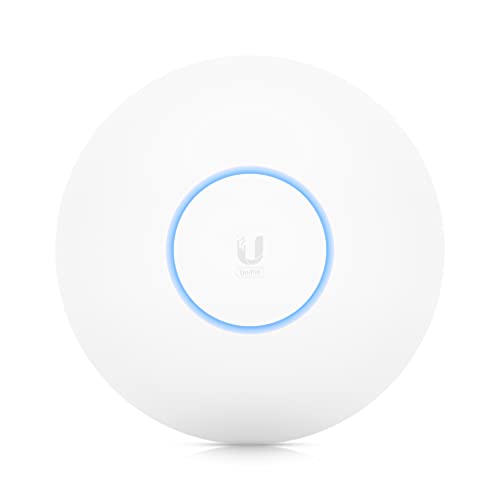 | Ubiquiti UniFi U6-LRBest coverage | WiFi 6 · 4×4 | 1G PoE+ | UniFi · controller | $244.99 |
 | UniFi U6-Pro (2-pack)Best multi-AP buy | WiFi 6 · 4×4 160 MHz | 1G PoE+ | UniFi · controller | $369.99 |
The reason this wins is not the wireless specification, it is that Omada Essentials cloud management is free with no licence fee, no subscription and no controller hardware required. You scan a code on the box, the AP appears in the app, and you manage it from anywhere. Competing ecosystems either charge annually or expect you to run a controller.
AX3000 gives you 2976 Mbps of aggregate dual-band throughput, which is more than the gigabit uplink can carry, so in practice the port is the ceiling, not the radio. That is the correct trade at this price.
Everything a business network actually needs is here: WPA3, band steering, load balancing, airtime fairness, multiple SSIDs mapped to different VLANs, and seamless roaming between units. Roaming and mesh do require an Omada controller, the free cloud one counts, so this is not a hidden cost.
Powered over PoE+, so it needs one cable to the ceiling. Pair it with a PoE switch and the whole deployment is one run per AP.
Buy it if you are deploying two to ten access points and do not want a management subscription.
The same Omada ecosystem and the same management for $20 less, with AX1800 instead of AX3000. For most business use that difference is theoretical, a laptop on a video call uses a few megabits, and the gigabit uplink caps both models anyway.
Where AX3000 earns its money is client density: more spatial streams means more simultaneous devices served efficiently. In a meeting room with thirty laptops, the EAP650 holds up better. In a shop, a café or a small office with a dozen devices, the EAP613 is the sensible buy and you can afford a third unit with the savings.
More access points beats faster access points, almost every time. Coverage problems are solved by putting a radio closer to the user, not by buying a bigger one.
One practical note: it accepts 802.3at PoE+, passive PoE or a 12 V DC adapter, but the adapter is not in the box.
Buy it if you need coverage across several rooms and would rather have three APs than two.
UniFi’s appeal is the software. The controller gives you the best network visualisation in this price bracket, client history, per-device throughput graphs, RF environment scanning, and a topology map that actually helps when something breaks. If you manage networks for a living, it is a genuinely nicer tool than Omada.
The cost is that you need a controller running somewhere: a Cloud Key, a UniFi gateway, or self-hosted software on a machine that stays on. That is either extra hardware or extra maintenance, and it is the main reason a small business might choose Omada instead.
The U6+ itself is a competent WiFi 6 AP with PoE+ at up to 25.5 W. Once you commit to UniFi, adding APs is genuinely painless, adopt, and the configuration pushes automatically.
Buy it if you already run UniFi, or you want the best management tooling and accept running a controller.
The distinguishing feature is the 2.5 Gigabit uplink port, the only one on this list. Every other AP here is capped by a gigabit connection, so its radio can never deliver full throughput to the wired network. The WAX610 removes that ceiling, provided you feed it from a multi-gig PoE switch.
NETGEAR rates it for 200 client devices and 2,500 sq ft, with WPA3, client isolation and rogue AP detection built in. Mounting hardware for wall or suspended ceiling is included, which sounds trivial until you are installing eight of them.
The catch is NETGEAR Insight: one year is free, after which remote management becomes a paid subscription. The AP keeps working standalone, but the cloud dashboard you set everything up in stops. Factor that into a multi-year cost comparison against Omada’s free tier.
Buy it if you have multi-gig switching already and want headroom for a WiFi 7 upgrade later.
Built for open spaces, warehouses, workshops, large retail floors, anywhere one radio needs to cover a lot of ground. 4×4 MU-MIMO on both bands with a 1.3 GHz dual-core processor gives it the antenna count and the processing headroom to hold connections at distance and serve many clients at once.
Understand the limit of “long range” though. A more powerful transmitter reaches a client further away, but the client’s transmitter is still weak, so the return path fails first. The U6-LR helps most in open areas with line of sight, it will not push through several internal walls where a second, closer AP would.
The PoE injector is not included, so budget for that or a PoE switch port.
Buy it if you are covering an open floor, warehouse or yard where running more cable is impractical.
Two U6-Pro units, which is the configuration most offices actually need. The Pro runs 4×4 MU-MIMO on 5 GHz at full 160 MHz width, the highest specification here, plus guest traffic isolation for a properly separated visitor network.
Buying a pair matters because roaming only works with two or more APs. A single access point, however good, cannot hand a device off; with two properly placed and the same SSID, a laptop moves between them mid-call without dropping.
Use 160 MHz channels carefully. They double throughput but require DFS channels, which force the AP off-air briefly when radar is detected, disruptive in a business setting. In dense offices, 80 MHz is usually the more reliable choice.
Buy it if you are deploying UniFi across an office and need two APs from the start.
The honest answer is more than you think, and each one cheaper than you were planning.
| Space | Typical APs | Limiting factor |
|---|---|---|
| Small office, under 1,500 sq ft | 1 to 2 | Walls, not area |
| Office, 1,500 to 4,000 sq ft | 2 to 4 | Walls and client count |
| Open-plan floor | 1 per ~2,000 sq ft | Client density |
| Meeting rooms | 1 each if 20+ people | Density, not coverage |
| Warehouse | 1 per ~5,000 sq ft | Racking blocks signal |
| Hotel or multi-room | 1 per 2 to 3 rooms | Walls |
Two rules that save money and rework:
| Omada (TP-Link) | UniFi (Ubiquiti) | Insight (NETGEAR) | |
|---|---|---|---|
| Controller needed | Optional, free cloud | Yes | Cloud |
| Ongoing cost | None | None (self-hosted) | Subscription after year 1 |
| Management quality | Good | Best in class | Adequate |
| Hardware cost | Lowest | Mid to high | High |
| Suits | Small business, no IT staff | Anyone technical | Existing NETGEAR sites |
Pick the ecosystem, then the model. Mixing vendors costs you roaming, central management and a single view of the network, the three reasons to buy business access points instead of consumer ones. For most small businesses that means Omada, because the management is free and good enough. For anyone comfortable running a controller, UniFi is the better tool.
An access point has no routing, no DHCP and no firewall, it is a radio that bridges wireless clients onto your wired network. That is why it needs a router or firewall behind it, and why it scales properly: adding a tenth AP changes nothing about the network’s structure. See what a wireless access point is for the fundamentals, and hub vs switch vs router for where each device sits.
Mesh systems solve the same coverage problem without cabling, but the wireless backhaul consumes airtime, expect to lose roughly half your throughput per hop. Wired access points beat mesh every time when you can run the cable.
The TP-Link Omada EAP650 at around $90 for most small businesses, WiFi 6 AX3000, PoE powered, with free cloud management and no licence fee. For the best management tooling, the Ubiquiti UniFi U6+ at $139, provided you are willing to run a controller.
One or two for under 1,500 sq ft, two to four for 1,500 to 4,000 sq ft. Walls matter far more than floor area, and a meeting room holding twenty or more people usually needs its own AP for density rather than coverage.
For Omada, no, the free cloud controller covers it, and standalone mode works too. For UniFi, yes: a Cloud Key, a UniFi gateway, or self-hosted software. Roaming and mesh generally require a controller in both ecosystems.
An access point only bridges wireless clients onto a wired network. A router adds routing, DHCP, NAT and a firewall. Access points scale to dozens of units on one network; routers do not.
Not strictly, most accept a DC adapter, but PoE is why you buy them. One cable carries power and data, so the AP can go on a ceiling where there is no socket. You will need a PoE switch or an injector.
Where you can run Ethernet, yes, substantially. Mesh uses wireless backhaul that consumes airtime and roughly halves throughput per hop. Wired access points have no backhaul penalty and roam more reliably.
They will all work, but you lose central management, seamless roaming and a single view of the network, which is most of the reason to buy business hardware. Stay in one ecosystem.
Disclosure: we earn a commission on purchases made through the links above, at no extra cost to you. Prices are those shown at the time of writing and change frequently, check the current price on Amazon before buying. Specifications are taken from manufacturer listings.
Hand-picked articles you might also find useful.
 Wireless
 The IEEE wireless communication standards explained — what the 802.11 family covers, how the standards differ in speed…
 Wireless
 What is Mobility Tunnel? A mobility tunnel is a secure communication channel that enables data to be sent…
 Wireless
 Over 200 WiFi network name ideas sorted by style — clever, cool, cute, creative and badass — plus…