
7 Best Routers for PS5 in 2026 (What the Console Can Actually Use)
The best routers for PS5 in 2026. The ASUS RT-BE86U at $199 wins on latency handling, not speed.…
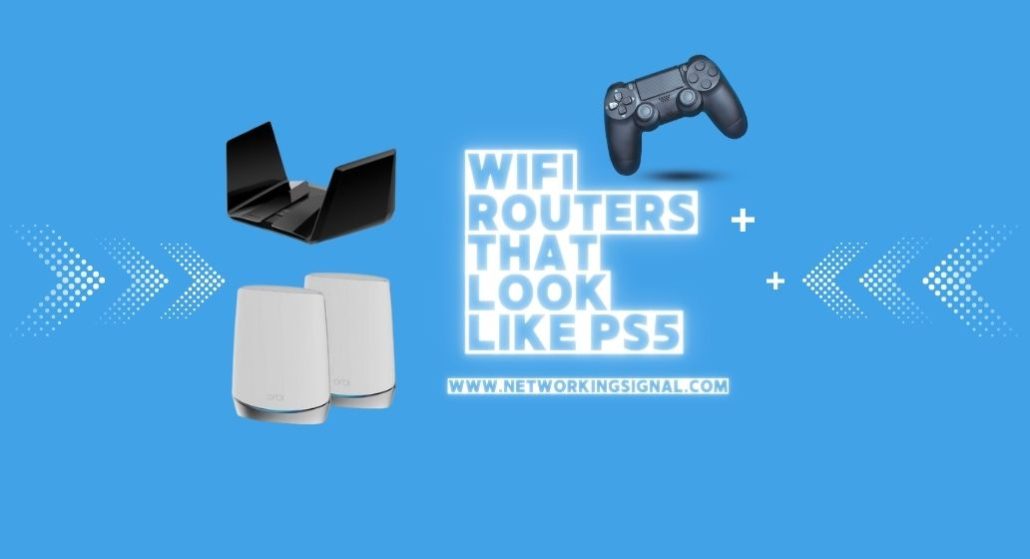
The TP-Link Archer BE550 ($199.99) is the closest thing to a PS5 you can put next to a PS5. Tall vertical tower, pale shell, dark recessed core, six antennas hidden inside instead of bristling off the back.
Here is the part nobody mentions. That shape is not a styling exercise. A vertical chassis lets heat rise straight up and out of the top vent instead of pooling under a flat lid, which is exactly why Sony built the PS5 that way and exactly why router makers moved to it. The routers that look like your console are also the ones that throttle least.
Every model below is current in 2026. The old lists on this topic are full of 2019 hardware that was black, flat and never resembled a PS5 at all.
| Product | Router | Shape | Speed | Coverage | Price |
|---|---|---|---|---|---|
 | TP-Link Archer BE550Closest match | Vertical tower | BE9300 tri band | Large home | $199.99 |
 | ASUS ZenWiFi BT6 (2-pack)Best white finish | White towers | Tri band WiFi 7 | 5,800 sq ft | $304.59 |
 | TP-Link Deco 7 BE25 (2-pack)Best value | White cylinders | BE5000 dual band | 4,600 sq ft | $159.98 |
 | TP-Link Archer AXE75Budget pick | Angular flat | AXE5400 tri band | Medium home | $99.00 |
 | ASUS ROG Strix GS-BE12000Best for gaming | Angular tower | BE12000 tri band | 3,000 sq ft | $289.99 |
 | TP-Link Archer GE650Best RGB | RGB tower | BE11000 tri band | Large home | $299.99 |
 | Netgear Orbi 370 (3-pack)Best coverage | White towers | WiFi 7, 5 Gbps | 6,000 sq ft | $299.99 |
The PS5 has three visual signatures: it stands vertically, it is pale on the outside with a dark core, and the surfaces curve rather than meet at right angles.
Routers copied all three, and mostly for engineering reasons.
Standing up is about heat. A WiFi 7 tri band router with a quad core processor produces real thermal load, and heat rises. A vertical chassis with vents at the bottom and top lets it leave on its own through convection. A flat router traps that heat under its lid, which is why so many of them sag in performance after an hour and why the old approach was to bolt on a fan or a heatsink lid.
The dark centre is antenna clearance. Internal antennas need distance from the metal shielding around the processor. That gap becomes a recess, and the recess is dark because it is a shadow rather than a painted panel. The same reason gives the PS5 its dark core.
Curves are radiation pattern. Sharp corners create reflections that make coverage uneven. Curved shells give a smoother pattern in every direction.
The upshot is a genuinely useful buying rule. A tall vertical router with internal antennas and a top vent will hold its speed under sustained load better than a flat one with the same silicon. The console look is a side effect of good thermal design, not a substitute for it.
One practical warning. These routers vent upward, so do not put one inside a closed AV cabinet, and do not stack anything on top. That kills the airflow the design depends on and undoes the advantage entirely.
Stand this beside a PS5 and the family resemblance is immediate. Tall vertical body, pale outer shell, dark recessed centre, curved rather than boxy, and no external antennas anywhere.
The specification is the reason to buy it regardless of looks. Five 2.5 Gbps ports, one WAN and four LAN, at $199.99. Most routers at this price give you one multi gig port and four gigabit ones. Every wired device here gets 2.5 Gbps, which matters for a NAS, a gaming PC or a console on a fast plan.
BE9300 tri band splits as 5,760 Mbps on 6 GHz, 2,880 Mbps on 5 GHz and 574 Mbps on 2.4 GHz, with 320 MHz channels, 4K-QAM and Multi Link Operation. MLO is the WiFi 7 feature worth caring about for gaming: a device holds two bands at once and traffic moves between them, so an interference spike on one band does not become a lag spike.
Six internal antennas with beamforming cover a large home, and EasyMesh means you can add nodes from any EasyMesh certified brand later rather than being locked to TP-Link.
HomeShield provides network protection and parental controls, with time limits and basic filtering in the free tier.
Two caveats. It is large, at roughly the height of a console, so measure your shelf. And 6 GHz has short range through walls, which is a WiFi 7 fact rather than a fault of this router.
Buy this if you want the console look and the best wired ports for the money.
ZenWiFi is the range where ASUS designs for a living room rather than a gaming desk. Clean white vertical units with no antennas showing, closer to the PS5’s Digital Edition than anything else here.
Two units cover 5,800 sq ft, and if a console sits upstairs and the modem is downstairs, that is the actual problem being solved. Put a node beside the PS5 and it stops competing with the rest of the house for a signal through two floors.
Tri band WiFi 7 with MLO and 4K-QAM, using seven internal antennas and eight high power front end modules per unit. Front end modules are the amplifier stage between chip and antenna, and having eight of them is why a small white cylinder reaches as far as it does.
Dual 2.5G Ethernet ports on each unit is the feature that makes this worth $305. Wire the two nodes together and each end still has a spare 2.5G port, so a console gets a full speed wired connection while the backhaul stays wired too. That is the best possible setup for online play.
AiProtection Pro security and parental controls are free for the life of the hardware, and it joins any AiMesh network, so an ASUS router you already own can become a third node.
It is the most expensive per unit here, and it is a mesh system rather than a single router, so it is overkill if one box already covers your home.
Buy this if the console is far from the modem and you want the cleanest white look.
Two white vertical WiFi 7 nodes for $160. Nothing else here covers this much house at this price and still looks like it belongs beside a console.
Deco units are compact white cylinders, so the resemblance is in the palette and the standing posture rather than the exact outline. On a TV stand next to a PS5 they read as a matched set, which is usually what people want.
BE5000 gives 4,324 Mbps on 5 GHz and 688 Mbps on 2.4 GHz across 4,600 sq ft with support for over 150 devices. Dual band, so no 6 GHz.
Skipping 6 GHz is the right call at this price. The 6 GHz band is fast and short ranged, and almost nothing in a normal home uses it yet. What you get instead is a wide, well amplified 5 GHz radio that reaches further, which matters more for a console two rooms away.
Each unit has a 2.5G Ethernet port and supports simultaneous wired and wireless backhaul, so the system balances traffic between the two automatically rather than making you choose.
AI Roaming learns the layout of your home over time and hands devices between nodes more cleanly than a fixed threshold would.
The compromise is the shared 5 GHz backhaul when the nodes are not wired. Run a cable between them if you can.
Buy this for whole home coverage on a budget with a matching white look.
A hundred dollars for a tri band 6 GHz router, and a 2025 PCMag Editors’ Choice. The cheapest way onto this page.
Be honest about the look. This is a flat angular router with external antennas, not a tower. What it shares with the console is the sharp faceted styling and the housing built around airflow rather than a plain box. TP-Link specifically calls out the shell design as a heat dissipation feature.
AXE5400 splits as 2,402 Mbps on 6 GHz, 2,402 Mbps on 5 GHz and 574 Mbps on 2.4 GHz. The 6 GHz band is empty, because no neighbour’s old router and no microwave reaches it, so a console sitting in the same room as this router gets a clean channel to itself. For gaming that is worth more than raw headline speed.
A 1.0 GHz dual core CPU with 512 MB of memory is modest, and that is the honest limit. Under fifty devices it is fine. Push past that and a quad core model handles the load better.
EasyMesh support means extending later is possible with any EasyMesh device, and both OpenVPN and WireGuard style VPN server and client modes are included.
Gigabit ports only, so a multi gigabit plan will be capped.
Buy this for the cheapest route to a clean 6 GHz band for a console in the same room.
Aggressively angular in the ROG way, which is a different aesthetic to the PS5’s soft curves, but it stands upright and hides all eight antennas internally. If your setup already leans gaming rig rather than living room, this fits better than the white units.
Seven 2.5 Gbps LAN ports plus a 2.5G WAN is the headline, and it is unusual. That is 20 Gbps of wired capacity, enough for a console, a gaming PC, a NAS, a capture setup and a switch feeding the rest of the house, all at 2.5 Gbps with nothing sharing.
Tri band WiFi 7 reaching 12,000 Mbps combined, with 320 MHz channels on 6 GHz, MLO and 4K-QAM. A quad core 2.0 GHz processor and 2 GB of RAM, which is double the memory of most consumer routers and the reason it holds up with a hundred devices connected.
Triple Level Game Acceleration is ASUS prioritising game traffic at the device, at the router and on the route to the game server. The ROG Gaming Network feature sets up a dedicated SSID for consoles so game traffic is separated from a household streaming 4K, which is the practical version of the same idea.
Smart Home Master creates up to three subnetworks for IoT devices and VPNs, and AiProtection Pro provides free lifetime security.
Coverage is 3,000 sq ft, less than the mesh systems here, and the styling is loud. This is a single powerful box for one enthusiast setup, not a whole home solution.
Buy this for a wired heavy gaming setup where seven multi gig ports earn their keep.
A vertical tower with a controllable RGB face. If your PS5 sits under an RGB backlit TV, this is the one that matches the room rather than just the console.
Ports are the strongest argument. One 5 Gbps WAN, one 5 Gbps LAN and three 2.5 Gbps LAN. A 5 Gbps LAN port is rare on a consumer router and matters if you run a fast NAS or move large capture files around.
BE11000 splits as 5,764 Mbps on 6 GHz, 4,320 Mbps on 5 GHz and 574 Mbps on 2.4 GHz. TP-Link sets the 5 GHz band aside as a dedicated gaming band, so a console keeps it while the rest of the house streams on the others. That is the single most effective thing a gaming router does, and it is more useful than any acceleration software.
The game panel is a real dashboard rather than marketing: current latency, which devices are being accelerated, router load, and the RGB controls in one place. WTFast is included for routing game traffic through optimised servers, which helps most on games with distant servers.
At $299.99 it is the most expensive single router here, and the RGB is decisive either way. Some people want it, some will consider it visual noise beside a clean white console.
MLO across all three bands keeps the connection stable when one band takes interference.
Buy this for an RGB lit setup where a dedicated gaming band and 5 Gbps ports matter.
Three white vertical towers covering 6,000 sq ft for $300. Orbi has used this shape since long before the PS5 existed, and the resemblance is real.
This is the pick when the problem is a house, not a room. Three units reach the far bedroom, the basement and the garden, and a console anywhere in that footprint has a strong signal rather than two bars.
WiFi 7 at up to 5 Gbps with Enhanced Backhaul, Netgear’s approach to keeping the node to node link fast on a dual band design. Dual band mesh normally suffers because the backhaul competes with client traffic, and Enhanced Backhaul is how Netgear reduces that.
Ready for internet plans up to 2.5 Gbps and works with any provider’s modem, cable or fibre. Setup through the Orbi app is guided and quick.
Security is on by default with automatic firmware updates, which is the correct behaviour and not something every brand does.
Two limits. The 70 device ceiling is low for a large modern home once you count smart bulbs, sensors and speakers. And Netgear’s parental controls and Armor security both want subscriptions, so budget for those if you need them.
Buy this when the whole house needs covering, not just the room with the console.
The TP-Link Archer BE550. It is a tall vertical tower with a pale outer shell, a dark recessed centre, curved surfaces and no external antennas. The ASUS ZenWiFi BT6 and Netgear Orbi 370 are close in colour and posture but smaller and simpler in outline.
Often, yes, and for a reason. The vertical shape with a top vent lets heat leave by convection instead of pooling under a flat lid, so the router holds its clock speed under sustained load. It is thermal design, not styling, and it only works if you leave the vents clear.
No. The PS5 supports WiFi 6 at best, so it cannot use WiFi 7 speeds. A WiFi 7 router still helps by handling everything else in the house more efficiently, leaving more airtime for the console. If the console is the only consideration, a good WiFi 6 router is enough.
Yes, whenever you can. A cable gives lower and far steadier latency than any wireless link, and jitter is what actually ruins online play rather than raw speed. Buy the router for the rest of the house and wire the console.
The useful part is band separation and quality of service, letting the console keep a band while the household streams. Game acceleration services help mainly on games with distant servers. A standard tri band router with the console wired covers most of the benefit.
Not one of these. They vent upward and rely on open airflow, so a closed cabinet traps heat and the router throttles. Wood and metal panels also absorb signal. Stand it in the open, upright, with nothing on top.
Buy the TP-Link Archer BE550 at $199.99. It is the closest visual match to a PS5 and, more usefully, it gives you five 2.5 Gbps ports at a price where competitors give you one.
If the console is far from the modem, the ASUS ZenWiFi BT6 two pack at $304.59 puts a white node right beside it with a spare 2.5G port for a wired connection. On a budget, the TP-Link Deco 7 BE25 two pack at $159.98 covers 4,600 sq ft and matches the palette.
And whichever you choose, run a cable to the console. The router shapes your household’s WiFi. The cable is what steadies your ping.
Disclosure: Networking Signal is a participant in the Amazon Services LLC Associates Program. We earn a commission on qualifying purchases made through links on this page, at no additional cost to you. Prices shown were accurate at the time of writing and may change. We are not affiliated with Sony Interactive Entertainment, and PlayStation and PS5 are trademarks of Sony. Visual comparisons here are our own opinion.
Hand-picked articles you might also find useful.
 Routers
 The best routers for PS5 in 2026. The ASUS RT-BE86U at $199 wins on latency handling, not speed.…
 Routers
 Do you frequently experience connection issues with your router? If so, it might be time to switch over…
 Routers
 The best mesh WiFi systems for Xfinity in 2026. The TP-Link Deco XE75 Pro has the 2.5 Gbps…