
7 Best Fiber Optic Cleaning Kits in 2026 (Pens, Cassettes and Scopes)
The best fiber optic cleaning kits in 2026. The D YEDEMC kit at $60 covers both cleaning types,…
Check which Starlink you own before buying anything. This is the mistake that wastes the most money here.
Gen 3, the current kit with the flat white router, already has two Ethernet ports built in. You need no adapter. Plug straight in.
Gen 2 Standard Actuated, the rectangular dish with the cylindrical router, has no spare port. That is the only kit these adapters fit.
If you have Gen 2, the LUCMO Gen 2 adapter at $17.99 does everything the official one does for less. If you want to wire two devices without adding a switch, the LUCMO dual port at $37.99 gives you two gigabit sockets.
Every adapter here is Gen 2 only. None of them work with Gen 3, the newer kickstand Standard kit, or the flat High Performance dish.
| Product | Adapter | Ports | Speed | Fits | Price |
|---|---|---|---|---|---|
 | LUCMO Gen 2 AdapterBest overall | Single RJ45 | Gigabit | Actuated Gen 2 | $17.99 |
 | Gen 2 Gigabit AdapterBest value | Single RJ45 | 1000 Mbps | Actuated Gen 2 | $23.99 |
 | LUCMO Dual PortBest dual port | Two RJ45 | Gigabit each | Actuated Gen 2 | $37.99 |
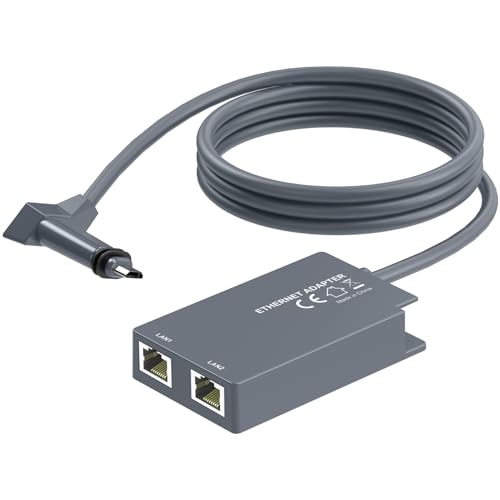 | IP65 Dual Port AdapterMost rugged | Two RJ45 | Gigabit each | Gen 2 family | $38.99 |
 | guugei Dual PortAlternative dual | Two RJ45 | Gigabit each | Actuated Gen 2 | $42.99 |
Every adapter on this page fits exactly one kit. Buying the wrong one is the single most common outcome in this category, so spend a minute here first.
Gen 3 Standard, the current kit. Flat rectangular dish with a folding kickstand, and a flat white router. The router has two Ethernet ports on the back. You need no adapter, and no adapter here will fit. Connect your router or switch directly.
Gen 2 Standard Actuated. Rectangular dish on a motorised mount that aims itself, paired with a tall cylindrical router. No Ethernet port anywhere. This is the kit these adapters are for.
Gen 1 round dish. The original circular dish. Its router has a spare Ethernet port already, so again, no adapter needed.
High Performance and Flat High Performance. These have their own arrangements and are not compatible with the standard Gen 2 adapters, with one exception noted below.
The quickest check: look at the back of your router. If you can see a spare RJ45 socket, you do not need anything on this page. If the only sockets are the dish cable and power, you have a Gen 2 Actuated and you do.
The adapter is a passive splice. You unplug the dish cable from the router, plug the adapter into the router, then plug the dish cable into the adapter. The adapter’s RJ45 socket then gives you a wired connection out of the Starlink router.
Three reasons people fit one:
To wire a device. A PC, a games console or a smart TV on Ethernet gets lower and far steadier latency than over WiFi, which matters on a satellite connection that already has more latency than cable or fibre.
To use your own router. This is the bigger reason. The Starlink router cannot be extended and covers a limited area, which is a poor fit for the large rural properties Starlink customers tend to have. An adapter plus bypass mode lets a proper router or mesh system take over the network.
To reach an outbuilding. Run Ethernet from the adapter to a workshop, barn or garden office, and put an access point at the far end.
Enable bypass mode afterwards. Open the Starlink app, go to Settings, and turn on Bypass Mode. That disables the Starlink router’s own routing and WiFi so it acts as a plain modem. Without it you get double NAT, which breaks port forwarding and degrades video calls and smart home discovery. Our guides to routers for Starlink and mesh systems for Starlink cover what to connect.
At $17.99 this is the cheapest way to get a wired port out of a Gen 2 Starlink, and for most people it is all that is needed.
Functionally it does exactly what the official Starlink adapter does: splices between the dish cable and the router, and presents one gigabit RJ45 socket. The official part is frequently out of stock and costs more, which is why third party adapters exist at all.
Installation is genuinely plug and play with no drivers or configuration. LUCMO makes one point worth heeding: press until you hear a firm click at both ends. The Starlink cable connector is stiff and a partial seat is the most common cause of an adapter that appears dead. If it does not work, reseat both ends and restart the router before assuming it is faulty.
One port is the right amount for the most common use, which is connecting your own router and letting that handle everything else. A second port only helps if you are wiring two devices directly with no router in between, which is unusual.
The compatibility warning is prominent and accurate: Standard Actuated Gen 2 only. Not Gen 3, not Flat High Performance, not any other model. Check your dish before ordering.
Buy this if you have a Gen 2 Actuated dish and want to connect your own router. It is the default answer.
Six dollars more than the LUCMO for the same single port function, and the reason to consider it is the support commitment.
The seller states a six hour response window for issues. That matters more than it sounds in this category, because the common failure is not a broken adapter but a compatibility question: people are unsure which Starlink they have, or the adapter seems not to work when it is simply not seated. A seller who answers quickly turns a return into a two message conversation.
Gigabit throughput at up to 1,000 Mbps, which is far beyond what Starlink delivers at 50 to 250 Mbps, so the adapter will never be your limit.
The listing is unusually clear about the boundary: it works with the Standard Actuated Kit and explicitly does not work with the newer Standard Kit that has a kickstand base. That kickstand detail is the fastest way to tell the generations apart, and few listings mention it.
Compact and portable, which suits anyone moving a Starlink between a home and an RV.
If you are confident about your dish generation, the LUCMO at $17.99 does the identical job for less. Pay the extra here if you want someone to answer quickly when something is unclear.
Buy this if you are unsure about your dish generation and want responsive support behind the purchase.
Two gigabit ports instead of one, which removes the need for a small switch in setups where you want exactly two wired devices.
The realistic use is a router plus one direct device: your own router handling the network, and a games console or a desktop wired straight to the second port so it bypasses the router entirely. Or two devices in a setup with no separate router at all.
LUCMO calls out snug port fit as a design feature, and on a device that lives behind a router and gets knocked occasionally, connectors that hold matter more than they do on a desk.
One specification is worth reading carefully: the listing states the maximum connection cable length must not exceed 150 feet, about 45 metres. That refers to the Starlink dish cable run, and it is shorter than the 100 metre Ethernet limit people assume. If your dish is a long way from the house, check your cable length before buying.
Same Gen 2 Standard Actuated restriction, explicitly not compatible with Standard Gen 3.
At $37.99 it is more than double the single port LUCMO. Only worth it if you genuinely need two direct connections. If you are connecting a router, that router already has LAN ports and one adapter port is enough.
Buy this only if you need two devices wired directly with no router in between.
This one is built for a harder life than the others, and it also has the broadest compatibility within the Gen 2 family.
The IP65 ABS housing resists dust and water jets. The adapter itself normally sits indoors next to the router, so that rating is not about weather exposure so much as tolerance of a garage, a barn, an RV or a boat, where humidity and dust are constant and most consumer electronics quietly corrode.
Gold plated ports resist exactly that corrosion at the contact surface, which is where an adapter in a damp building actually fails.
The seller states 72 hour industrial stress testing and a rating for 24/7 operation. Treat that as a claim rather than a certification, but it is consistent with the rest of the build.
Compatibility is wider than the others here. The listing covers Gen 2 routers paired with Enterprise, mobile Flat High Performance Gen 2, High Performance Gen 1 and Standard Actuated Gen 2 systems. If you have a High Performance dish rather than a plain Actuated one, this is the adapter to look at first.
Two gigabit ports, with the same caveat as the LUCMO dual: if you are connecting your own router, one port is enough and you are paying for a second you will not use.
Buy this for a damp or dusty location, or if you run a High Performance rather than Actuated dish.
The third dual port option, and the most expensive adapter here, which needs a clear reason to justify it.
Functionally it matches the LUCMO dual: two gigabit RJ45 ports, plug and play, Standard Actuated Gen 2 only. Build quality is good and the housing is compact enough to sit tidily behind a router.
The listing emphasises reduced packet loss and latency. In practice a passive adapter does not improve a connection; it either passes the signal cleanly or it does not. What a well made adapter avoids is adding problems through poor contacts or shielding, which cheap ones can.
Compatibility with third party routers, Ethernet switches, desktops and smart TVs is stated broadly, which is true of any adapter presenting a standard RJ45 socket.
The honest position: at $42.99 it is $5 more than the LUCMO dual and $4 more than the IP65 dual, without the LUCMO’s price advantage or the IP65 unit’s environmental rating and wider dish compatibility.
Include it in your shopping if the others are out of stock, which happens regularly in this category, or if it is discounted below the LUCMO. Otherwise there is no specific reason to choose it first.
Buy this if the other dual port adapters are out of stock or it is discounted below them.
Only if you have the Gen 2 Standard Actuated kit, which is the rectangular dish on a motorised mount with a tall cylindrical router. Gen 3 kits have two Ethernet ports built into the router, and the original Gen 1 round dish router has a spare port too. Look at the back of your router: if you can see a free RJ45 socket, you do not need an adapter.
No. Every adapter on this page is Gen 2 Standard Actuated only, and the sellers state this prominently because it is the most common return. Gen 3 does not need one anyway, since Ethernet ports are built into the router.
The quickest check is the router. Gen 2 Actuated uses a tall cylindrical router with no spare Ethernet port. Gen 3 uses a flat white router with two Ethernet ports and the dish has a folding kickstand base. Gen 1 has a round dish. If your router already has a free RJ45 socket, no adapter is required.
No. These are passive gigabit adapters and Starlink delivers roughly 50 to 250 Mbps, so the adapter has around four to twenty times more capacity than the connection uses. It will never be the bottleneck.
Only if you are connecting your own router. Bypass mode disables the Starlink router’s routing and WiFi so it behaves as a plain modem, which prevents double NAT. If you are just wiring a single device such as a console directly, leave bypass mode off, because the Starlink router still needs to route.
Yes, and it is one of the better reasons to fit one. Run outdoor rated Ethernet from the adapter to a workshop or barn and put an access point at the far end. Note that one listing specifies a 150 foot limit on the Starlink dish cable run, which is separate from the Ethernet run and shorter than people expect.
Before anything else, check your router for a spare Ethernet port. If it has one, you own a Gen 3 or Gen 1 kit and nothing on this page applies to you.
If you have the Gen 2 Standard Actuated kit, buy the LUCMO Gen 2 adapter at $17.99. It does exactly what the official Starlink part does, costs less, and is usually in stock when the official one is not.
Pay more only for a specific reason: the IP65 dual port at $38.99 if the adapter lives somewhere damp or dusty, or if you have a High Performance rather than Actuated dish. And if you are connecting your own router, one port is enough, so the dual port versions are money spent on a socket you will not use.
Disclosure: Networking Signal is a participant in the Amazon Services LLC Associates Program. We earn a commission on qualifying purchases made through links on this page, at no additional cost to you. Prices shown were accurate at the time of writing and may change. We are not affiliated with SpaceX or Starlink. Confirm your dish generation before ordering, as none of these adapters fit Gen 3 hardware.
Hand-picked articles you might also find useful.
 Cables
 The best fiber optic cleaning kits in 2026. The D YEDEMC kit at $60 covers both cleaning types,…
 Networking Gears
 The routers that actually match a PS5 in 2026. The TP-Link Archer BE550 at $200 is the closest…
 Networking Gears
 The best PoE switches for 2026, compared on power budget rather than port count. Includes how to size…