
How to Convert an IP Address from Decimal to Binary
Two reliable methods for converting IP octets to binary, a lookup table for the eight bit values, worked…
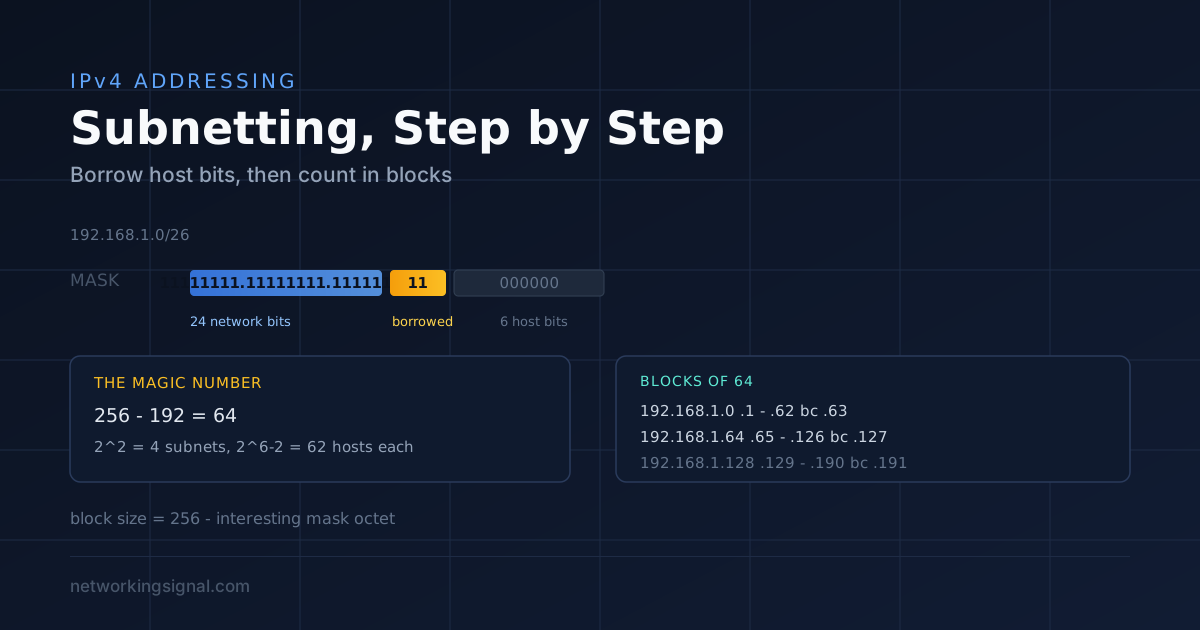
Subnetting is dividing one IP network into several smaller networks. You do it by borrowing bits from the host portion of the address and using them to identify subnets instead.
That single sentence is the whole concept. Everything else, the masks, the charts, the exam questions, follows from it. If you just need a value rather than the method, the CIDR to subnet mask converter gives it instantly.
Within an octet, each bit position has a fixed value:
| Bit | 1 | 2 | 3 | 4 | 5 | 6 | 7 | 8 |
|---|---|---|---|---|---|---|---|---|
| Value | 128 | 64 | 32 | 16 | 8 | 4 | 2 | 1 |
| Running mask | 128 | 192 | 224 | 240 | 248 | 252 | 254 | 255 |
The second row is the mask octet after borrowing that many bits. A subnet mask octet can only ever be one of those nine values (including 0), because mask bits are contiguous from the left. If you ever calculate a mask octet of 100 or 200, you have made an arithmetic error.
Take 192.168.1.0/24. The mask is 255.255.255.0, so 24 bits are network and 8 are host:
192.168.1.0     11000000.10101000.00000001.00000000
255.255.255.0   11111111.11111111.11111111.00000000
                |------- network (24) ------||host(8)|
Borrow 2 host bits for subnetting and you get a /26:
255.255.255.192 11111111.11111111.11111111.11000000
                |------- network (26) --------||host|
                                             ^^
                                      borrowed bits
Two borrowed bits give 2² = 4 subnets, and 6 host bits remain, giving 2⁶ minus 2 = 62 usable hosts each.
| Formula | Meaning |
|---|---|
| 2borrowed bits | Number of subnets |
| 2host bits minus 2 | Usable hosts per subnet |
| 256 minus mask octet | Block size (the magic number) |
Every subnet loses two addresses: the one with all host bits 0 is the network address, and the one with all host bits 1 is the broadcast address. Neither can be assigned to a device.
This is how experienced engineers subnet in their head. Once you understand the binary, you only need one subtraction.
Mask:              255.255.255.192
Interesting octet: 4th (192)
Magic number:      256 - 192 = 64
Blocks: 0, 64, 128, 192| Subnet | Network | First host | Last host | Broadcast |
|---|---|---|---|---|
| 1 | 192.168.1.0 | 192.168.1.1 | 192.168.1.62 | 192.168.1.63 |
| 2 | 192.168.1.64 | 192.168.1.65 | 192.168.1.126 | 192.168.1.127 |
| 3 | 192.168.1.128 | 192.168.1.129 | 192.168.1.190 | 192.168.1.191 |
| 4 | 192.168.1.192 | 192.168.1.193 | 192.168.1.254 | 192.168.1.255 |
/28 -> 255.255.255.240
Interesting octet: 4th (240)
Magic number: 256 - 240 = 16
Blocks: 0, 16, 32, 48, 64, 80, 96, 112, 128, 144 ...

130 falls between 128 and 144.| Address | |
|---|---|
| Network | 172.16.68.128 |
| First host | 172.16.68.129 |
| Our host | 172.16.68.130 |
| Last host | 172.16.68.142 |
| Broadcast | 172.16.68.143 |
The method is identical, the block size just applies one octet to the left. For 10.20.0.0/22:
/22 -> 255.255.252.0
Interesting octet: 3rd (252)
Magic number: 256 - 252 = 4
Blocks in the 3rd octet: 0, 4, 8, 12, 16 ...

10.20.0.0   -> hosts 10.20.0.1 - 10.20.3.254,  broadcast 10.20.3.255
10.20.4.0   -> hosts 10.20.4.1 - 10.20.7.254,  broadcast 10.20.7.255
10.20.8.0   -> hosts 10.20.8.1 - 10.20.11.254, broadcast 10.20.11.255
Note the host range spans several third-octet values. A /22 is four /24s joined together, 1,022 usable hosts.
| CIDR | Subnet mask | Block size | Usable hosts | Typical use |
|---|---|---|---|---|
| /24 | 255.255.255.0 | 256 | 254 | Standard office VLAN |
| /25 | 255.255.255.128 | 128 | 126 | Split a /24 in two |
| /26 | 255.255.255.192 | 64 | 62 | Small department |
| /27 | 255.255.255.224 | 32 | 30 | Small office, IoT VLAN |
| /28 | 255.255.255.240 | 16 | 14 | Server cluster, DMZ |
| /29 | 255.255.255.248 | 8 | 6 | Small server group |
| /30 | 255.255.255.252 | 4 | 2 | Point-to-point WAN links |
| /31 | 255.255.255.254 | 2 | 2 (RFC 3021) | Point-to-point, no network/broadcast |
| /32 | 255.255.255.255 | 1 | 1 | Loopback, host route |
The /30 is worth knowing cold, it is the classic WAN link subnet, giving exactly the two addresses a point-to-point link needs. /31 is the modern improvement: RFC 3021 allows point-to-point links to skip the network and broadcast addresses entirely, so a /31 also gives 2 usable addresses while consuming half the space.
Our subnet calculator works any of these out instantly, and the IP to binary converter shows the bit-level view while you are learning.
You are given 192.168.10.0/24 and need:
Always allocate largest first, or you will fragment the space and run out.
| Department | Needs | Subnet | Mask | Usable | Range |
|---|---|---|---|---|---|
| Sales | 50 | 192.168.10.0/26 | 255.255.255.192 | 62 | .1 to .62 |
| Engineering | 25 | 192.168.10.64/27 | 255.255.255.224 | 30 | .65 to .94 |
| Management | 10 | 192.168.10.96/28 | 255.255.255.240 | 14 | .97 to .110 |
| WAN link | 2 | 192.168.10.112/30 | 255.255.255.252 | 2 | .113 to .114 |
Everything from 192.168.10.116 upward is still free for growth. Using different mask lengths within one network like this is VLSM, see VLSM explained for the full method.
Assigning the network or broadcast address to a host. 192.168.1.64/26 is a network address, not a usable host. Devices configured with it will not communicate.
Forgetting the mask when checking “same subnet”. 192.168.1.100 and 192.168.1.200 are in the same subnet with a /24 but different subnets with a /25. Two hosts only talk directly when their network portions match, otherwise traffic goes to the gateway.
Overlapping subnets. 192.168.1.0/25 and 192.168.1.0/26 overlap. Routing becomes unpredictable, because longest-prefix match will silently prefer the /26.
Subnetting on a non-boundary. A subnet must start on a multiple of its block size. 192.168.1.100/26 is invalid, with a block size of 64, valid networks are .0, .64, .128 and .192 only.
Mismatched masks on the same segment. One host on /24 and another on /25 on the same wire produces asymmetric reachability: one can reach the other but not the reverse. It is a genuinely confusing fault to diagnose.
Subnetting is a skill, not knowledge, you learn it by repetition until the magic number is instant. Work through our subnetting practice questions, and keep the subnetting cheat sheet beside you until you no longer need it.
Splitting one large network into several smaller ones by borrowing bits from the host portion of the address and using them to identify subnets.
256 minus the interesting mask octet. It is the block size, the increment between consecutive subnet addresses. For a /26 (mask 192), the magic number is 64, so subnets start at 0, 64, 128 and 192.
The all-zeros host address is the network address and the all-ones is the broadcast address. Neither can be assigned to a device, so a /24 gives 254 usable hosts rather than 256.
2³ = 8 subnets. Each borrowed bit doubles the number of subnets and halves the hosts in each.
A /24 is one network of 254 usable hosts. A /25 splits that same space into two networks of 126 hosts each, with block size 128, so they start at .0 and .128.
Only through a router or a Layer 3 switch. Subnets are separate broadcast domains by design; a device compares its own network portion against the destination’s and sends anything that does not match to its default gateway.
No. A VLAN is a Layer 2 broadcast domain; a subnet is a Layer 3 address range. In practice they are mapped one-to-one, one VLAN, one subnet, but they are different mechanisms. See VLAN vs subnet.
Hand-picked articles you might also find useful.
 IPv4
IPv4 Two reliable methods for converting IP octets to binary, a lookup table for the eight bit values, worked…
![[Solutions] Ethernet Doesn’t Have a Valid IP Configuration](https://www.networkingsignal.com/wp-content/uploads/2026/09/auto/art-ethernet-doesnt-have-a-valid-ip-configuration.svg) IPv4
IPv4 Dealing with technology glitches can be exasperating, especially when you're trying to connect to the internet and encounter…
 IPv4
IPv4 An IPv4 address is a 32-bit number written as four octets. Here are the classes, private ranges, subnet…