
Loop Prevention in BGP Routing
The stability and optimal performance of networks running BGP ( Border Gateway Protocol ) rely heavily on preventing…
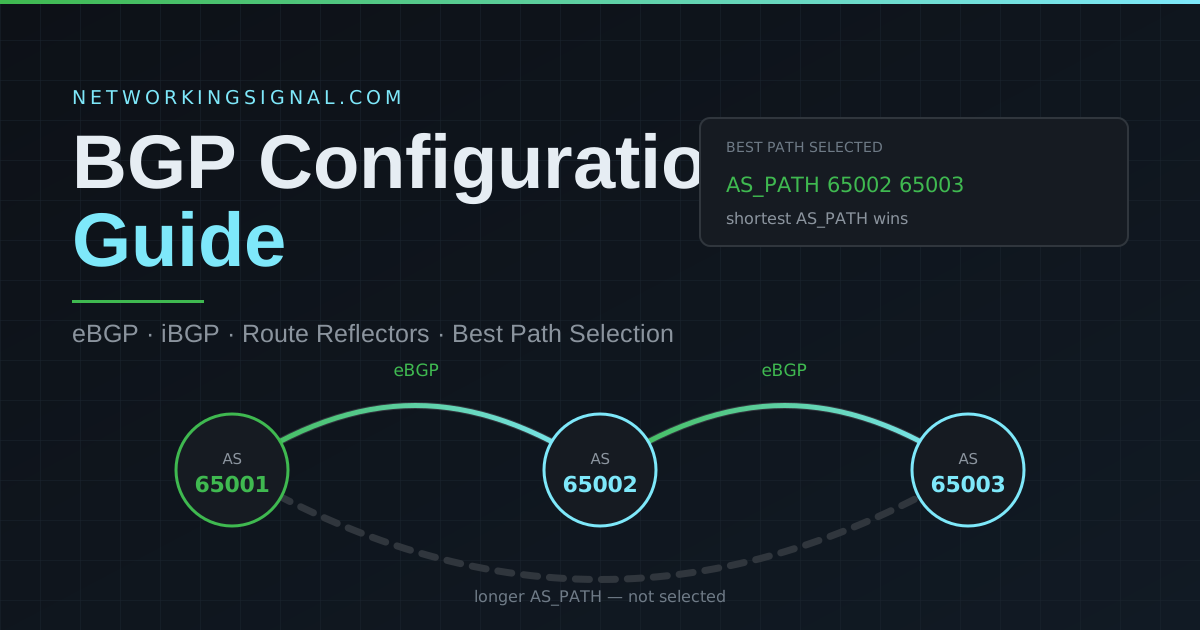
Quick answer: To configure BGP on a Cisco router, enter router bgp <AS-number>, set a stable router ID, define each peer with neighbor <ip> remote-as <AS>, and advertise prefixes with network <prefix> mask <mask>. eBGP peers use directly connected interface addresses; iBGP peers use loopbacks with update-source and next-hop-self. Verify with show ip bgp summary.
This guide builds a working three-router BGP network from scratch. You will configure an eBGP session between two autonomous systems, an iBGP session inside one of them, fix the two problems that break almost every first iBGP attempt, and then verify everything with real command output.
Every command here is Cisco IOS and can be pasted into Packet Tracer, CML, EVE-NG or GNS3.
network statement vs redistributionBGP will not form a session unless the underlying network already works. Confirm all four of these first, most “BGP won’t come up” problems are actually one of these:
neighbor statement. For iBGP over loopbacks, that means the loopbacks must be reachable, which requires an IGP such as OSPF or static routes.! ---------- R1 ----------
interface Loopback0
ip address 1.1.1.1 255.255.255.255
!
interface GigabitEthernet0/0
ip address 10.0.12.1 255.255.255.252
no shutdown
!
interface Loopback1
ip address 192.168.1.1 255.255.255.0
! ---------- R2 ----------
interface Loopback0
ip address 2.2.2.2 255.255.255.255
!
interface GigabitEthernet0/0
ip address 10.0.12.2 255.255.255.252
no shutdown
!
interface GigabitEthernet0/1
ip address 10.0.23.2 255.255.255.252
no shutdown
! ---------- R3 ----------
interface Loopback0
ip address 3.3.3.3 255.255.255.255
!
interface GigabitEthernet0/1
ip address 10.0.23.3 255.255.255.252
no shutdown
!
interface Loopback1
ip address 192.168.3.1 255.255.255.0R2 and R3 also need an IGP so their loopbacks can reach each other:
! ---------- R2 and R3 ----------
router ospf 1
 network 10.0.23.0 0.0.0.3 area 0
 network 0.0.0.0 255.255.255.255 area 0
If OSPF is new to you, start with our OSPF guide.
eBGP runs between routers in different autonomous systems. Because they are normally directly connected, you peer using the physical interface addresses.
! ---------- R1 (AS 65001) ----------
router bgp 65001
 bgp router-id 1.1.1.1
 bgp log-neighbor-changes
 neighbor 10.0.12.2 remote-as 65002
 neighbor 10.0.12.2 description eBGP to R2
 network 192.168.1.0 mask 255.255.255.0

! ---------- R2 (AS 65002) ----------
router bgp 65002
 bgp router-id 2.2.2.2
 bgp log-neighbor-changes
 neighbor 10.0.12.1 remote-as 65001
 neighbor 10.0.12.1 description eBGP to R1
Why set the router ID manually? Without bgp router-id, the router picks the highest loopback address, or the highest physical interface address if no loopback exists. That value can change after a reboot or an interface flap, which resets your sessions. Always set it explicitly.
Within a few seconds you should see:
%BGP-5-ADJCHANGE: neighbor 10.0.12.2 UpThe two are the same protocol with different rules, and the differences are exactly what trips people up.
Those two amber behaviours cause the two classic failures:
next-hop-self.For a deeper comparison see iBGP vs eBGP and loop prevention in BGP routing.
iBGP peers are often several hops apart, so peer using loopbacks. A loopback never goes down, so if there are two physical paths between the routers the session survives the loss of either one.
! ---------- R2 ----------
router bgp 65002
 neighbor 3.3.3.3 remote-as 65002
 neighbor 3.3.3.3 description iBGP to R3
 neighbor 3.3.3.3 update-source Loopback0
 neighbor 3.3.3.3 next-hop-self

! ---------- R3 ----------
router bgp 65002
 bgp router-id 3.3.3.3
 neighbor 2.2.2.2 remote-as 65002
 neighbor 2.2.2.2 description iBGP to R2
 neighbor 2.2.2.2 update-source Loopback0
network 192.168.3.0 mask 255.255.255.0R3 expects the session to come from 2.2.2.2. Without update-source Loopback0, R2 sources the TCP connection from its outgoing interface (10.0.23.2), R3 does not recognise that address as a configured neighbour, and the session never establishes. The rule is simple: the source address you send from must match the address your peer has configured.
When R2 passes R1’s prefix 192.168.1.0/24 to R3 over iBGP, it leaves the next hop as 10.0.12.1, an address inside AS 65001 that R3 has no route to. R3 marks the route inaccessible and never installs it.
R3# show ip bgp
   Network          Next Hop        Metric LocPrf Weight Path
 * i 192.168.1.0     10.0.12.1            0    100      0 65001 i
       ^
       no > symbol, not a best path, next hop is unreachable
neighbor 3.3.3.3 next-hop-self on R2 rewrites the next hop to 2.2.2.2, which R3 can reach through OSPF. The route then becomes valid and best:
R3# show ip bgp
   Network          Next Hop        Metric LocPrf Weight Path
*>i 192.168.1.0 2.2.2.2 0 100 0 65001 iThere are two ways to get a prefix into BGP, and the difference matters.
router bgp 65001
 network 192.168.1.0 mask 255.255.255.0
In BGP, network does not mean “enable BGP on this interface” the way it does in OSPF or EIGRP. It means “advertise this exact prefix, if it already exists in the routing table“. Two rules follow:
mask 255.255.255.0, nothing is advertised.mask for anything that is not classful, or IOS assumes the classful mask.router bgp 65001
redistribute ospf 1 route-map OSPF-TO-BGPRedistribution injects everything from the source protocol. Always filter it with a route-map, redistributing an entire IGP into BGP without a filter is one of the classic ways to cause an outage, and it can leak internal prefixes to a peer.
This is the first command to run. The State/PfxRcd column is what matters.
R2# show ip bgp summary
BGP router identifier 2.2.2.2, local AS number 65002

Neighbor    V   AS MsgRcvd MsgSent  TblVer InQ OutQ Up/Down  State/PfxRcd
10.0.12.1   4 65001      24      26       5   0    0 00:18:42        1
3.3.3.3     4 65002      21      22       5   0    0 00:15:07        1
A number in that column means the session is Established and shows how many prefixes you received. A word, Idle, Active, Connect, OpenSent, means it is not up.
| State shown | What it means | Where to look |
|---|---|---|
| Idle | Not attempting, or repeatedly failing | Route to the peer address; is the neighbour statement right? |
| Active | Trying to open TCP, getting no answer | ACL or firewall on port 179; wrong peer IP; update-source mismatch |
| Connect | TCP handshake in progress | Usually transient |
| OpenSent / OpenConfirm | Negotiating | AS number mismatch, router-id conflict, authentication mismatch |
| A number | Established | Working |
R2# show ip bgp
     Network          Next Hop        Metric LocPrf Weight Path
 *>  192.168.1.0      10.0.12.1            0             0 65001 i
 *>i 192.168.3.0      3.3.3.3              0    100      0 i
Read the leading characters carefully, they carry most of the information:
*, the route is valid (the next hop is reachable)>, this is the best path, and the only one installed in the routing tablei in the second column, learned from an iBGP peeri at the end of the line, origin is IGP (from a network statement)A route with * but no > is valid but lost the best-path selection. A route with neither is not usable at all, almost always a next-hop problem.
show ip bgp neighbors 3.3.3.3        ! full session detail, timers, capabilities
show ip bgp 192.168.1.0              ! why this prefix won or lost
show ip route bgp                    ! what actually made it into the RIB
show ip bgp neighbors 3.3.3.3 advertised-routes
show ip bgp neighbors 3.3.3.3 received-routes
clear ip bgp * soft                  ! safe refresh, does NOT tear sessions down
Use clear ip bgp * soft, never a plain clear ip bgp * on a production router. The hard clear drops every session and reconverges the whole table.
Because an iBGP router never re-advertises a route learned from one iBGP peer to another iBGP peer, every iBGP router must peer with every other one. That is a full mesh, and it needs n(nminus 1)/2 sessions.
A route reflector is allowed to break the rule and pass iBGP routes between its clients. Configuration is one line on the reflector, the clients need no special config at all:
! ---------- On the route reflector ----------
router bgp 65002
 neighbor 3.3.3.3 route-reflector-client
 neighbor 4.4.4.4 route-reflector-client
 neighbor 5.5.5.5 route-reflector-client
Deploy at least two reflectors for redundancy. Loop prevention still works, using the ORIGINATOR_ID and CLUSTER_LIST attributes instead of AS_PATH. Full detail in our BGP route reflector guide.
When BGP has several paths to the same prefix, it works down this list and stops at the first tiebreaker that produces a winner. This is the process shown in our BGP best path animation.
The classic mnemonic is “We Love Oranges AS Oranges Mean Pure Refreshment”, Weight, Local preference, Originate, AS_PATH, Origin, MED, Paths (eBGP over iBGP), RID.
In practice you only ever tune four of them:
| Attribute | Direction it influences | Scope | Prefer |
|---|---|---|---|
| Weight | Outbound | This router only | Highest |
| Local Preference | Outbound | Your entire AS | Highest |
| AS_PATH prepend | Inbound | Advertised to others | Shortest |
| MED | Inbound | Neighbouring AS | Lowest |
The rule of thumb: Local Preference controls traffic leaving your AS; AS_PATH prepending and MED influence traffic coming in. Inbound influence is only ever a request, the other AS decides what it honours. See BGP local preference for configuration examples.
next-hop-self on iBGP. Routes appear in the BGP table but never install. The single most common iBGP fault.update-source. You peer to a loopback but send from a physical interface, so the peer rejects the connection. The session sits in Active.network statement that does not match the routing table exactly. Wrong mask, or the prefix is not in the RIB at all, so nothing is advertised and no error is shown.bgp router-id.clear ip bgp *. Tears down every session. Use soft.Working through a broken session? See BGP configuration errors and how to fix them and BGP flap issues.
! MD5 authentication, must match on both peers
router bgp 65001
 neighbor 10.0.12.2 password S3cur3BGPk3y

! Limit how many prefixes a peer can send you
 neighbor 10.0.12.2 maximum-prefix 1000 90 restart 15

! Filter what you accept and what you send
 neighbor 10.0.12.2 prefix-list CUSTOMER-IN in
 neighbor 10.0.12.2 prefix-list MY-PREFIXES-OUT out
maximum-prefix is genuinely important: it protects you when a peer accidentally advertises the full internet routing table, which is one of the most common causes of real-world BGP outages. See BGP authentication and BGP communities for policy tagging.
Enter router bgp <AS-number>, set bgp router-id, add each peer with neighbor <ip> remote-as <AS>, and advertise prefixes with network <prefix> mask <mask>. For iBGP peers, add update-source Loopback0 and next-hop-self. Verify with show ip bgp summary.
Active means the router is trying to open a TCP connection and getting no answer. Check four things: can you ping the exact peer address, is TCP 179 permitted by any ACL or firewall in between, does your source address match what the peer has configured (an update-source mismatch), and is the AS number correct on both sides.
eBGP runs between different autonomous systems and iBGP runs within one. eBGP rewrites the next hop and prepends the AS number; iBGP does neither. iBGP also does not re-advertise routes between iBGP peers, which is why a full mesh or a route reflector is needed.
iBGP does not change the next-hop attribute, so a route learned from an external peer keeps a next hop that is inside the other AS. Your internal routers have no route to that address, so the prefix stays inaccessible. next-hop-self rewrites it to the advertising router’s own address, which the IGP can reach.
It advertises one exact prefix, and only if that prefix already exists in the routing table. Unlike OSPF or EIGRP, it does not enable BGP on an interface. The prefix and mask must match the routing table exactly or nothing is advertised.
It works down eleven tiebreakers in order and stops at the first that produces a winner: highest weight, highest local preference, locally originated, shortest AS_PATH, lowest origin type, lowest MED, eBGP over iBGP, lowest IGP metric to the next hop, oldest path, lowest router ID, lowest neighbour address. In practice only weight, local preference, AS_PATH and MED are tuned.
A full mesh needs n(nminus 1)/2 sessions, 6 routers need 15, and 20 routers need 190. A route reflector reduces this to one session per client, which is why every network beyond a handful of routers uses one.
Not the plain form. clear ip bgp * tears down every session and forces a full reconvergence. Use clear ip bgp * soft, which re-applies policy without dropping the sessions.
Start with the theory in what is BGP, attributes, states and how it works, then compare it against other protocols in our routing protocols guide and BGP vs OSPF.
Go deeper on specific topics: iBGP vs eBGP, route reflectors, local preference, communities, conditional advertisement, FlowSpec, local AS, which TCP port BGP uses and loop prevention.
Preparing for an interview or an exam? Work through our 150+ BGP interview questions and test your fundamentals with the OSI model quiz. For addressing practice, use the subnet calculator and the rest of our free networking tools.
Hand-picked articles you might also find useful.
 BGP
BGP The stability and optimal performance of networks running BGP ( Border Gateway Protocol ) rely heavily on preventing…
 BGP
BGP The Border Gateway Protocol ( BGP ) is the routing protocol that glues the internet together. BGP allows…
 BGP
BGP What is BGP Route Reflector? BGP Route Reflector is a feature in the Border Gateway Protocol (BGP) that…