
What is Bandwidth in Networking? Detail Guide
What is Bandwidth in Networking? Bandwidth in networking is the maximum rate at which data can be transferred…
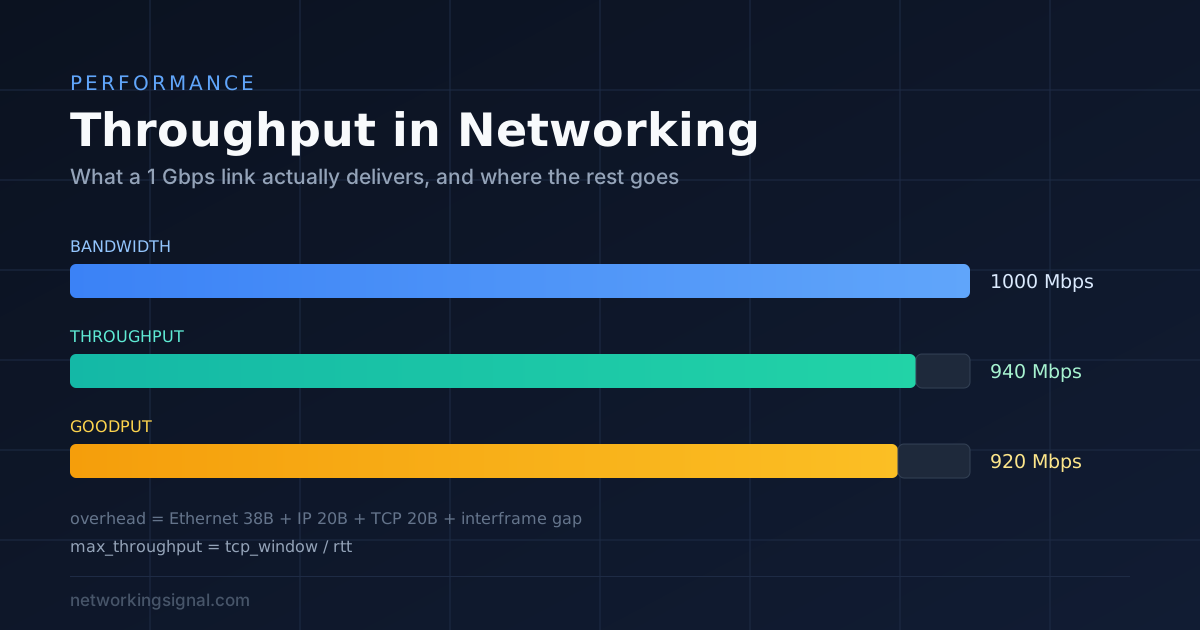
Throughput is the amount of data actually transferred over a link in a given time. Bandwidth is the maximum that link could theoretically carry. Throughput is always lower, and understanding why is most of network performance troubleshooting.
A gigabit link does not deliver a gigabit of file transfer. Some of the capacity goes to protocol overhead, some to retransmissions, and a great deal can be lost to latency and window sizing that have nothing to do with the link speed at all.
| Term | Meaning | Example on a 1 Gbps link |
|---|---|---|
| Bandwidth | Theoretical maximum capacity | 1,000 Mbps |
| Throughput | Data actually transferred, including protocol headers | ~940 Mbps |
| Goodput | Useful application data only | ~920 Mbps |
| Latency | Time for data to travel one way | Independent of the above |
| Jitter | Variation in latency | Independent of the above |
The gap between 1,000 and 940 is protocol overhead, and it is unavoidable. Ethernet adds a 38-byte frame overhead (header, FCS, preamble and interframe gap), IP adds 20 bytes, TCP adds 20 more. On a standard 1500-byte MTU that is roughly 6% of the wire consumed before any payload moves. ~940 Mbps is the correct expected result on a healthy gigabit link, if you measure that, nothing is wrong.
Throughput (Mbps) = (bytes transferred × 8) ÷ (seconds × 1,000,000)Worked example: a 2 GB file copies in 25 seconds.
2 GB = 2,147,483,648 bytes
× 8 = 17,179,869,184 bits
÷ 25 s = 687,194,767 bits/s
÷ 1,000,000 = ~687 Mbps
Watch the units. Storage is measured in bytes (MB, GB); network speed in bits (Mbps, Gbps). The factor of 8 between them is where most confusion originates, a 100 Mbps connection downloads at about 12.5 MB/s, not 100.
This explains a very common complaint: “we upgraded to a 1 Gbps circuit and transfers to the other office are still slow.”
TCP can only have a window’s worth of unacknowledged data in flight at once. Over a long-latency path, the sender fills the window and then waits for acknowledgements, regardless of how much bandwidth is available.
Maximum throughput = TCP window size ÷ round-trip timeWith a 64 KB window (the classic maximum without window scaling) over a 100 ms RTT link:
65,536 bytes × 8 = 524,288 bits
÷ 0.1 s = 5,242,880 bits/s = ~5.2 Mbps
5.2 Mbps on a gigabit circuit. The link is not the constraint; the window is. The fixes:
# Check window scaling is on
sysctl net.ipv4.tcp_window_scaling
sysctl net.ipv4.tcp_rmem net.ipv4.tcp_wmem| Cause | Symptom | Check |
|---|---|---|
| Protocol overhead | ~6% below line rate | Normal, no action |
| Latency + small window | Slow over distance, fast locally | Calculate the bandwidth-delay product |
| Packet loss | Throughput collapses; even 1% loss is severe for TCP | ping loss, interface error counters |
| Duplex mismatch | Works but is slow, with late collisions | show interfaces, duplex, late collisions, CRC |
| A slow link in the path | Capped at the slowest hop | Test hop by hop |
| Disk or CPU on the endpoints | Network is idle while the transfer is slow | Test with memory-to-memory iperf3 |
| MTU mismatch / fragmentation | Small transfers fine, large ones stall | DF-bit ping at 1472 bytes |
| QoS shaping or policing | Consistent hard ceiling below line rate | Provider or firewall policy |
| Wireless | Roughly half of the negotiated rate at best | Signal strength, channel congestion |
iperf3 is the right tool, it removes disk speed from the equation by generating traffic in memory.
# On the server
iperf3 -s

# On the client, basic TCP test
iperf3 -c 10.10.10.5

# 8 parallel streams, 30 seconds, realistic for long-distance paths
iperf3 -c 10.10.10.5 -P 8 -t 30

# Reverse direction
iperf3 -c 10.10.10.5 -R

# UDP at a target rate, to measure loss and jitter
iperf3 -c 10.10.10.5 -u -b 900M
Rules for a meaningful test:
That is the correct figure. Ethernet, IP and TCP headers plus the interframe gap consume roughly 6% of the wire. The IP header alone accounts for 20 of those bytes per packet. 940 to 950 Mbps is a healthy gigabit link.
Bandwidth is the maximum the link could carry; throughput is what you actually achieve. Bandwidth is a property of the link, throughput is a result of the whole path and both endpoints.
Over distance, usually the bandwidth-delay product, TCP’s window fills and stalls waiting for acknowledgements. Locally, usually packet loss, a duplex mismatch, or the disk at one end. Test with iperf3 to separate network from storage.
No. Latency is governed by distance and the number of hops. More bandwidth reduces queuing delay under load, but the propagation delay is unchanged, a fatter pipe is not a shorter one.
Severely. TCP treats loss as congestion and halves its window, then recovers slowly. Even 1% loss can cut throughput by an order of magnitude on a long path, which is why loss matters far more than its percentage suggests.
WiFi is half duplex on a shared medium, with acknowledgements, contention and management overhead consuming airtime. Roughly 50% of the negotiated rate is a realistic expectation, and it falls further with distance and more clients.
Hand-picked articles you might also find useful.
 Networking Fundamentals
 What is Bandwidth in Networking? Bandwidth in networking is the maximum rate at which data can be transferred…
 Networking Fundamentals
 What is an SD-WAN Controller? SDWAN Controller is a software-defined wide area network ( SD-WAN ) solution that…
 Networking Fundamentals
 The world is quickly running out of IPv4 addresses , and a new version of the internet protocol…