
What is the Backbone Area in OSPF? Detail Explained
What is the Backbone Area of OSPF? The Backbone Area is the central area of an Open Shortest…
In the dynamic landscape of networking, optimizing routing protocols is crucial to ensure efficient data flow.
Open Shortest Path First (OSPF) is a popular routing protocol that allows routers to communicate and exchange routing information. One of the key elements in OSPF configuration is the concept of a passive interface.
In this article, we’ll delve into the OSPF passive interface, its significance, and how to configure it for an optimized network.
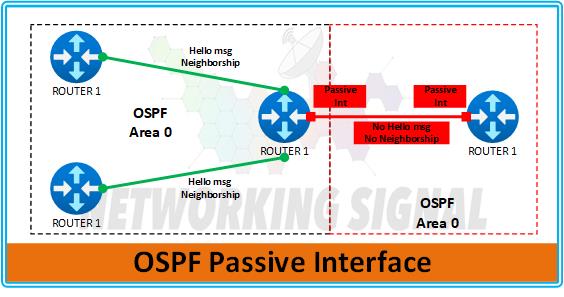
The OSPF passive interface is a configuration option that allows you to control the advertisement of routing information through certain interfaces.
When an interface is marked as passive, OSPF will not send out hello packets or form adjacencies on that interface.
This can be extremely useful in scenarios where you want to prevent unnecessary traffic or maintain a more controlled routing environment.
Configuring an OSPF passive interface involves marking specific interfaces as passive, preventing OSPF from sending hello packets and forming adjacencies on those interfaces.
This can be particularly useful for interfaces where dynamic routing updates are not required or where you want to reduce unnecessary network traffic.
Router> enable
Router# configure terminal
Router(config)# show ip interface brief
Interface IP-Address OK? Method Status Protocol
FastEthernet0/0 192.168.1.1 YES manual up up
FastEthernet0/1 unassigned YES manual administratively down down
Serial0/0 10.0.0.1 YES manual up up
Serial0/1 unassigned YES manual administratively down down
Router(config)# interface FastEthernet0/1
Router(config-if)# ip ospf passive-interface
Router(config-if)# exit
Router(config)# interface Serial0/1
Router(config-if)# ip ospf passive-interface
Router(config-if)# exit
Router(config)# end
Router# write memory
Building configuration…
[OK]
Router# show running-config
!
interface FastEthernet0/0
ip address 192.168.1.1 255.255.255.0
ip ospf authentication message-digest
ip ospf message-digest-key 1 md5
duplex auto
speed auto
!
interface FastEthernet0/1
no ip address
ip ospf passive-interface
duplex auto
speed auto
shutdown
!
interface Serial0/0
ip address 10.0.0.1 255.255.255.0
ip ospf authentication message-digest
ip ospf message-digest-key 1 md5
clock rate 64000
!
interface Serial0/1
no ip address
ip ospf passive-interface
shutdown
!
router ospf 1
log-adjacency-changes
network 192.168.1.0 0.0.0.255 area 0
network 10.0.0.0 0.0.0.255 area 0
!
- Log In: Log in to the router’s command-line interface using the appropriate credentials.
- Show Interface Status: To identify the interface you want to set as passive, use the command
show ip interface brief. This command will display a list of all interfaces on the router along with their status.
- Choose Interface: Based on the output of the previous command, choose the interface you wish to configure as passive.
- Enter Configuration Mode: Enter the interface configuration mode for the chosen interface using the command
interface [interface-name]. Replace[interface-name]with the actual name of the interface.
- Passive Interface Command: In the interface configuration mode, use the command
ip ospf passive-interface. This command tells OSPF that this interface should be treated as passive.
- Exit: Once you have marked the interface as passive, exit the interface configuration mode by typing
exit.
- Save Configuration: To ensure that the configuration changes are saved, use the appropriate command to save the router’s configuration. The command may vary based on the router model, but it’s usually something like
write memoryorcopy running-config startup-config.
- Verify: To confirm that the passive-interface configuration has been applied successfully, you can use the command
show running-config. Look for the line that corresponds to the passive interface configuration you just entered.
no ip ospf passive-interface command.The concept of OSPF passive interfaces offers a valuable tool for network administrators to optimize their OSPF routing environment.
By designating specific interfaces as passive, you can strategically control the behavior of OSPF and enhance the overall efficiency and stability of your network.
Let’s explore when it’s most appropriate to use OSPF passive interfaces:
Point-to-point links refer to connections between two devices, such as a router and a switch, where only these two devices communicate.
In such scenarios, OSPF updates are unnecessary because the link connectivity is fixed. Configuring the point-to-point interfaces as passive ensures that OSPF doesn’t attempt to establish unnecessary adjacencies on these links.
This not only reduces unnecessary OSPF traffic but also simplifies the network topology.
Backup links are often used to provide redundancy in case of primary link failures. These links remain inactive unless the primary link goes down.
Configuring backup link interfaces as passive prevents OSPF from sending hello packets and forming adjacencies on these links.
This approach ensures that the backup links don’t participate in OSPF routing updates unless they are actively used, contributing to better resource utilization and a cleaner routing table.
In some cases, certain interfaces might experience frequent adjacencies flapping due to external factors like noise, interference, or temporary link instability.
Marking these interfaces as passive can help stabilize network adjacencies. When OSPF doesn’t attempt to form adjacencies on these interfaces, the network experiences fewer disruptions caused by adjacency changes.
This can be particularly beneficial in networks where quick convergence is crucial.
Not all network segments require frequent OSPF updates. For example, interfaces leading to client networks or segments with static routing might not need dynamic OSPF routing updates.
By configuring these interfaces as passive, you prevent OSPF hello packets and routing updates from being sent unnecessarily.
This effectively reduces OSPF-related traffic and conserves network resources.
Passive interfaces can also contribute to network security. By configuring interfaces that don’t need OSPF communication as passive, you limit the exposure of your network to potential attacks.
Since OSPF hello packets won’t be sent on these interfaces, malicious actors have fewer opportunities to intercept or manipulate routing information.
In networks with complex topologies, there might be cases where OSPF’s default behavior needs to be customized.
Passive interface configuration allows network administrators to tailor OSPF behavior to specific network segments.
This flexibility can be especially useful when dealing with unique routing requirements or specialized network configurations.
Configuring OSPF passive interfaces is a powerful technique to optimize your network’s routing efficiency, reduce unnecessary traffic, and enhance security.
By understanding the concept and benefits of passive interfaces, you can strategically implement them in your network to achieve better stability and resource utilization.
Remember that the OSPF passive interface should be used thoughtfully, focusing on the interfaces where dynamic routing updates are unnecessary or undesirable. This approach can contribute to a more streamlined and secure networking environment.
Hand-picked articles you might also find useful.
 OSPF
OSPF What is the Backbone Area of OSPF? The Backbone Area is the central area of an Open Shortest…
 OSPF
OSPF OSPF neighbours pass through Down, Init, 2-Way, ExStart, Exchange, Loading and Full. What each state means, where adjacencies…
 OSPF
OSPF What is Stub Area in OSPF? The Stub Area is a special type of area in the Open…