
Verizon Fios Router Login: How to Access and When to Use?
So you just got Verizon Fios - congratulations! With blazing fast fiber optic speeds, you’re probably loving how…
The Spectrum router is the networking device provided by Spectrum Internet Service to connect your home devices to the internet via Wi-Fi or ethernet. It serves as the central hub for your home network.
The router connects to the internet through a cable modem, which is what Spectrum uses to deliver high-speed cable internet to your home. The Spectrum router has built-in firewall protections, allows you to set up a guest Wi-Fi network, and gives you the ability to manage connected devices. Having admin access lets you configure these features to customize your home network.
| Feature | Description |
|---|---|
| Built-in Firewall | Protects the home network from malicious attacks over the internet |
| Guest Network | Separate Wi-Fi network for guests to use with different password |
| Device Management | View and control devices connected to your home network |
Logging into your Spectrum router gives you access to the admin settings panel, which is where you can fully customize your home Wi-Fi network and router configuration. Here are some examples of what you can do within the admin interface that requires logging in first:
Logging in opens up additional configuration options so you can optimize your network’s security, performance, connectivity, and features beyond the basics.
The process to login to the admin settings of your Spectrum router requires first connecting to your home Wi-Fi network, launching a web browser, entering the correct IP address, and then authenticating with the admin username and password credentials. We’ll cover the step-by-step process in more detail shortly.
Before attempting to log into your Spectrum router’s admin panel, you’ll want to make sure:
If you are not sure of the above details, try using the default settings first. The default Spectrum admin login is:
192.168.0.1 admin passwordIf those do not work, you may need to factory reset your router to restore the defaults before logging in.
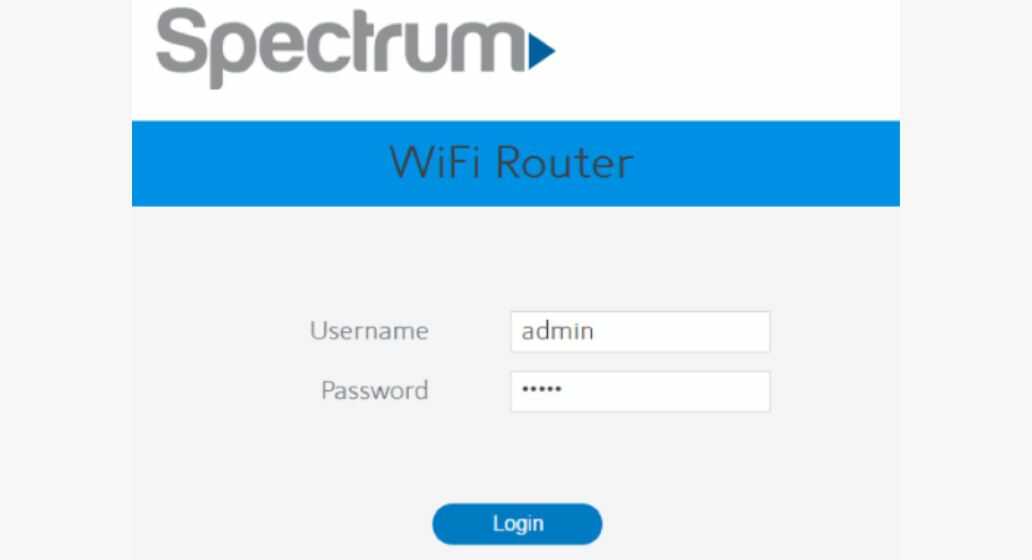
Follow these exact steps to access your Spectrum router’s admin interface:
192.168.0.1 (or current admin IP) into the address bar. Press enter.admin the username and password the password.Once logged in, you will see the router admin dashboard page. This is where you can access the various configuration settings.
If you are unable to login to your Spectrum router admin page, here are some troubleshooting tips:
For additional help, contact Spectrum support for troubleshooting assistance.
If you changed the default admin username or password on your Spectrum router previously, but can no longer remember them, follow these steps:
This will reset the entire router configuration back to factory default settings, including the admin login reverting to:
192.168.0.1 admin passwordYou can then log in with those credentials.
As mentioned in the previous section, to complete a full factory reset of your Spectrum router’s software and settings, follow this physical hardware reset process:
Resetting your router is useful not only when forgetting your admin login credentials, but also as a troubleshooting step when experiencing connectivity or performance problems. Just be aware a reset wipes out any custom settings.
Once logged into your Spectrum router’s admin interface, the full suite of controls becomes available to customize your home network. Here are some of the common advanced settings you can tweak:
To update your Wi-Fi network name (SSID) and Wi-Fi password:
Any devices will need to reconnect using the new Wi-Fi credentials once changes are saved. Consider keeping your old password handy during the transition.
Enabling a separate guest network allows visitors to access a different Wi-Fi network from your private one. To enable:
Now your guests can connect to the separate Wi-Fi network you set up just for them. Keep the credentials handy so you can easily share access.
With your Spectrum router acting as the gateway to your home network, keeping its access and settings secure is a critically important task.
The default admin login credentials for Spectrum routers are widely known. This means that if left unchanged, random attackers could access your network. That’s why it’s strongly recommended to personalize your admin username and password upon initial setup. This prevents unauthorized access to your router’s control panel.
Beyond changing that default admin login, here are additional tips to lock down your Spectrum router:
Following best practices for home router security ensures your network and connected devices are safe from intrusion.
As technology rapidly advances, upgrading your Spectrum router periodically provides faster speeds, expanded Wi-Fi range, and new features.
Generally, if your router is over 3-4 years old, replacing it with a newer model brings noticeable improvements. The latest routers have better internal antennas, faster processors, and enhanced wireless radios to handle more devices simultaneously. They also tend to have improved security protections.
Upgrading also future-proofs your setup, providing support for faster internet speeds delivered over the cable line. So if you want to take advantage of speed tier upgrades from Spectrum in the future, having an up-to-date router ensures compatibility.
The process of upgrading your Spectrum router is straightforward:
Be sure to back up any needed settings before sending back your previous router. Overall, self-installing your new Spectrum router takes less than 10-15 minutes for a major upgrade.
Gaining access to your Spectrum router admin settings empowers you to customize key aspects of your home network. The ability to tweak Wi-Fi settings, enable guest networks, beef up security protections, and manage connected devices all require logging into the router control panel. We walked through the step-by-step process to access this interface using the correct IP address and admin credentials.
Routers serve as the backbone of our home networks and a primary access point to the internet. That means securing your Spectrum router should be a top concern. Take proactive measures like changing default credentials, updating firmware regularly, and configuring built-in firewall settings.
Monitoring your network through the admin interface and controlling access with strong Wi-Fi passwords adds further protection. Investing a small amount of time into router security goes a long way toward safeguarding your home tech ecosystem.
Hand-picked articles you might also find useful.
 Router Login
 So you just got Verizon Fios - congratulations! With blazing fast fiber optic speeds, you’re probably loving how…
 Router Login
 The Starlink satellite internet service comes with a wifi router to connect your devices. Logging into the router…
 Router Login
 Access ATTWiFiManager safely: find the correct gateway and credentials, secure your AT&T hotspot, and fix a login page…