
OSI Model Complete Guide: All 7 Layers Explained [2026]
Complete OSI model guide — all 7 layers explained with protocols, devices, PDUs, and real-world examples. Essential for…
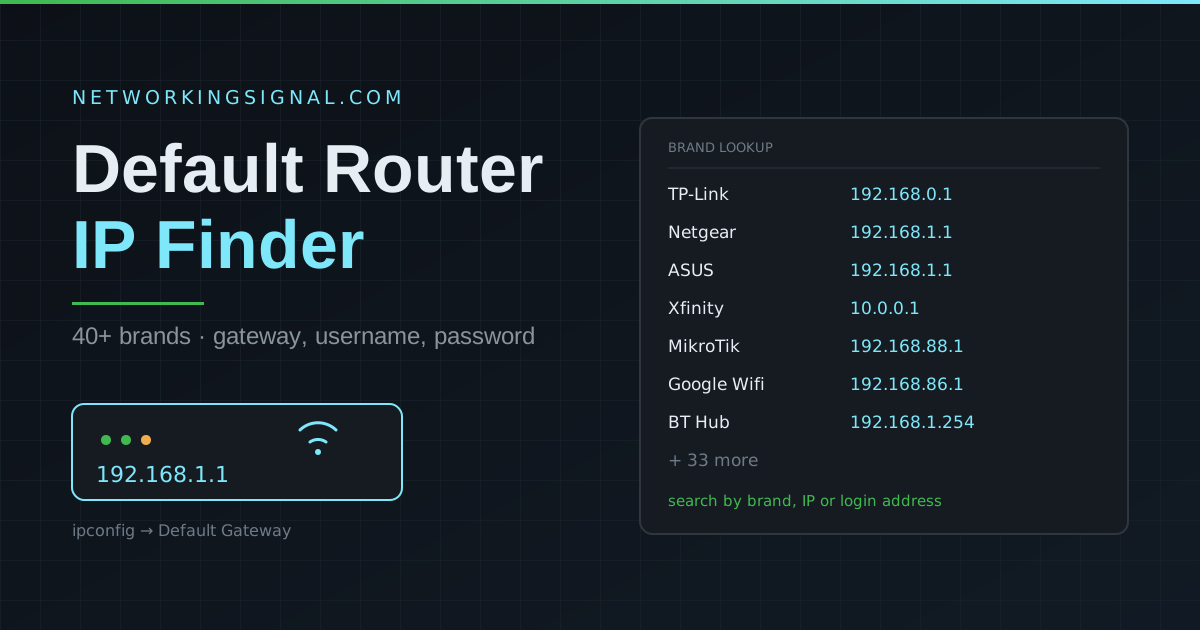
Search 40+ router brands for the default gateway address, username and password. If your brand is not listed, the guide below shows how to find your router’s IP on any operating system in under a minute.
| Brand | Default IP | Username | Password | Login address |
|---|
The table covers common brands, but the most reliable answer always comes from your own device. Your router’s IP is whatever your computer calls the “default gateway”.
Open Command Prompt and run:
ipconfigLook for Default Gateway under your active adapter. That address is your router.
Open Terminal and run:
netstat -nr | grep defaultOr go to System Settings, then Network, select your connection, click Details and open the TCP/IP tab.
ip route | grep defaultSettings → Network & internet → Wi-Fi → tap your network → Advanced. The gateway is listed there. Some versions show it only when the IP setting is switched to Static.
Settings → Wi-Fi → tap the (i) next to your network. The Router field is the address you need.
Generic defaults such as admin/admin have largely disappeared. Most routers made in the last several years ship with a unique password printed on the device label, precisely because default credentials were being exploited at scale. If the table’s password fails, check the label before assuming the router has been changed.
If the credentials really have been changed and forgotten, a factory reset is the only route back in. Hold the recessed reset button for 10 to 30 seconds until the lights cycle. Be aware this wipes everything, your Wi-Fi name, password, port forwarding rules and any ISP-specific settings. On an ISP-supplied router you may need to re-enter connection details afterwards, so note them down first.
It is the most common default gateway address for home routers, a private IPv4 address reserved for internal networks under RFC 1918. Netgear, ASUS, Linksys and many others use it for the admin panel. It is not reachable from the internet, only from inside your own network.
Check the label on the router, or use the ipconfig / ip route method above, it works on every network regardless of brand.
Usually one of four reasons: you are not connected to that network; you typed the address into a search box rather than the address bar; the router uses HTTPS and needs https:// in front; or the address has been changed from the default. Confirm the gateway with ipconfig before troubleshooting further.
Yes, it is a local connection to a device on your own network. What is unsafe is leaving the default password in place afterwards, and leaving remote management enabled. See how to improve network security.
The router IP is the private address your devices use to reach the router from inside the network. Your public IP is the address your ISP assigns to the router, which the rest of the internet sees. NAT translates between the two, see what NAT is.
A factory reset returns the router to its default IP, which is the one listed in the table. If someone had changed it to a custom address, that change is undone.
See our step-by-step guides for 192.168.1.1 router login and resetting a TP-Link router. Plan your own addressing with the subnet calculator and VLAN calculator, or read up on improving network security. Browse all our free networking tools.
Hand-picked articles you might also find useful.
![OSI Model Complete Guide: All 7 Layers Explained [2026]](https://www.networkingsignal.com/wp-content/uploads/2026/09/auto/art-osi-model-complete-guide.svg) Networking Fundamentals
Networking Fundamentals Complete OSI model guide — all 7 layers explained with protocols, devices, PDUs, and real-world examples. Essential for…
 Networking Fundamentals
 The world is quickly running out of IPv4 addresses , and a new version of the internet protocol…
 Networking Fundamentals
 A free IPv6 subnet calculator that runs in your browser. Enter a prefix, choose a new prefix length,…