
What is a Network? Types, Components and How It Works
A network is two or more devices linked so they can exchange data. Here are the network types…

The IPconfig command is a powerful command-line tool that allows you to configure your computer’s TCP/IP settings. It is used to view, release and renew IP addresses from the DHCP server as well as display the current network information for interfaces on the machine.
The IPconfig command can also be used to modify DNS servers, set default gateways, and configure IP address properties. This command is a useful tool for troubleshooting any network connection issues that may arise. It can also be used to quickly identify whether or not DHCP settings are being properly applied.
Additionally, the IPconfig command can be used to display information about wireless networks in the range of your computer and obtain their security settings. By making use of this command, you can easily configure and maintain your network settings to ensure the best possible performance.
Here are the main benefits of using the IPconfig command:

Here are the steps for using the IPconfig command:
1. Open the Command Prompt window.
2. Type in ‘ipconfig’ and press enter.
3. A list of all current network configurations will appear on your screen.
4. To view information about a specific configuration, type in ‘ipconfig /all’ and press enter.
5. To release and renew an IP address, type in ‘ipconfig /release’ followed by ‘ipconfig /renew’ and press enter.
6. If you want to configure a different DNS server or default gateway, type in the respective commands with the appropriate parameters and press enter.
7. Finally, to exit the IPconfig command, type in ‘exit’ and press enter.
By following these steps, you can easily use the IPconfig command to configure and maintain your network settings. IPconfig is a powerful tool that can help you troubleshoot any network connection issues quickly and easily.
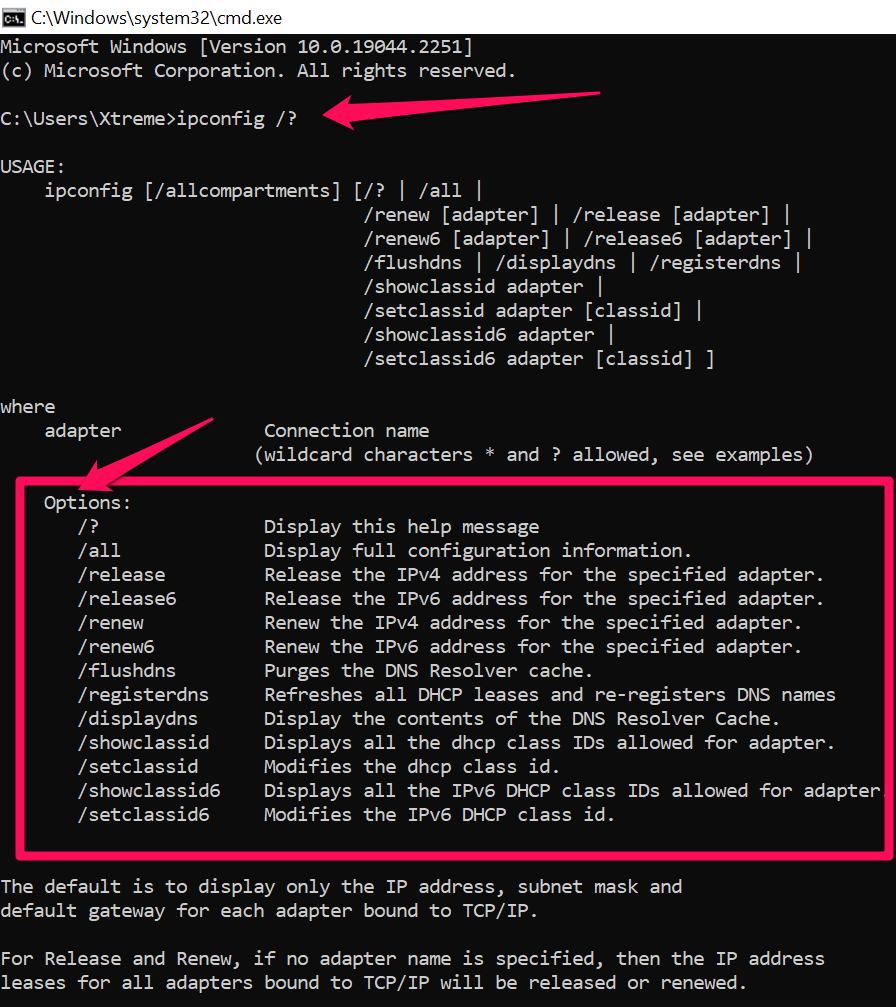
The IPconfig /? command is a helpful tool used to obtain detailed information about the usage and syntax of different IPconfig commands. This command can be used to view descriptions, syntax, and options available for each specific command. Using this feature can help you become more familiar with the various commands and how they work.
The IPconfig /all command is used to view detailed information about all current network configurations. This includes the IP address, subnet mask, default gateway, DHCP server address, and more. By using this command, you can quickly identify any issues that may be occurring with your network settings and make the necessary changes to fix them.
The IPconfig /release command is used to release the current IP address assigned to your computer by a DHCP server. This can be useful if you are having difficulty connecting to the internet and would like to try getting a new IP address from the DHCP server.
The IPconfig /renew command is used to request a new IP address from the DHCP server. This can be useful if you are experiencing connectivity issues and would like to get a fresh, new set of network settings.
The IPconfig /flushdns command is used to flush the contents of the DNS resolver cache. This can be useful if you are experiencing difficulty accessing certain websites or services and would like to clear out any potentially outdated information stored in the DNS resolver cache.
The IPconfig /registerdns command is used to register the current IP address and other network settings with a DNS server. This can be useful if you want to ensure that your current settings are properly registered with the DNS server so that you can access all services and websites without any issues.
The IPconfig /displaydns command is used to view the contents of the DNS resolver cache. By using this command, you can see what information is currently stored in the DNS resolver cache and verify that it is up-to-date.
The IPconfig /showclassid command is used to view the class identifier (ClassID) of each IP address assigned to your computer. This can be useful if you want to determine which type of IP address is being used on your network and ensure that it is configured properly.
The IPconfig /setclassid command is used to set the class identifier (ClassID) of an IP address assigned to your computer. This can be useful if you want to customize your network settings and make sure that the appropriate ClassID is being used for each IP address on your network.
Hand-picked articles you might also find useful.
 Routing & Switching
 A network is two or more devices linked so they can exchange data. Here are the network types…
 Routing & Switching
 What is Patch Panel? A patch panel is a component of structured cabling that facilitates the connection, organization,…
 Routing & Switching
 What are Edge Devices in SD-WAN? Edge devices are components of a Software-Defined Wide Area Network ( SD-WAN…