
Comcast Xfinity xFi Complete: Revolutionizing Home Internet Experience
In today's digital age, a reliable and high- speed internet connection is essential for both work and leisure.…
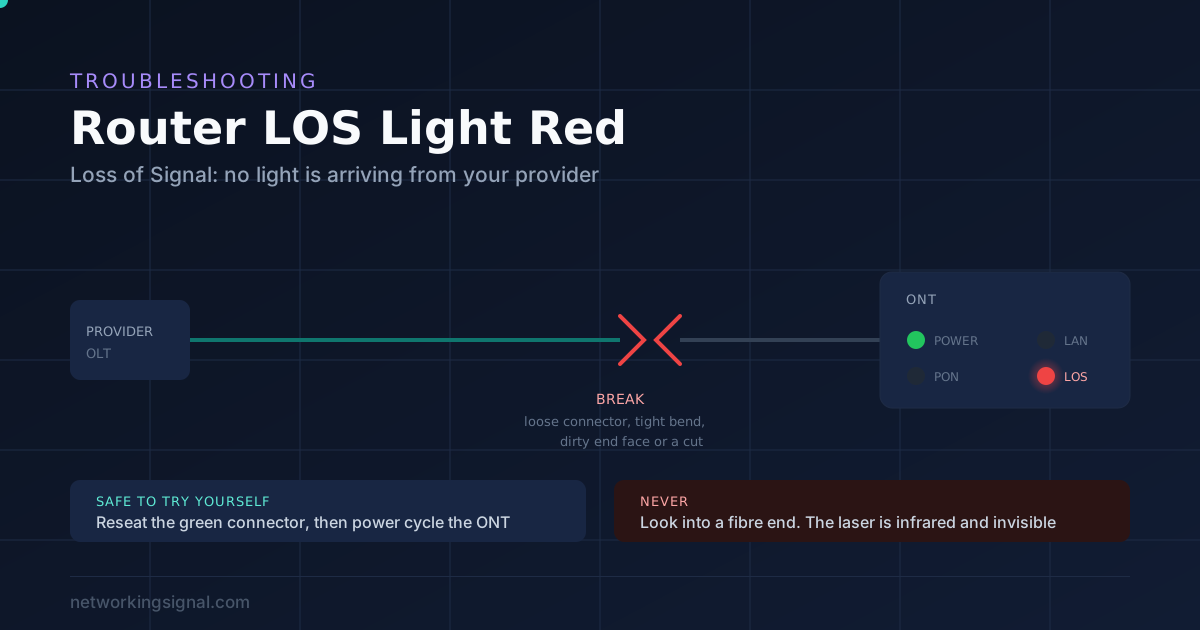
LOS stands for Loss of Signal. A red LOS light means your fibre box, properly called an ONT, is receiving no light from your provider’s equipment. It is not a WiFi problem and rebooting your router will not touch it.
Two things are safe and worth doing yourself:
1. Reseat the fibre cable. The thin green connector on the back backs out more often than anything else. Unclip, inspect, push back until it clicks.
2. Power cycle the ONT. Unplug it for 30 seconds, plug it back in, and give it two minutes to re-register.
If LOS is still red after both, it is your provider’s problem, either an outage or a broken fibre, and you need to call them.
Safety: never look into the end of a fibre cable or an open ONT port. The light is infrared, so you cannot see it, and it can damage your eye before you notice anything.
Every fibre ONT has the same small set of lights, and reading two of them together tells you almost everything.
| Light | State | What it means |
|---|---|---|
| LOS | Off | Light is arriving normally. Good. |
| LOS | Blinking red | No optical signal. The ONT is searching and finding nothing. |
| LOS | Solid red | Signal lost or far too weak to use. |
| PON | Solid green | Registered with the provider. This is the one you want on. |
| PON | Blinking green | Trying to register. Normal for a minute after power on. |
| POWER | Off | Not a signal fault at all. Check the adapter and socket. |
The combination that matters most:
LOS red and PON off. No light is reaching the ONT. This is the common case and it points at the fibre cable or the provider.
LOS off but PON blinking forever. Light is arriving but the ONT is not being accepted onto the network. That is usually a provisioning or account problem, not a cable one.
Everything green but no internet. The fibre side is fine and the fault is past the ONT, in the router or the cable between them.
Exact colours vary a little between manufacturers, so check the label on your own unit if it disagrees with the table above. If the light is amber rather than red, that is a different fault with a different cause, and we cover it separately in what a blinking orange router light means.
By a wide margin the most common cause, and the easiest to fix.
The fibre lead uses a small connector, usually a green SC/APC type, that clips into the ONT. It does not need much of a knock to back out by a millimetre, which is enough to break the light path while still looking perfectly seated.
Anything that moves the box will do it: cleaning, a vacuum cable, a child, or pulling on a nearby power lead.
Fibre carries light, and light travels in straight lines. Bend the cable tighter than it allows and the light escapes at the curve instead of continuing.
The minimum bend radius is roughly ten times the cable diameter, which for a typical indoor lead is about a 30 mm curve. Tighter than that and you lose signal.
Look for the cable pinched behind furniture, trapped under a door, crushed by a skirting board clip, or coiled tightly behind the unit.
The light-carrying core of a single mode fibre is 9 microns across. A human hair is around 70. So a single speck of ordinary dust can cover most of the core.
This happens when the protective cap was left off, when the connector was put down on a surface, or after a few years in a dusty cupboard. It looks completely clean to the eye, because you cannot see 9 microns.
Nothing wrong at your end at all. Their equipment is down, or they are doing planned maintenance.
Check the provider’s status page or app before spending an hour on this. If neighbours on the same service are also down, you have your answer.
Roadworks, storm damage, a fallen branch, or a contractor digging. Nothing you can do, and the provider will usually already know.
The optical receiver inside can degrade, particularly on units that have run hot for years. Rare, and it is the provider’s equipment, so they replace it.
A suspended account or an ONT that has been removed from the provider’s system. Usually shows as PON refusing to register rather than LOS red, but worth ruling out if a bill was missed.
Step 1. Check for an outage first. Provider’s app or status page, or ask a neighbour on the same service. Two minutes here saves an hour.
Step 2. Reseat the fibre. Press the tab and pull the green connector out. Look at the port and the connector for dust or damage, without ever pointing the fibre end towards your face. Push it back in until it clicks. Wait two minutes.
Step 3. Follow the cable. Trace the whole run from the ONT to the wall box. Look for tight bends, kinks, crush points, a trapped section under a door, or anything that has been pulled taut. Free anything you find and give it a gentle loop instead.
Step 4. Power cycle the ONT. Unplug it completely for 30 seconds, then plug it back in. Give it a full two minutes, because registration is not instant. Watch PON: blinking green then solid green is success.
Step 5. Clean the connector, if you have the right tool. Only if the first four failed and you have a proper fibre cleaner. Never use a cloth, a cotton bud or alcohol wipes, all of which leave fibres and residue that make it worse.
If LOS is still red after all five, stop. Everything left is the provider’s equipment or their cable, and there is nothing further you can safely do.
You will get through the script faster if you lead with what you have already done.
Say that the LOS light is red, whether it is solid or blinking, and what the PON light is doing. Tell them you have reseated the fibre, checked the run for damage and power cycled the ONT.
That sentence tells a competent agent immediately that this is an optical fault, not a WiFi complaint, and it usually skips the first two tiers of troubleshooting.
Ask them to check the optical power reading on your line from their end. They can see it remotely, and it tells them whether the fault is at your premises or further upstream.

Most people reading this do not need to buy anything. A red LOS light is usually a loose connector or an ISP fault, and both are free to resolve. Buy a cleaner only if you handle fibre regularly, or if steps one to four failed and you want to rule out contamination before waiting for an engineer.
Nineteen dollars gets both sizes you might need: the 2.5 mm pen for SC and FC connectors, which is what most home ONTs use, and the 1.25 mm pen for the smaller LC type.
The 180 degree rotating head sweeps the whole end face rather than pressing on one spot, which is where cheap cleaners fall short and simply smear a contaminant around.
It is a dry cleaner, so there are no fluids and no residue. That matters, because alcohol left to evaporate on an end face deposits exactly the kind of film you were trying to remove.
A transparent window shows how many of the 800 cleans are left, so it cannot quietly run out.
What not to use, ever: a cloth, a tissue, a cotton bud or a household wipe. All of them shed fibres onto the end face and leave you worse off than before. Our guide to fibre optic cleaning kits covers the full range if you work with fibre professionally.
Buy this only if you handle fibre regularly. For a one off red light, call the provider.
Once LOS is off and PON is solid green, the fibre side is healthy. If the internet is still not working, the fault has simply moved downstream to the router or the cable between it and the ONT.
Two things to check at that point. That the Ethernet lead from the ONT to your router is seated at both ends and undamaged, and that the router has actually picked up an address rather than sitting in a reconnect loop.
If you are replacing the router at the same time, our guide to the best routers for fibre internet covers which ones can actually keep up with a multi gigabit service, and the home network setup guide explains bridge mode so you do not end up with two routers fighting each other.
Loss of Signal. It is on the fibre box, properly called an ONT, rather than the router itself, and it means the unit is receiving no light from your provider’s equipment. It is an optical fault, so restarting your WiFi router will not change it.
In order of likelihood: the fibre connector has worked loose, the cable is bent too tightly, the connector end is dirty, your provider has an outage, the fibre outside has been cut, or the ONT has failed. The first is by far the most common and takes seconds to check.
Sometimes. Reseating the fibre connector and power cycling the ONT are both safe and resolve a good share of cases. Beyond that the fault is in the provider’s cable or equipment, and there is nothing further you can safely do yourself.
No. The light is infrared and invisible, so there is no visible warning and no blink reflex to protect you, and it can damage your retina. Never point a fibre end or an open ONT port towards your face, even when you believe the line is dead.
A provider side configuration fault is often resolved within hours. A physically cut fibre needs an engineer and a splice, which typically means one to three days depending on where the break is and whether it needs excavation.
No. The LOS light is on the ONT and reports the optical link to your provider, which the router plays no part in. Power cycling the ONT itself can help; restarting the router will not.
A red LOS light means no light is arriving from your provider. Check their status page, reseat the green fibre connector, trace the cable for tight bends or crush points, then power cycle the ONT and wait two minutes.
If it is still red, call the provider, tell them LOS is red and that you have already reseated and power cycled, and ask them to check the optical power on your line. That single sentence usually skips two tiers of scripted troubleshooting.
And whatever you do, do not look into the fibre.
Disclosure: Networking Signal is a participant in the Amazon Services LLC Associates Program. We earn a commission on qualifying purchases made through links on this page, at no additional cost to you. Prices shown were accurate at the time of writing and may change. Light behaviour varies between ONT manufacturers, so check the label on your own unit. Fibre optic equipment emits invisible infrared laser light; never look into a connector or port, and leave work on the provider’s cabling to their engineers.
Hand-picked articles you might also find useful.
 Internet & ISP
 In today's digital age, a reliable and high- speed internet connection is essential for both work and leisure.…
 Internet & ISP
 Internet speed fluctuation refers to inconsistent internet speeds that can rapidly change from fast to slow. Having a…
 Internet & ISP
 What is MBPS? MBPS stands for megabits per second and is a measurement unit that measures an internet…