
Does Bridging Connections Increase Speed?
The internet has revolutionized the way we live, work, and play. But with this revolutionary technology comes a…
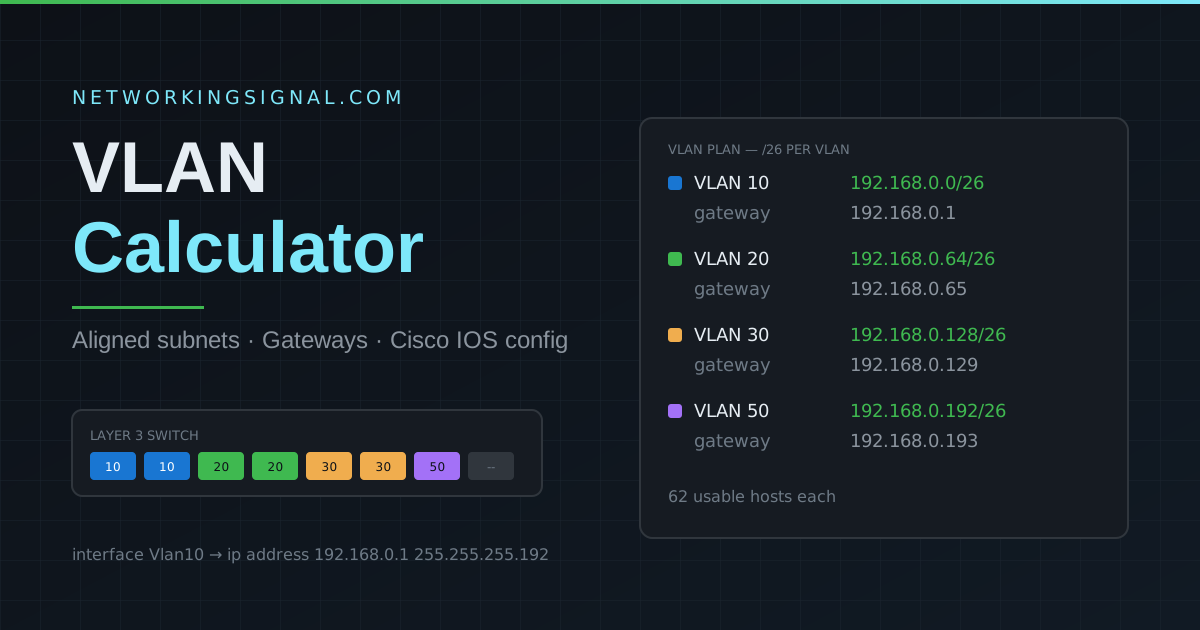
Use this VLAN calculator to add departments, pick a subnet size, and get an aligned IP plan with gateway and broadcast addresses, plus a Cisco IOS configuration you can paste straight into a Layer 3 switch.
192.168.0.0, 10.0.0.0 or 172.16.0.0. If the address you type is not on a clean subnet boundary, the calculator aligns it down for you and tells you what it used.Every VLAN needs its own IP subnet. The subnet size decides how many addresses each VLAN gets, and those blocks have to line up on clean boundaries or the switch will reject the configuration.
Take a base network of 192.168.0.0 with a /26 subnet per VLAN. A /26 is 64 addresses, so each VLAN starts 64 addresses after the previous one:
| VLAN | Network | Gateway | Broadcast | Usable hosts |
|---|---|---|---|---|
| 10 | 192.168.0.0/26 | 192.168.0.1 | 192.168.0.63 | 62 |
| 20 | 192.168.0.64/26 | 192.168.0.65 | 192.168.0.127 | 62 |
| 30 | 192.168.0.128/26 | 192.168.0.129 | 192.168.0.191 | 62 |
| 40 | 192.168.0.192/26 | 192.168.0.193 | 192.168.0.255 | 62 |
Two addresses in every block are unusable: the first is the network address itself and the last is the broadcast address. That is why a /26 with 64 addresses only gives you 62 usable hosts. The gateway is conventionally the first usable address, which is what this calculator assigns.
| Range | Type | Notes |
|---|---|---|
| 0, 4095 | Reserved | Cannot be used, reserved by the 802.1Q standard. |
| 1 | Default VLAN | Every Cisco switch port starts here. Do not use it for user traffic. |
| 2 to 1001 | Normal range | Stored in vlan.dat and carried by VTP versions 1 and 2. |
| 1002 to 1005 | Reserved | Legacy Token Ring and FDDI VLANs. |
| 1006 to 4094 | Extended range | Requires VTP transparent mode on VTP v1/v2, or VTP version 3. |
The 802.1Q standard allows VLAN IDs 1 through 4094, so 4094 VLANs in theory. In practice the limit is your switch model, many access switches support 255 or 1024 active VLANs at once, so check the datasheet before planning a large deployment.
Yes. A VLAN is a separate broadcast domain, and devices in different broadcast domains cannot reach each other at Layer 2. Giving two VLANs the same subnet means traffic between them has to be routed to an address that appears to be local, which breaks. See our guide on VLAN vs subnet for the full explanation.
Count the devices in the segment and add room for growth, then pick the smallest block that fits. A /24 (254 hosts) suits a general office VLAN. A /27 (30 hosts) or /28 (14 hosts) is right for printers, cameras or a small server segment. Oversized subnets create unnecessarily large broadcast domains.
It is a convention, not a rule, you could equally use the last usable address. What matters is that you pick one convention and apply it everywhere, so anyone troubleshooting the network knows where to look.
The network address is the first address in the block and identifies the subnet itself; it cannot be assigned to a device. The gateway is a real, assignable address on the router or Layer 3 switch that hosts use to reach other subnets.
The vlan and name commands work on any Cisco switch. The interface Vlan sections with IP addresses require a Layer 3 switch or a router, on a Layer 2 switch the gateway lives on the upstream router instead.
Yes. A VLAN ID is carried in the 802.1Q tag on trunk links, so VLAN 20 on one switch must be VLAN 20 on every other switch in the same Layer 2 domain. VTP can propagate the VLAN database automatically, but the IDs themselves must stay consistent.
Learn more about VLANs in our detailed guides: What is a VLAN?, VTP, VLAN Trunking Protocol, Access Port vs Trunk Port, and VLAN vs Subnet. For pure subnetting work, use our free subnet calculator, and to see how addresses break down in binary try the IP to binary converter. Browse all our free networking tools.
Yes. Add separate rows for IoT, guest, camera and management networks, then select a subnet size that fits each segment. Keep these devices on separate VLANs and apply firewall rules on the router or Layer 3 switch to control traffic between them.
No. The calculator creates an addressing plan and starter configuration, but you should still verify trunk ports, allowed VLANs, routing, DHCP scopes and security policies before applying changes to a production network.
After planning your VLANs, calculate an exact host range with the subnet calculator, convert an address with the IP to binary converter, and learn practical isolation steps in our IoT VLAN home network guide.
Hand-picked articles you might also find useful.
 Networking Fundamentals
 The internet has revolutionized the way we live, work, and play. But with this revolutionary technology comes a…
![OSI Model Complete Guide: All 7 Layers Explained [2026]](https://www.networkingsignal.com/wp-content/uploads/2026/09/auto/art-osi-model-complete-guide.svg) Networking Fundamentals
Networking Fundamentals Complete OSI model guide — all 7 layers explained with protocols, devices, PDUs, and real-world examples. Essential for…
 Networking Fundamentals
 What is a Transmission Control Protocol TCP? The Transmission Control Protocol (TCP) is a set of rules that…