
What is RAM in a Router?
What is RAM? RAM (Random Access Memory) is a type of volatile computer memory that stores data and…
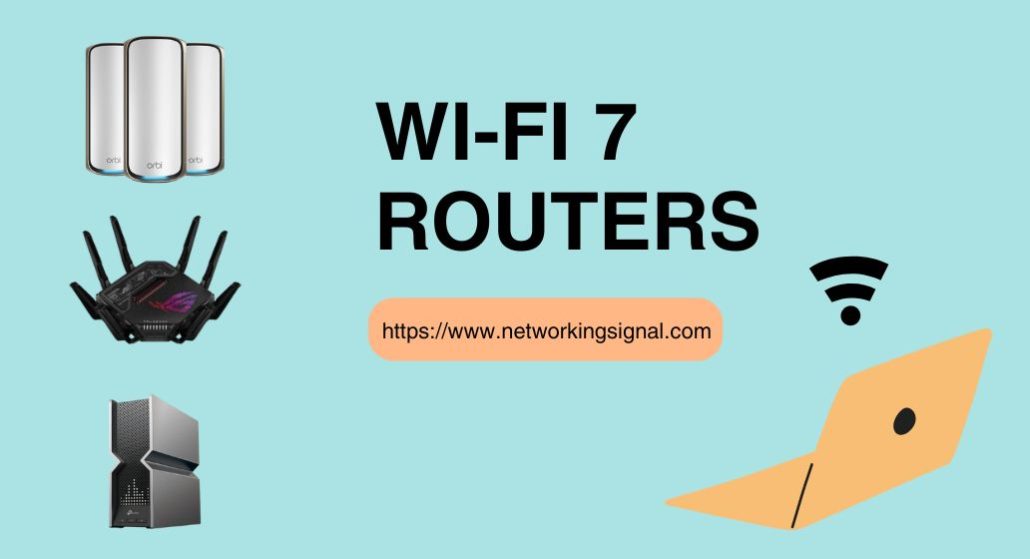
The TP-Link Archer BE550 ($199) is the best WiFi 7 router for most homes in 2026, tri-band BE9300 speeds, five 2.5 Gbps ports, and no subscription for its security features. If you only want to spend around a hundred dollars, the Archer BE230 ($89) is the cheapest genuinely useful WiFi 7 router you can buy. For a house that needs whole-home coverage, the Deco 7 Pro BE10000 three-pack covers 7,600 sq ft.
WiFi 7’s real-world benefit in 2026 is not raw speed, it is Multi-Link Operation, which keeps a device on two bands at once so latency stays flat when the network is busy.
| Product | Router | Class | Fast ports | Coverage | Price |
|---|---|---|---|---|---|
 | TP-Link Archer BE550Best overall | Tri-band BE9300 | 5 × 2.5G | 2,000 sq ft | $199.99 |
 | TP-Link Archer BE230Budget pick | Dual-band BE3600 | 2 × 2.5G | 2,000 sq ft | $89.99 |
 | ASUS RT-BE86UBest for gaming | Dual-band 6.8 Gbps | 10G + 2.5G | Large home | $199.00 |
 | TP-Link Archer BE600Best value | Tri-band BE9700 | 10G + 4 × 2.5G | 2,600 sq ft | $189.99 |
 | ASUS RT-BE88UPremium pick | Dual-band 7.2 Gbps | 10G + 10G SFP+ | Large home | $299.99 |
 | TP-Link Deco 7 Pro BE63Best mesh | Tri-band BE10000 | 10G + 4 × 2.5G | 7,600 sq ft | $399.98 |
 | NETGEAR Nighthawk RS90Simplest upgrade | Dual-band BE3600 | 2.5G WAN | 2,000 sq ft | $129.00 |
 | ASUS RT-BE58UBest for VPN | Dual-band BE3600 | 2.5G dual-WAN | Mid-size home | $144.99 |
WiFi 7, the marketing name for the 802.11be standard, is usually sold on a headline number, and that number is the least useful thing about it. Nobody’s broadband plan delivers 9,700 Mbps, and no single client device will ever pull that from a router. The changes that matter show up somewhere else entirely.
Multi-Link Operation (MLO) is the important one. A WiFi 6 client picks one band and stays on it. A WiFi 7 client can hold a link on 5 GHz and 6 GHz simultaneously and move traffic across both. If one band gets congested, a neighbour’s network, a microwave, a burst of smart-home chatter, the connection does not stall while it renegotiates. It just keeps sending on the other link. In practice this is why WiFi 7 feels steadier rather than faster: the latency spikes that made video calls stutter on a busy network largely stop happening.
320 MHz channels double the widest channel available in WiFi 6E, but only on the 6 GHz band. That is a real speed increase, and it is also the reason tri-band routers cost more than dual-band ones, dual-band WiFi 7 has no 6 GHz radio at all, so it cannot use 320 MHz channels.
4096-QAM packs 20% more data into each transmission than WiFi 6’s 1024-QAM, but it needs an excellent signal to work. You will see the benefit in the same room as the router and essentially nowhere else.
The practical read: if your household runs a lot of devices at once, MLO is worth upgrading for. If you have a 300 Mbps plan and four devices, WiFi 7 will not make your internet faster, because your internet was never the bottleneck.
The BE550 is the router that made tri-band WiFi 7 sensible at a normal price, and eighteen months later nothing has displaced it. It runs 5,760 Mbps on 6 GHz, 2,880 Mbps on 5 GHz and 574 Mbps on 2.4 GHz, which means it has a real 6 GHz radio and can actually use 320 MHz channels, the thing most sub-$200 WiFi 7 routers quietly leave out.
The port layout is what pushes it past its rivals. Every one of its five Ethernet ports is 2.5 Gbps: one WAN and four LAN. Most competitors at this price give you one fast port and then three or four 1 Gbps ports, which is fine until you want to wire a NAS and a desktop and a mesh backhaul at the same time. Here you can wire all of them at 2.5 Gbps without thinking about which socket you are using.
Coverage is rated at 2,000 sq ft, which is honest rather than optimistic, it comfortably covers a two-bedroom apartment or a small single-storey house, and it starts to thin out through more than two brick walls. If your home is bigger than that, the BE550 supports EasyMesh, so a second EasyMesh unit or a range extender joins the same network rather than creating a second one.
HomeShield handles parental controls and IoT security without a mandatory subscription for the basics, which matters when the alternative brands increasingly gate similar features behind monthly fees.
Buy it if you want one router that covers a normal home properly and you would rather not think about your network again for five years.
Under $100 is where most “WiFi 7” routers turn into marketing, so it is worth being specific about what the BE230 does and does not give you. It is dual-band: 2,882 Mbps on 5 GHz and 688 Mbps on 2.4 GHz, with no 6 GHz radio. That means no 320 MHz channels and no 6 GHz MLO link.
What it does keep is the part that matters most day to day. Multi-Link Operation still works across 2.4 and 5 GHz, 4K-QAM is there, and Multi-RU improves how the router allocates airtime when a dozen devices are talking at once. On a 500 Mbps or 1 Gbps plan you will not notice the missing 6 GHz band, because your connection runs out of headroom long before the radio does.
The port selection is unusually generous for the money: a 2.5 Gbps WAN/LAN port, a second 2.5 Gbps LAN port, and three gigabit LAN ports. Plenty of $150 routers give you one 2.5G port and call it multi-gig ready.
The 2.0 GHz quad-core processor is the reason it holds up with 40 or 50 connected devices rather than falling over at 20, a common failure point in cheap routers that has nothing to do with wireless standards at all.
Buy it if you want WiFi 7 on a normal broadband plan without paying tri-band prices for a band you would rarely use.
ASUS made an unusual choice here: skip the 6 GHz radio, spend the money on the processor and the wired side instead. For gaming that trade is the right way round. A 2.6 GHz quad-core CPU is what keeps QoS, adaptive routing and the firewall running without adding latency of their own, and that is the latency you actually feel, not the theoretical airtime of a band your console does not support.
The 10 Gbps WAN/LAN port is the headline. Combined with the 2.5 Gbps port it gives you up to 20 Gbps of wired capacity, so a wired PC and a NAS never compete with each other. If your console is wired, and for competitive play it should be, the RT-BE86U treats it properly.
The software is the other reason to pick ASUS over TP-Link at this price. AiProtection Pro is included with no subscription, the VPN client and server support is genuinely comprehensive rather than tokenistic, and Guest Network Pro lets you run up to five SSIDs so IoT devices sit on their own segment away from your gaming traffic. Merlin firmware is also an option if you want to go further.
Dual-band means throughput on 5 GHz tops out at 6,800 Mbps across both bands rather than the 9,700 a tri-band router advertises. In a house with WiFi 6 phones and a wired console, that difference is invisible.
Buy it if you wire your gaming PC or console and want the router’s own processing to stay out of the way.
The BE600 is the awkward one to write about, because on paper it beats the BE550 and costs ten dollars less. Tri-band BE9700, 5,765 Mbps on 6 GHz, 2,882 on 5 GHz, 1,032 on 2.4 GHz, plus a 10 Gbps WAN/LAN port, a 2.5 Gbps WAN/LAN port and three more 2.5 Gbps LAN ports. That is a genuinely better spec sheet at a slightly lower price.
The reason it is listed as best value rather than best overall is that it is newer, so the firmware has had less time to settle and there is less accumulated user experience to draw on. TP-Link’s release firmware is usually fine and improves quickly, but the BE550 has two years of updates behind it and a well-documented track record. If you are comfortable being on a slightly newer platform, the BE600 is the better buy.
Coverage is rated at 2,600 sq ft for up to 120 devices, using six antennas with beamforming. That is a meaningful step up from the BE550’s 2,000 sq ft, and it is the difference between covering a two-storey house from a central position and needing a second node.
The 10 Gbps port is the real argument for it. Multi-gig fibre above 2.5 Gbps is arriving in more markets every year, and this is the cheapest tri-band WiFi 7 router that will not cap it.
Buy it if you want the most specification per dollar and multi-gig fibre is either already there or coming.
This is a router bought for its Ethernet, not its WiFi. It carries one 10 Gbps SFP+ cage and one standard 10 Gbps WAN/LAN port, plus a bank of 2.5 Gbps ports, for around 34 Gbps of aggregate wired capacity. If you run a home lab, a 10 GbE NAS, or a fibre handoff that terminates in SFP+ rather than RJ45, nothing else on this list will connect to it directly.
The SFP+ port deserves specific mention because it solves a real problem. Several fibre providers hand off on optical, and the usual answer is a media converter sitting between the ONT and the router, one more device, one more power brick, one more thing to fail. The RT-BE88U takes the module directly.
Wireless is dual-band, up to 7,200 Mbps, with no 6 GHz radio. For the intended buyer that is consistent rather than disappointing: this router lives at the centre of a wired network, and the wireless is for phones and laptops rather than for pushing multi-gig throughput over the air.
Software is full ASUS: AiProtection Pro from Trend Micro with no subscription, site-to-site VPN, Guest Network Pro with five SSIDs, and 4G/5G tethering over USB as a WAN failover. The 2.6 GHz quad-core CPU has the headroom to run all of it at once.
Buy it if your wired network is the point, 10 GbE NAS, home lab, or an SFP+ fibre handoff.
A single router cannot cover a large or awkwardly shaped house, and no amount of specification changes that, radio waves do not go through two brick walls and a staircase because the box says BE10000. The Deco 7 Pro is the answer when the problem is geometry rather than throughput.
The three-pack covers up to 7,600 sq ft and handles more than 200 devices. Each unit is tri-band, 5,188 Mbps on 6 GHz, 4,324 on 5 GHz, 574 on 2.4 GHz, which is what makes the backhaul work. With three bands the system can dedicate one to node-to-node traffic instead of stealing airtime from your devices, and that is the difference between a mesh that halves your speed at the far node and one that does not.
Each unit has four 2.5 Gbps WAN/LAN ports and the main unit adds a 10 Gbps port. That port count is unusual for mesh hardware, where two ports per node is standard, and it means a satellite node can also serve as a wired switch for a TV, a console and a desk without adding another box.
If your house has Ethernet in the walls, wire the backhaul. Wired backhaul turns a good mesh into a genuinely excellent one, and the Deco will use it automatically alongside the wireless link rather than choosing one or the other.
Buy it if your problem is dead zones rather than speed, a big house, a multi-storey layout, or thick walls.
The RS90 exists for people who want to replace an ISP box, not administer a network. NETGEAR’s setup flow through the Nighthawk app is the most forgiving of any brand here, it detects the connection, walks you through bridge mode if your gateway needs it, and gets you online without ever showing you a settings page.
Specification is modest and honestly stated: dual-band BE3600 across 2.4 and 5 GHz, up to 3.6 Gbps combined, 2,000 sq ft, up to 50 devices. NETGEAR quotes it as roughly 1.2× the throughput of comparable WiFi 6 hardware, which is a realistic claim rather than a marketing one. MU-MIMO and OFDMA are both present, so multiple devices transmit concurrently rather than queueing.
The 2.5 Gbps WAN port plus four gigabit LAN ports is the right layout for its buyer: enough to accept a multi-gig plan, enough wired sockets for a TV, a console and a printer, and no ports you will never use.
The caveat is NETGEAR’s subscription model. Armor security and advanced parental controls are paid add-ons here, where ASUS and TP-Link include comparable features. If you want those, factor the annual cost into the price, it changes the comparison against the Archer BE230 considerably.
Buy it if you want to swap out an ISP router in ten minutes and never open a settings page.
If you want VPN handled at the router rather than on every device individually, the RT-BE58U is the cheapest sensible way to do it. It runs as both a VPN client and a VPN server, supports WireGuard alongside OpenVPN, and, the part that actually matters, lets you route specific devices through the tunnel while everything else goes direct. Routing your whole household through a VPN is rarely what anyone wants; routing one laptop and leaving the streaming boxes alone usually is.
Dual-WAN is the second reason to pick it. You can run a primary broadband connection with a 4G or 5G phone tethered over USB as automatic failover, and the router switches over when the main line drops. For anyone working from home on an unreliable connection, that is worth more than an extra thousand megabits of theoretical throughput.
Wireless is dual-band BE3600, so 3,600 Mbps combined with MLO across 2.4 and 5 GHz and no 6 GHz radio. Smart Home Master gives three SSIDs, which is enough to separate IoT devices, guests and your own traffic.
AiProtection Pro is included, and AiMesh means you can pair it with any other ASUS router later rather than being locked into a matched set.
Buy it if you want router-level VPN and a failover connection without stepping up to prosumer hardware.
Start with your internet plan, not the router. If you pay for 500 Mbps, every router on this list exceeds what your line can deliver. Spending more buys you better handling of many simultaneous devices, not a faster connection. Check your plan first, it is the ceiling, and no router raises it.
Decide whether you need 6 GHz. Tri-band routers have a 6 GHz radio; dual-band ones do not. The 6 GHz band is fast and clean but short-range, it barely survives one wall. It is genuinely useful for a VR headset or a laptop in the same room as the router, and as dedicated mesh backhaul. If neither applies to you, dual-band saves real money.
Count your fast Ethernet ports honestly. “Multi-gig” on the box often means exactly one 2.5 Gbps port. If you want to wire a NAS, a desktop and a mesh node, you need three, and the difference between one fast port and five is the main thing separating the $90 and $200 routers here.
Check what the security costs. ASUS includes AiProtection Pro outright. TP-Link includes HomeShield basics and charges for the advanced tier. NETGEAR charges for Armor annually. Over five years a subscription can cost more than the router did.
Be realistic about coverage numbers. Manufacturer square-footage figures assume open space. Drywall costs you a little, brick and concrete cost you a lot, and foil-backed insulation is close to a wall of metal. If your home is over roughly 2,500 sq ft or has more than one floor, plan on mesh rather than hoping a single router reaches. Our guide to mesh WiFi for thick walls goes into the specifics.
Honestly, many people do not, and it is worth saying so plainly before you spend two hundred dollars.
Upgrade now if your household regularly has 30 or more connected devices, if you pay for more than 1 Gbps, if you already own WiFi 7 client devices such as a recent flagship phone or laptop, or if your current router is WiFi 5 or older. In those cases the improvement is immediate and obvious.
Wait if you have a solid WiFi 6 router, a plan under 500 Mbps and a handful of devices. WiFi 7 will not make that setup faster, because the router was not what was limiting it. The money is better spent on a second mesh node or on running an Ethernet cable to wherever your problem actually is.
One thing worth knowing: WiFi 7 routers are fully backward compatible. Every WiFi 6, 5 and 4 device you own will connect normally. Buying WiFi 7 early costs you nothing in compatibility, it just means you are paying now for capability you will use later.
For a busy network, yes, mainly because of Multi-Link Operation, which WiFi 6E does not have. MLO lets a device hold links on two bands simultaneously, so congestion on one band no longer causes a stall. If you have few devices and a moderate plan, the difference between WiFi 7 and WiFi 6E is small enough that it is not worth replacing working hardware.
Partly. Features like MLO and 320 MHz channels require both ends to support WiFi 7. But older devices still benefit indirectly: a WiFi 7 router has more capacity and a faster processor, so it handles a crowded network better even when every client is WiFi 6.
Tri-band adds a 6 GHz radio on top of 2.4 and 5 GHz. Only the 6 GHz band supports 320 MHz channels, so dual-band WiFi 7 routers cannot reach the highest advertised speeds. The 6 GHz band has very short range, which is why it is most valuable for same-room devices and for mesh backhaul.
Around $90 gets you working dual-band WiFi 7 with MLO. Around $200 gets tri-band with a full set of 2.5 Gbps ports, which is the sweet spot for most homes. Above $300 you are paying for 10 GbE and SFP+ ports that only matter if you have equipment to plug into them.
Yes. WiFi 7 routers connect to any modem or ISP gateway over Ethernet, regardless of its age. If your ISP supplied a combined modem-router, you will usually need to put it into bridge mode so the two devices are not both routing. If your plan is faster than 1 Gbps, check that the modem itself has a 2.5 Gbps port, otherwise it becomes the bottleneck.
Over wireless, yes, MLO reduces the latency spikes that happen when a band gets congested, which is the main cause of inconsistent ping on WiFi. It does not lower your baseline ping to a game server; that is determined by your ISP and the distance to the server. A wired connection still beats any wireless standard for competitive play.
The TP-Link Archer BE550 at $199 remains the right default: real tri-band, five 2.5 Gbps ports, mature firmware, and no subscription for the security basics. The Archer BE600 beats it on paper for less money and is the better buy if you want a 10 Gbps port and are comfortable on a newer platform.
At the low end, the Archer BE230 at $89 is the honest budget answer, dual-band, but with MLO intact and two 2.5 Gbps ports, which is more than most routers twice its price offer. For a large house, the Deco 7 Pro three-pack solves a problem no single router can. And if your network is mostly wired, the ASUS RT-BE88U is the only one here with an SFP+ cage.
Disclosure: Networking Signal is a participant in the Amazon Services LLC Associates Program. We earn a commission on qualifying purchases made through links on this page, at no additional cost to you. Prices shown were accurate at the time of writing and may change. Product selections are based on published specifications and independent testing reports, we are not paid to feature specific brands.
Hand-picked articles you might also find useful.
 Routers
 What is RAM? RAM (Random Access Memory) is a type of volatile computer memory that stores data and…
![[Easy Way] How to Reset Your Xfinity Router?](https://www.networkingsignal.com/wp-content/uploads/2026/09/auto/art-how-to-reset-your-xfinity-router.svg) Routers
Routers Resetting your Xfinity router is a simple process that can solve a lot of internet connectivity issues you…
 Routers
 Do you need a reliable internet connection for your business? Then multi-gig routers could be the answer. In…