
What is Network Administrator and Its Skills, and Role
What is Network Administrator? A Network Administrator is a professional responsible for the maintenance, configuration, and reliable operation…
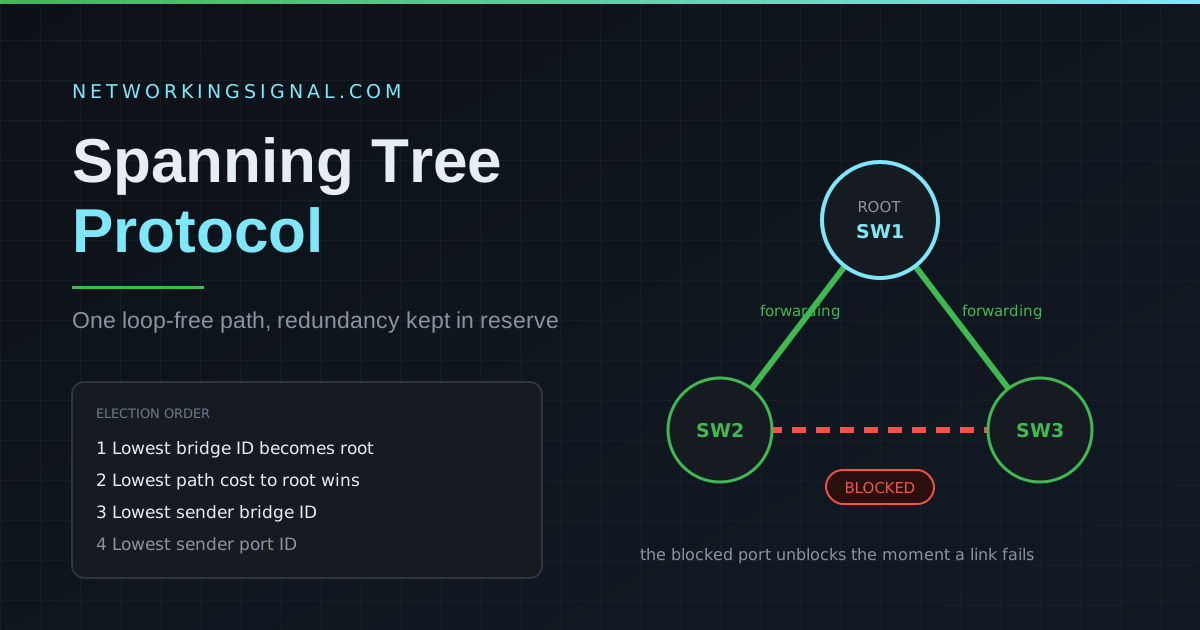
STP (Spanning Tree Protocol), defined in IEEE 802.1D, is a Layer 2 network protocol that prevents switching loops in Ethernet networks with redundant paths. Without STP, a broadcast storm would occur, frames would loop endlessly through redundant switch paths, consuming all available bandwidth and bringing the network down within seconds.
STP works by electing a root bridge and then logically blocking redundant paths, keeping exactly one active path between any two network segments. If the active path fails, STP unblocks a previously blocked port to restore connectivity, automatically and without manual intervention.
In enterprise networks, redundant switch connections are deliberately designed for fault tolerance. But redundancy without STP creates three dangerous problems:
All switches in a STP domain elect a single Root Bridge, the central reference point for the entire topology. The election process:
To control which switch becomes the root bridge, lower its priority: spanning-tree vlan 1 priority 4096
Every non-root switch selects one Root Port (RP), the port with the best path to the root bridge. Path cost is determined by link speed:
| Link Speed | STP Cost (802.1D) | RSTP Cost (802.1w) |
|---|---|---|
| 10 Mbps | 100 | 2,000,000 |
| 100 Mbps | 19 | 200,000 |
| 1 Gbps | 4 | 20,000 |
| 10 Gbps | 2 | 2,000 |
On each network segment, one port is elected as the Designated Port (DP), the port that forwards traffic on that segment. The root bridge’s ports are always designated ports.
Any port that is neither a Root Port nor a Designated Port becomes an Alternate Port and is placed in Blocking state, it does not forward traffic but continues to listen for BPDUs.
| State | Duration | Forwards Data? | Learns MACs? | Sends BPDUs? |
|---|---|---|---|---|
| Blocking | 20 sec (Max Age) | No | No | No |
| Listening | 15 sec (Forward Delay) | No | No | Yes |
| Learning | 15 sec (Forward Delay) | No | Yes | Yes |
| Forwarding | Indefinite | Yes | Yes | Yes |
| Disabled | N/A | No | No | No |
Total STP convergence time = 30 to 50 seconds (blocking → listening → learning → forwarding). This is why RSTP was developed.
RSTP (Rapid Spanning Tree Protocol), defined in IEEE 802.1w, dramatically improves convergence time from 30 to 50 seconds to 1 to 2 seconds. RSTP is backward compatible with STP and is the recommended standard today.
| Feature | STP (802.1D) | RSTP (802.1w) |
|---|---|---|
| Standard | IEEE 802.1D | IEEE 802.1w |
| Convergence Time | 30 to 50 seconds | 1 to 2 seconds |
| Port States | 5 states | 3 states (Discarding, Learning, Forwarding) |
| Port Roles | Root, Designated, Blocked | Root, Designated, Alternate, Backup |
| BPDU Handling | Only root bridge generates BPDUs | All switches generate BPDUs |
| Topology Changes | Slow propagation | Rapid propagation |
MSTP (IEEE 802.1s) allows multiple VLANs to be mapped to a single STP instance, reducing the number of spanning tree instances running on a network. This improves load balancing and reduces CPU overhead compared to PVST+ (Per-VLAN Spanning Tree Plus) which runs a separate STP instance per VLAN.
Switch(config)# spanning-tree mode rapid-pvstSwitch(config)# spanning-tree vlan 10 priority 4096
Switch(config)# spanning-tree vlan 10 root primarySwitch(config-if)# spanning-tree portfast
Switch(config)# spanning-tree portfast defaultSwitch(config-if)# spanning-tree bpduguard enable
Switch(config)# spanning-tree portfast bpduguard defaultSwitch# show spanning-tree
Switch# show spanning-tree vlan 10
Switch# show spanning-tree summary| Issue | Symptom | Solution |
|---|---|---|
| Unintended root bridge | Wrong switch is root, slow performance | Set correct root bridge priority |
| Slow convergence | 30 to 50 sec network outage on topology change | Migrate to RSTP / enable PortFast on access ports |
| Broadcast storm | High CPU, network unusable | Check for STP disabled or misconfigured |
| Topology change loop | Repeated MAC table flushes | Enable BPDU Guard and Root Guard |
STP (802.1D) takes 30 to 50 seconds to converge after a topology change. RSTP (802.1w) converges in 1 to 2 seconds. RSTP also adds new port roles (Alternate, Backup) and all switches generate BPDUs, making it more proactive.
A BPDU (Bridge Protocol Data Unit) is the message switches exchange to elect the root bridge and determine the STP topology. BPDUs contain the Bridge ID, root bridge information, and path cost values.
Always use Rapid PVST+ (or MSTP) in modern networks. The original STP (PVST+) is outdated, its 30 to 50 second convergence time is unacceptable for production networks.
PortFast allows a switch port to immediately enter the Forwarding state, bypassing the Listening and Learning states. Use it only on access ports connected to end devices (PCs, printers), never on trunk ports or ports connected to other switches.
Related: What is a Switch in Networking? | What is a VLAN? | VTP, VLAN Trunking Protocol | VLAN vs Subnet
Hand-picked articles you might also find useful.
 Routing & Switching
 What is Network Administrator? A Network Administrator is a professional responsible for the maintenance, configuration, and reliable operation…
 Routing & Switching
 What is Patch Panel? A patch panel is a component of structured cabling that facilitates the connection, organization,…
 Routing & Switching
 What a server rack is, what 1U and 19 inch actually mean, and the depth mistake that catches…