
How to Convert an IP Address from Decimal to Binary
Two reliable methods for converting IP octets to binary, a lookup table for the eight bit values, worked…
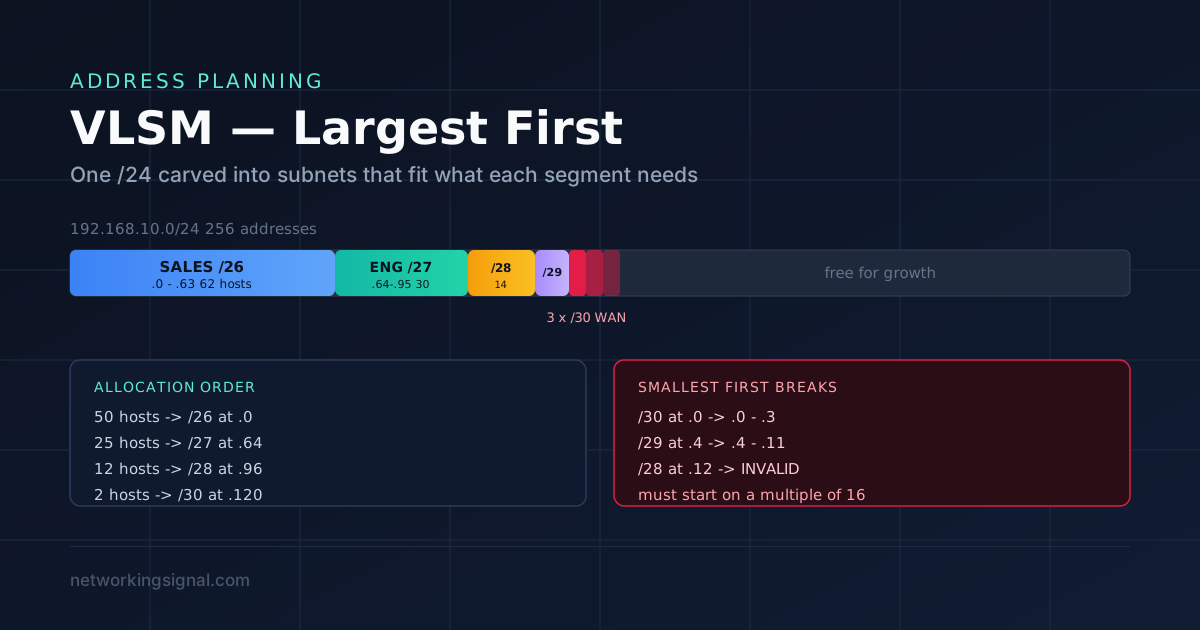
VLSM (Variable Length Subnet Masking) means using different subnet mask lengths within the same network, so each segment gets only as many addresses as it actually needs.
Without VLSM every subnet must be the same size, sized for the largest segment. If your biggest LAN needs 50 hosts you would use /26 everywhere, including on point-to-point WAN links that need exactly 2 addresses. Each of those links would then waste 60 addresses.
Take 192.168.10.0/24 serving four LANs (50, 25, 12 and 5 hosts) plus three WAN links of 2 hosts each.
| Fixed-length (/26 everywhere) | VLSM | |
|---|---|---|
| Subnets available | 4 | As many as needed |
| Segments to serve | 7 | 7 |
| Result | Fails, runs out after 4 | Fits with room spare |
| Addresses wasted on WAN links | 180 | 0 |
Fixed-length subnetting cannot even complete this design. That is the practical case for VLSM.
This is the whole method, and getting it wrong is why people produce overlapping subnets.
Why largest first? A large block must start on a boundary that is a multiple of its own size. If you place small subnets first, you fragment the space and the large block no longer has a valid aligned position, even when the raw address count would fit.
Requirements:
| Segment | Hosts needed | Prefix required | Gives |
|---|---|---|---|
| Sales | 50 | /26 | 62 |
| Engineering | 25 | /27 | 30 |
| Support | 12 | /28 | 14 |
| Management | 5 | /29 | 6 |
| WAN link 1 | 2 | /30 | 2 |
| WAN link 2 | 2 | /30 | 2 |
| WAN link 3 | 2 | /30 | 2 |
Already sorted largest to smallest. Now allocate:
| Segment | Network | Mask | Usable range | Broadcast |
|---|---|---|---|---|
| Sales | 192.168.10.0/26 | 255.255.255.192 | .1 to .62 | .63 |
| Engineering | 192.168.10.64/27 | 255.255.255.224 | .65 to .94 | .95 |
| Support | 192.168.10.96/28 | 255.255.255.240 | .97 to .110 | .111 |
| Management | 192.168.10.112/29 | 255.255.255.248 | .113 to .118 | .119 |
| WAN link 1 | 192.168.10.120/30 | 255.255.255.252 | .121 to .122 | .123 |
| WAN link 2 | 192.168.10.124/30 | 255.255.255.252 | .125 to .126 | .127 |
| WAN link 3 | 192.168.10.128/30 | 255.255.255.252 | .129 to .130 | .131 |
Seven segments placed, and 192.168.10.132 through .255, 124 addresses, remains free for growth. Fixed-length subnetting could not have fitted this at all.
Sales /26:       block 64  ->  0 to 63,   next free = 64
Engineering /27: block 32  ->  64 to 95,  next free = 96
Support /28:     block 16  ->  96 to 111, next free = 112
Management /29:  block 8   ->  112 to 119, next free = 120
WAN 1 /30:       block 4   ->  120 to 123, next free = 124
WAN 2 /30:       block 4   ->  124 to 127, next free = 128
WAN 3 /30:       block 4   ->  128 to 131, next free = 132
Each subnet begins exactly where the previous broadcast ended, plus 1, and each start address is a multiple of its own block size. That second property is what makes the allocation valid.
| Site | Hosts | Prefix | Network | Range |
|---|---|---|---|---|
| HQ | 4,000 | /20 | 172.16.0.0/20 | 172.16.0.1 to 172.16.15.254 |
| Branch A | 900 | /22 | 172.16.16.0/22 | 172.16.16.1 to 172.16.19.254 |
| Branch B | 400 | /23 | 172.16.20.0/23 | 172.16.20.1 to 172.16.21.254 |
| Branch C | 200 | /24 | 172.16.22.0/24 | 172.16.22.1 to 172.16.22.254 |
| DMZ | 60 | /26 | 172.16.23.0/26 | 172.16.23.1 to 172.16.23.62 |
| WAN links ×4 | 2 each | /30 | 172.16.23.64/30 … | 172.16.23.65 to .78 |
The whole design consumes just over 23 of the 256 available /24s, leaving 172.16.24.0 onward for expansion.
This is the mistake that causes real outages. Suppose you allocate small first:
WAN link:    192.168.10.0/30    -> 0 to 3
Management:  192.168.10.4/29    -> 4 to 11
Support:     192.168.10.12/28   -> INVALID
A /28 has block size 16, so it must start on a multiple of 16, .0, .16, .32 and so on. It cannot start at .12. You would have to skip forward to .16, wasting .12 to .15, and every subsequent allocation inherits the fragmentation.
Allocating largest first makes each boundary fall naturally, because every block size is a multiple of the ones that come after it.
If you do configure overlapping subnets, say 192.168.10.0/25 and 192.168.10.64/26, routers apply longest prefix match, so the /26 silently wins for addresses in its range. Some hosts become unreachable, others work, and the routing table looks correct at a glance. It is a genuinely unpleasant fault to trace.
VLSM only works if your routing protocol carries the subnet mask in its updates, that is, if it is classless.
| Protocol | Classless? | Supports VLSM |
|---|---|---|
| RIPv1 | No | No |
| IGRP | No | No |
| RIPv2 | Yes | Yes |
| EIGRP | Yes | Yes |
| OSPF | Yes | Yes |
| IS-IS | Yes | Yes |
| BGP | Yes | Yes |
Everything in current use is classless, so this is mainly an exam point. One live gotcha remains: auto-summary. If EIGRP or RIPv2 has auto-summary enabled, it summarises to classful boundaries at major network borders and breaks discontiguous VLSM designs.
Router(config-router)# no auto-summary| VLSM | CIDR / Supernetting | |
|---|---|---|
| Direction | Divides a network into smaller pieces | Combines networks into a larger block |
| Prefix moves | Longer (/24 → /26, /30) | Shorter (four /24s → one /22) |
| Purpose | Efficient address use inside your network | Smaller routing tables between networks |
| Where used | Enterprise LAN design | Internet routing, route summarisation |
They are complementary: VLSM to allocate efficiently downward, summarisation to advertise efficiently upward. A well-designed network does both, which is only possible if addresses are assigned contiguously per site.
no auto-summaryCheck your allocations with the subnet calculator, and if the block-size arithmetic is not yet automatic, work through subnetting explained and the practice questions first.
Using different subnet mask lengths inside one network so each segment gets only the addresses it needs, a /30 for a WAN link, a /26 for a 50-host LAN, instead of forcing every subnet to the same size.
Because a subnet must start on an address that is a multiple of its block size. Placing small subnets first fragments the space so the large block no longer has a valid aligned starting point, even when enough raw addresses remain.
Subnetting divides a network into equal-sized pieces. VLSM is subnetting a subnet, applying the process repeatedly with different mask lengths, so the pieces can differ in size.
No. RIPv1 and IGRP are classful and do not carry the subnet mask in their updates, so they cannot support VLSM. RIPv2, EIGRP, OSPF, IS-IS and BGP all can.
VLSM divides a network into progressively smaller subnets. CIDR (supernetting) combines networks into a larger block with a shorter prefix, to reduce routing table size. Opposite directions, complementary purposes.
List every subnet with its network and broadcast address, sort by network address, and confirm each network address is greater than the previous broadcast. Any subnet not starting on a multiple of its block size is invalid.
Hand-picked articles you might also find useful.
 IPv4
IPv4 Two reliable methods for converting IP octets to binary, a lookup table for the eight bit values, worked…
 DHCP
DHCP A 169.254.x.x address means DHCP failed and Windows self-assigned an APIPA address. Here is how APIPA works, what…
 IPv4
IPv4 The Internet Protocol header is the initial portion of an IP packet that contains information about the packet's…