
How to run Ethernet Cable Through Walls?
How to run Ethernet Cable Through Walls ? If you're looking to add an Ethernet connection to your…
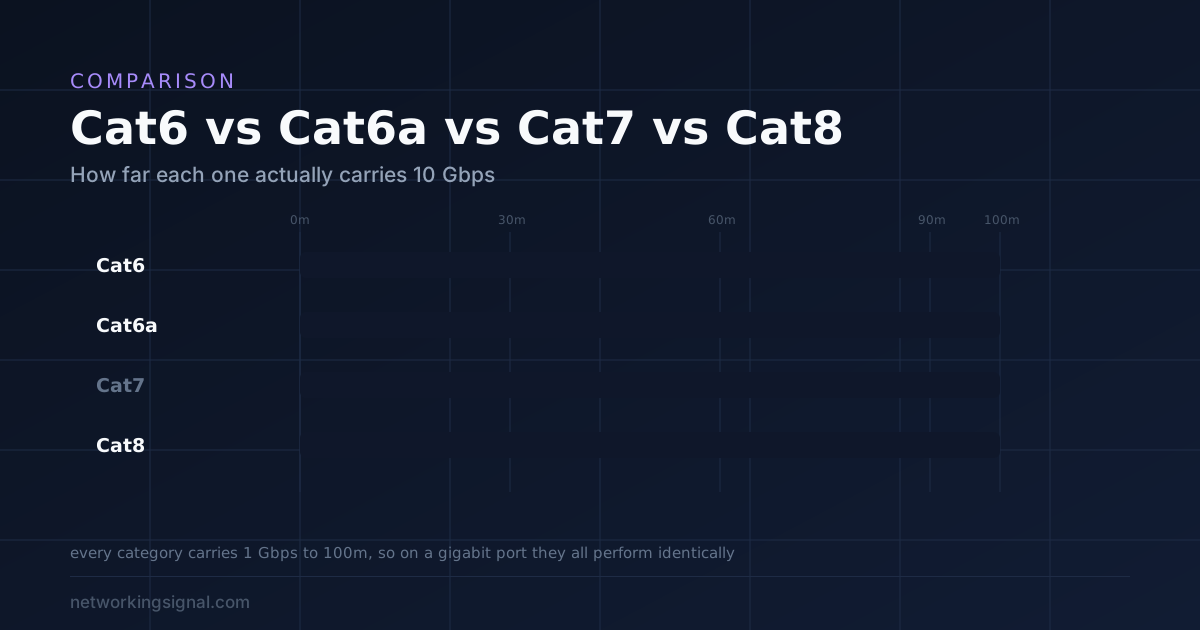
Buy Cat6. It carries 1 Gbps to the full 100 metres and 10 Gbps to 55 metres, which covers every run in a house and almost every run in an office. From $8.49.
Buy Cat6a only if you need 10 Gbps over more than 55 metres, or the cable runs alongside heavy electrical equipment where shielding helps.
Do not buy Cat7. Cat7 is an ISO standard that specifies GG45 or TERA connectors, not RJ45. The TIA, which defines Ethernet cabling in North America, has never recognised it. Anything sold as “Cat7 with RJ45 ends” is not Cat7 to specification.
Cat8 is a data centre cable. It reaches 40 Gbps but only to 30 metres, and it exists for short switch to server runs in a rack. In a home it changes nothing.
The rule that settles it: a cable cannot make a link faster than the slowest port at either end. If your router has gigabit ports, Cat5e already saturates them and Cat8 will not add a single megabit.
| Category | Bandwidth | Max speed | At that speed | Connector | Buy it when |
|---|---|---|---|---|---|
| Cat5e | 100 MHz | 1 Gbps | 100 m | RJ45 | Never, Cat6 costs the same |
| Cat6Right for almost everyone | 250 MHz | 10 Gbps | 55 m | RJ45 | Any home or office run |
| Cat6aFor long 10G runs | 500 MHz | 10 Gbps | 100 m | RJ45 | 10G over 55 m, or heavy EMI |
| Cat7Not a TIA standard | 600 MHz | 10 Gbps | 100 m | GG45 or TERA | Skip it entirely |
| Cat8Data centre only | 2000 MHz | 40 Gbps | 30 m | RJ45 | Rack to server, 25G or 40G |
A network link runs at the speed of the slowest component in it. That is the cable, the port on the router or switch, and the port on the device.
Almost every home router has gigabit ports. A gigabit port moves 1 Gbps and nothing more, no matter what you plug into it. Cat5e handles 1 Gbps comfortably. So does Cat6, Cat6a and Cat8.
Buying Cat8 for a gigabit port is like fitting a wider fuel line to a car with a fixed throttle. The restriction is elsewhere. If you are deciding what those ports should be in the first place, our comparison of 2.5GbE against 10GbE covers which speed is actually worth the cable.
The cable only becomes the limit when both ends are faster than the cable, and that means 2.5 Gbps, 5 Gbps or 10 Gbps ports at each end. That is real, and it is increasingly common with multi gig routers and network storage, but it is not what most people have.
Check your ports before you spend anything. If the router says 10/100/1000, you have gigabit, and every category from Cat5e upward delivers the same result.
Cat6 runs at 250 MHz and carries 1 Gbps to the full 100 metre limit.
Its 10 Gbps figure comes with the caveat that matters: 10 Gbps only to 55 metres, and as little as 37 metres in bundles where cables interfere with each other, which is called alien crosstalk.
For a house that is irrelevant, because no domestic run approaches 55 metres. From a router to the far corner of a large home is typically 20 to 30 metres including the vertical drops.
So in a home, Cat6 is a 10 Gbps cable in every practical sense, and it costs a dollar or two more than Cat5e.
That is the whole argument. It is cheap, it is thin and flexible enough to pull easily, and it will not be the limiting factor in any house for the life of the building.
Cat6a doubles the bandwidth to 500 MHz and carries 10 Gbps to the full 100 metres. It achieves that with tighter twists, thicker insulation and usually a shield.
Two situations justify it.
Long 10 Gbps runs. An office backbone between floors, or a run from a comms room to a distant workstation, where the distance exceeds 55 metres and you genuinely need 10 Gbps.
Electrical interference. Shielded Cat6a resists electromagnetic interference from motors, fluorescent lighting, lift machinery and mains cable running in parallel. In a workshop, a plant room or an industrial setting this is a real benefit.
A warning about shielding that catches people out. A shield only works if it is properly earthed at one end, through shielded connectors and a shielded patch panel or switch port. An ungrounded shield can behave like an antenna and pick up more interference than an unshielded cable would. If you are not terminating with shielded hardware, plain unshielded Cat6 is the better choice.
The practical costs of Cat6a are thickness and stiffness. It is harder to pull through conduit and has a larger bend radius, which matters in a full cable tray or behind a wall plate.
This is the part most buying guides get wrong.
Cat7 is an ISO/IEC standard, not a TIA one. The TIA defines structured cabling in North America and has never recognised Cat7 as a category. It went from Cat6a to Cat8.
More importantly, the Cat7 specification requires GG45 or TERA connectors. Those are physically different from RJ45. A true Cat7 channel does not terminate in the socket on the back of your router.
So when a listing offers “Cat7 cable with RJ45 connectors”, it is describing a cable that may have Cat7 grade conductors and shielding, terminated in a connector the standard does not permit. The result is not a Cat7 channel. It is, at best, a well built Cat6a cable with a different label.
Those cables usually work fine. The point is that the label buys you nothing. If you want performance above Cat6, buy Cat6a, which is a recognised standard with defined RJ45 performance and testable results.
The same reasoning applies to “Cat7a” and “Cat6e”. Cat6e is not a standard at all; it is a marketing term with no defined specification behind it.
Cat8 is a real, recognised TIA standard, and it is not a home product.
It runs at 2000 MHz and supports 25GBASE-T and 40GBASE-T. The specification limits it to a 30 metre channel with two connectors, which is far shorter than every other category here.
That distance limit is not a flaw. It is the design intent. Cat8 exists for top of rack, middle of row and end of row runs in a data centre, connecting switches to servers a few metres apart at 25 or 40 Gbps.
It is heavily shielded, thick and stiff, which makes it awkward to route in a house and easy to damage by over bending.
For a console or a gaming PC on a gigabit connection, it delivers exactly the same result as a $9 Cat6 cable. Our guides to the best Ethernet cables for PS5 and the best Ethernet cables for Xbox Series X go into the console side of this in detail.
One legitimate niche: Cat8’s heavy shielding and thick conductors handle PoE heat well in dense bundles. That is a data centre concern rather than a home one.
Some cheap cables use copper clad aluminium, abbreviated CCA: an aluminium core with a thin copper coating. It is cheaper and it is worse in three ways.
Aluminium has higher electrical resistance than copper, so signals attenuate faster over distance. It is more brittle, so it breaks when bent or when a connector is crimped. And it is not permitted under TIA specifications, which assume solid copper conductors.
The resistance problem becomes serious with Power over Ethernet. Higher resistance means more heat and more voltage drop, so a camera or access point at the end of a long CCA run may not receive enough power.
Look for “bare copper” or “100 percent copper” in the listing. If it says CCA, or says nothing at all about the conductor, choose another cable.
AWG measures conductor thickness, and lower numbers are thicker.
23 AWG is standard for solid in wall cable. Thicker, lower resistance, better for long runs and for PoE.
26 to 28 AWG is used for slim flexible patch cables. Convenient in a crowded rack, and it has meaningfully higher resistance.
For short patch leads that is fine. For a long run powering a device, thickness matters: thin conductors run hotter under PoE load and drop more voltage along the way. If you are wiring cameras or access points, as in our office network guide, use 23 AWG solid copper for the permanent runs.

Eleven dollars for fifty feet of plain, correctly specified Cat6. For connecting a television, console, desktop or printer, this is the whole answer.
The listing is honest in a way that is unusual in this category: it states 1,000 Mbps rather than claiming a 10 Gbps figure the connection will never reach. A gigabit port moves a gigabit, and that is what you get.
Gold plated RJ45 connectors resist corrosion, which matters on a cable that will sit behind furniture for a decade.
A standard round jacket rather than a flat one. Round cable holds its twisted pair geometry better, and that geometry is what rejects interference. Flat cables flatten the pairs, which is a small compromise that rarely matters at home but is a real one.
Where this is enough: any run in a house, any device on a gigabit port, PoE for a camera or access point over a short distance, and 10 Gbps over anything under 55 metres.
Where it is not: 10 Gbps over more than 55 metres, or a run alongside heavy electrical equipment where you want a shield.
The Jadaol flat Cat6 at $8.49 is cheaper and includes 20 cable clips, which is genuinely useful for running along a skirting board. Note its listing mixes Cat6, Cat7 and Cat8 claims together, which is marketing noise rather than specification, and it uses thin 30 AWG conductors. Fine for a short patch lead, not ideal for a long PoE run.
Buy this for any normal home or office run. It is the correct default.
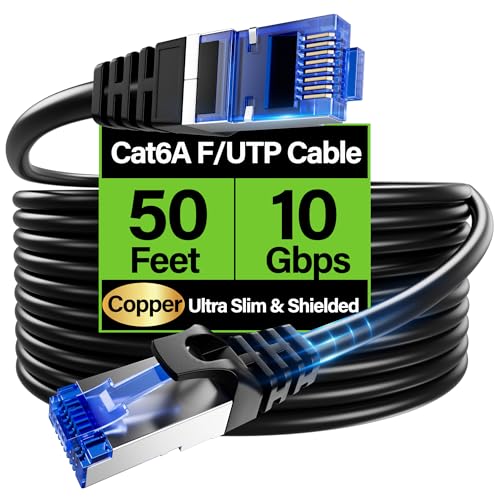
Sixteen dollars for shielded Cat6a. Buy it for one of two reasons, not because the number is higher.
F/UTP shielding means a foil screen around all four pairs. It rejects electromagnetic interference from mains cable, motors and lighting, which is why this belongs in a workshop, a plant room or a rack where cables run beside power.
Remember the earthing rule: a shield must be grounded at one end through shielded connectors and a shielded port. Terminated into unshielded hardware, the screen does nothing useful and can make things marginally worse.
Bare copper conductors, stated explicitly, which is the specification that matters most and one many cheap cables quietly omit.
It is 28 AWG and 4.5 mm in diameter, which TuokaJu markets as 40 percent thinner and 50 percent more bendable than standard Cat6a. That is a genuine convenience in a crowded rack or behind a wall plate, where standard Cat6a is stiff and awkward.
The trade is resistance. 28 AWG has higher resistance than 23 AWG, so for long PoE runs powering cameras or access points, a thicker solid core cable is the better choice despite being harder to route.
For permanent in wall installation at 10 Gbps, the Cable Matters 23 AWG bulk Cat6a at $279.99 for 1,000 ft is the correct product, terminated into keystone jacks or a patch panel rather than modular plugs.
Buy this for 10G over long distances or runs beside electrical equipment.

If you genuinely need Cat8, buy a certified one. Most Cat8 sold is not tested against the standard, and this is.
Certification matters more here than in any other category, because Cat8’s 2000 MHz performance depends on manufacturing precision that cheap production does not achieve. An uncertified Cat8 cable is a Cat6a cable with a bigger number printed on it.
S/FTP construction, meaning foil around each pair plus an overall braided screen, which is what 2 GHz operation requires.
Cable Matters is explicit about the purpose: top of row, middle of row and end of row data centre configurations, with optimal distance and power handling for 25 or 40 Gbps within a 30 metre two connection channel.
That sentence is the whole story. Thirty metres. Beyond it, Cat8 is not a 40 Gbps cable, and this listing is at the upper end of its own usable range at 50 feet.
It does have a genuine advantage for dense PoE: Cat8 supports up to 280 cables in a bundle against Cat6a’s 101, and withstands 75 degrees Celsius for 100W transmission. That is a real data centre benefit and irrelevant at home.
Do not buy this for a console, a PC or a home router. On a gigabit or even a 2.5 Gbps port it performs identically to a $9 Cat6 cable, while being thicker, stiffer and harder to route. The cheaper Cat8 options such as the Orbram 50 ft at $9.99 and UGREEN 15 ft at $15.99 exist, and the same reasoning applies: at home they are Cat6 with extra bulk.
Buy this only for 25G or 40G runs inside a rack, never for a home connection.
No. A cable cannot make a link faster than the slowest port at either end, and almost every home router has gigabit ports that Cat5e already saturates. Cat8 is designed for 25 and 40 Gbps runs inside a data centre rack, limited to 30 metres, and at home it performs identically to Cat6.
Not in any way that helps you. Cat7 is an ISO standard requiring GG45 or TERA connectors, and the TIA has never recognised it. Cables sold as Cat7 with RJ45 ends are not Cat7 to specification. If you need more than Cat6, buy Cat6a, which is a recognised standard with defined RJ45 performance.
Cat6 runs at 250 MHz and carries 10 Gbps to 55 metres. Cat6a doubles that to 500 MHz and carries 10 Gbps to the full 100 metres, usually with shielding. Cat6a is thicker and stiffer to install, and the difference only matters over long 10 Gbps runs or in high interference environments.
Only near sources of electrical interference such as motors, fluorescent lighting or mains cable running in parallel. A shield must be earthed at one end through shielded connectors and ports to work, and an ungrounded shield can act as an antenna and perform worse than unshielded cable.
Copper clad aluminium: an aluminium core with a thin copper coating. It has higher resistance so signals attenuate faster, it is brittle and breaks when crimped, and it is not permitted under TIA specifications. It is particularly bad for Power over Ethernet. Look for bare copper in the listing.
No, provided the current cable is working. Latency comes from physical distance to the game server and routing, not from cable category. Moving from WiFi to any wired cable does reduce jitter substantially, which is a real improvement, but Cat8 does not beat Cat6.
Buy Cat6. The Amazon Basics 50 ft at $10.99 covers every run in a house and almost every run in an office, carries 10 Gbps over any distance a building actually contains, and costs about what Cat5e does.
Buy Cat6a, such as the TuokaJu shielded at $15.99, for one of two reasons only: 10 Gbps beyond 55 metres, or a run alongside heavy electrical equipment. Terminate the shield into shielded hardware or leave it unshielded.
Skip Cat7 entirely; it is not an RJ45 standard. Buy Cat8 only for 25 or 40 Gbps runs inside a rack under 30 metres.
And check two things the category number does not tell you: bare copper rather than CCA, and 23 AWG for permanent runs carrying PoE. Those matter far more than moving up a category.
Disclosure: Networking Signal is a participant in the Amazon Services LLC Associates Program. We earn a commission on qualifying purchases made through links on this page, at no additional cost to you. Prices shown were accurate at the time of writing and may change. Distance and bandwidth figures are from the TIA-568 and ISO/IEC 11801 cabling standards; real world performance depends on installation quality, bundling and termination.
Hand-picked articles you might also find useful.
 Cables
 How to run Ethernet Cable Through Walls ? If you're looking to add an Ethernet connection to your…
 Cables
 The best fiber optic cleaning kits in 2026. The D YEDEMC kit at $60 covers both cleaning types,…
 Cables
 Recently, I moved into a new construction home that came with a pleasant surprise - all the rooms…