
RJ11 vs RJ45 — Differences, Pins, and Why They Are Not Interchangeable
RJ11 is a 6-position phone connector using 2 or 4 wires; RJ45 is an 8-position Ethernet connector using…
The Cable Matters Cat 6 ($9.99 for 25 ft) is the cable to buy. Both the Series X and the Series S have a gigabit Ethernet port, and Cat 6 exceeds that tenfold for ten dollars.
What wiring actually fixes on Xbox is more specific than “faster internet”. It resolves most Teredo errors, the IPv6 tunnelling Xbox uses for party chat and multiplayer, which fails constantly over unstable WiFi. It gives Xbox Cloud Gaming the steady connection it needs. And it makes console-to-console Network Transfer usable instead of painful.
Cat 8’s 40 Gbps rating is forty times what the port accepts. Buy it for a braided jacket if you like, never for the number.
| Product | Cable | Category | Shape | Length | Price |
|---|---|---|---|---|---|
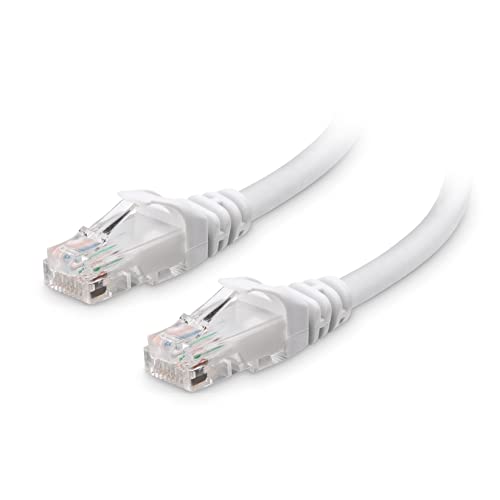 | Cable Matters Cat 6Best overall | Cat 6, 24 AWG | Round | 25 ft | $9.99 |
 | Amazon Basics Cat 6Cheapest | Cat 6 | Round | 25 ft | $7.20 |
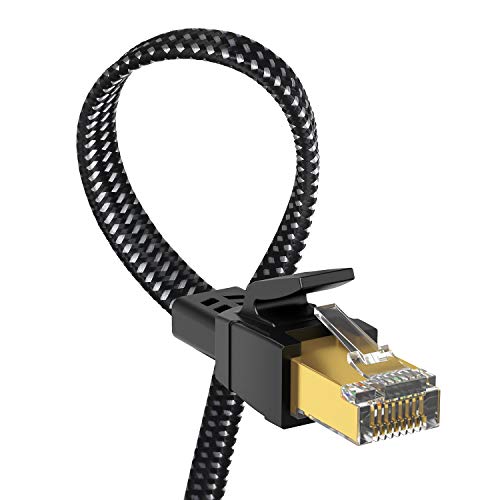 | Orbram Cat 8 FlatBest flat | Cat 8, S/FTP | Flat braided | 10 ft | $8.49 |
 | 10Gsupxsel Cat 6Most flexible | Cat 6, 26 AWG | Round slim | 25 ft | $9.49 |
 | UGREEN Cat 8 BraidedMost durable | Cat 8, F/FTP | Braided round | 10 ft | $9.99 |
 | ARISKEEN Cat 8 (2-pack)Best 2-pack | Cat 8, S/FTP | Flat braided | 2 × 10 ft | $9.99 |
 | CABNEER Cat 8 (5-pack)Best multipack | Cat 8 shielded | Nylon braided | 5 × 10 ft | $21.99 |
Most cable guides talk about download speeds. On Xbox specifically, three other things improve, and they are the ones people actually complain about.
Teredo and NAT errors. Xbox multiplayer and party chat rely on Teredo, a Microsoft IPv6-over-IPv4 tunnelling protocol. It is unusually sensitive to packet loss and connection instability, which is why “Teredo is unable to qualify” and “Your network settings are blocking party chat” appear so often on WiFi and so rarely on Ethernet. Wiring the console eliminates the wireless packet loss that breaks the tunnel. It does not fix a genuinely blocked port, but it removes the most common cause.
Xbox Cloud Gaming. Streaming a game is far less forgiving than downloading one. It needs a steady 10 to 20 Mbps with low jitter, sustained; a brief WiFi stall that would be invisible while browsing shows up as a frozen frame mid-match. Ethernet removes the variance entirely, and it is the single biggest improvement available to a cloud gaming setup.
Network Transfer between consoles. Moving a library from an Xbox One or another Series X over your local network is bounded by the slowest link. Two wired consoles transfer at close to gigabit; two wireless ones can take a full day for the same library. If you are setting up a new console, wire both, even temporarily.
Download speeds, if WiFi was the limit. On a 300 Mbps plan with a good router it probably was not. On a gigabit plan, or with the console two rooms from the router, wiring can double or triple throughput. Worth checking under Settings → General → Network settings → Detailed network statistics.
The Xbox Series X and Series S each have a single Ethernet port running at 1 Gbps. That is the ceiling, and no cable raises it.
Cat 5e already carries gigabit. Cat 6 carries 10 Gbps. Cat 6a carries 10 Gbps over a full 100 m. Cat 8 carries 40 Gbps and was designed for short switch-to-switch runs in data centres. Plug any of them into a Series X and you get 1 Gbps, because an Ethernet link negotiates to the slowest device in the chain, and that device is the console.
So the sensible choice is Cat 6: same price as Cat 5e, ten times the headroom, and useful later if you repurpose the cable for a PC or a 2.5 GbE device.
Cat 8 cables at $8 to 10 are not a bad buy, several are on this list, but you are buying them for the braided jacket and the flat profile, not for the 40 Gbps. Paying $30 for Cat 8 because of the number is money wasted, as our Cat6 vs Cat6a vs Cat7 vs Cat8 comparison sets out.
The specification worth checking instead: bare copper versus copper-clad aluminium. CCA cables are more brittle, have higher resistance, and cannot legally carry PoE. Listings that use real copper say so explicitly. Listings that avoid the word are usually CCA.
The right cable for a Series X, and the reason is that everything on the spec sheet is verifiable rather than asserted.
24 AWG bare copper conductors are thicker than the 26 or 30 AWG in budget and flat cables, and genuinely copper rather than copper-clad aluminium. That combination is what makes a cable still work after five years of being pulled out from behind a TV unit.
It is certified to meet or exceed TIA/EIA 568-C.2 for Category 6, an actual standard tested against, not a marketing claim. A great many Amazon cables labelled Cat 6 have never been near that test.
Snagless strain-relief boots protect the retaining clip, which is what actually breaks on console cables that get unplugged regularly. Gold-plated contacts resist corrosion behind a warm AV cabinet.
25 ft gives you room to route the cable properly, around the door frame, along the skirting, behind the unit, rather than stretching it taut across a floor. It is available in white here, which disappears against most skirting better than black does.
Buy it if you want the correct cable with nothing to think about, this is the default.
$7.20 for 25 ft, and for a console that maxes out at gigabit it is genuinely enough.
Amazon rates it at 1,000 Mbps rather than claiming 10 Gbps, which is unusually straightforward in a category where every listing inflates. That figure is exactly what the Series X port does.
The build is deliberately unremarkable: gold-plated RJ45 connectors, standard PVC jacket, no braiding or unusual construction. Nothing exotic means nothing exotic to fail.
What is missing is documentation. Amazon does not publish conductor gauge or state bare copper, so you are trusting the brand rather than a specification. For a cable that gets plugged in behind a TV and left there, that is a reasonable trade for saving $2.79.
If the cable will be coiled, carried to a friend’s house, or unplugged weekly, spend the extra on the Cable Matters, the documented 24 AWG copper matters for cables that move.
Buy it if the cable gets plugged in once and left alone and you want minimum spend.
At $8.49 this is the cheapest cable here that is both flat and braided, and those two properties are what make a console cable liveable in a room people sit in.
The flat profile runs under a closed door, along a skirting board and beneath a carpet edge without being crushed. That matters because the most common reason a Series X stays on WiFi is not technical, it is that a visible cable across the room is unacceptable to somebody in the house.
Double-braided nylon over the flat core is unusual; most flat cables are bare PVC and crease permanently. The braid resists that and makes the cable far more tolerant of being routed around corners.
S/FTP shielding wraps each pair and then the bundle. More than a living room needs, but genuinely useful if the run passes behind an AV rack full of mains adapters.
The Cat 8 rating is, as always, irrelevant to a gigabit console. At $8.49 you are not paying for it, so it is neither here nor there, judge this cable on being flat, braided and cheap, which it is.
Buy it if the cable must disappear into the room and the console is near the router.
This is the cable for a console wedged into a tight AV cabinet, where a stiff 24 AWG cable would need six inches of clearance behind it that you do not have.
26 AWG conductors are thinner than the Cable Matters’ 24 AWG, which is a real trade, but it buys meaningfully more flexibility, and the cable will bend tightly behind a console without straining the connector. Over 25 ft at gigabit, the thinner gauge costs you nothing measurable.
It is pure copper and compliant with ANSI/TIA 568.2-D, the current revision of the cabling standard. Publishing the specific revision rather than a vague “meets Cat 6” claim is a good sign about the manufacturer.
Snagless plugs protect the clip when routing through cable managers, and the jacket is rated for indoor and outdoor use, relevant if the run passes through a garage or briefly outside a wall.
It supports PoE and PoE+, so like the Cable Matters it stays useful if you later repurpose it for a camera or an access point.
Buy it if the console sits in a shallow cabinet with no room to bend a stiff cable.
If the console travels, to a friend’s house, between rooms, to a LAN session, this is the cable that survives it.
UGREEN rates the cotton braid for 10,000 bend cycles. A standard PVC cable develops stress fractures at the boot after being coiled and uncoiled a few hundred times, and then fails intermittently in a way that is genuinely hard to diagnose. Braided cable does not do that.
UGREEN is also a brand with real accountability behind it, which in a category dominated by anonymous sellers is worth something when a cable fails in month four.
F/FTP shielding is more than a home needs but does no harm, and helps if the run parallels mains wiring for any distance.
The Cat 8 rating is unusable by the Series X, and that is fine, at $9.99 it costs the same as an unbraided Cat 6, so the specification you cannot use is free. What you are actually paying for is the jacket, and the jacket is worth it.
10 ft suits a console within a room of the router. UGREEN sells the same construction in longer lengths.
Buy it if the console or the cable gets moved regularly, the braid is what you are paying for.
Two flat braided cables for $9.99 is roughly $5 each, and there is a specific Xbox reason to want two.
Console-to-console Network Transfer moves your installed library from an Xbox One or another Series X over the local network, and it runs at the speed of the slowest link. Wire both consoles and a library that would take most of a day over WiFi completes in a couple of hours. Two cables is exactly what that job needs, and afterwards the second one wires a TV or a PC.
The construction is the good combination again: flat so it hides, double-braided nylon so it does not crease, rated for 15,000 bend cycles, the highest figure on this list.
S/FTP shielding and 24K gold-plated contacts round it out. Backward compatible with everything, as all Ethernet is.
At 10 ft each these are short cables. For a permanent run across a room you want the 25 ft options above; for a temporary transfer setup and a tidy final installation near the router, two 10 ft cables is right.
Buy it if you are transferring a library from an old console, wire both ends and it finishes in hours.
Five braided 10 ft cables for $21.99 works out at $4.40 each, and it is the right buy if the Xbox is part of a wider tidy-up rather than a single connection.
A typical living room has more devices that should be wired than people realise: the console, a smart TV, a streaming box, a soundbar with network features, and often a second console. Each performs better wired, and buying five cables at once costs less than buying two separately.
The 50-micron gold-plated RJ45 contacts are worth noting, that is a thicker plating than the typical 24K flash coating, and it resists wear better on connectors that get plugged and unplugged during a cable-management session.
Nylon braiding over a PVC jacket gives the same durability benefit as the UGREEN and Orbram, and the shielded twisted pairs handle a run behind an AV unit full of power supplies.
The caveat is length: all five are 10 ft, so this suits a setup where everything is within about three metres of a router or switch. For longer runs, buy singles at the right length instead.
Buy it if you are wiring the whole AV setup, console, TV, streaming box and soundbar together.
Plug in before you change any settings. The Series X switches to Ethernet automatically when a cable is connected, there is no setting to toggle. Confirm under Settings → General → Network settings; it should read “Wired network”.
Check Teredo afterwards. Go to Settings → General → Network settings → Test multiplayer connection. You want NAT type Open or Moderate and Teredo qualified. If Teredo still fails on a wired connection, the cause is your router rather than the console, enable UPnP, and if that does not work, take the ISP gateway out of routing mode so you are not behind double NAT.
Run detailed network statistics. Under Settings → General → Network settings → Detailed network statistics, the console reports packet loss and latency over a real test. Packet loss should be 0%. Anything above that on a wired connection points at a bad cable, a bad port, or a failing switch, try a different cable and a different router port before assuming the console is at fault.
If a cable to the console is impossible, a mesh node in the same room with the Xbox wired to it gives you nearly all the benefit. Our mesh guide covers systems with enough Ethernet ports per node to do that.
Cat 6. The Series X has a gigabit Ethernet port, and Cat 6 exceeds that tenfold while costing the same as Cat 5e. Cat 6a, Cat 7 and Cat 8 all work but add capability the console cannot use. Prioritise bare copper conductors, snagless boots and adequate length over the category number.
No. Cat 8 is rated for 40 Gbps; the Xbox Series X port runs at 1 Gbps, and an Ethernet link negotiates to the slowest device. A Cat 8 cable performs identically to Cat 5e on an Xbox. The braided jackets common on Cat 8 cables are a genuine durability benefit, but that is the jacket, not the category.
Often, yes. Teredo is the IPv6 tunnelling Xbox uses for party chat and multiplayer, and it is very sensitive to packet loss, which is why it fails so much more on WiFi than on Ethernet. Wiring removes the most common cause. If it still fails wired, the problem is router-side: enable UPnP and check you are not behind double NAT.
It reduces latency variance, which is what players actually feel. Ethernet has no airtime contention and no wireless retransmissions, so ping stays flat instead of spiking when other devices get busy. It does not lower your baseline ping to a game server, that is set by your ISP and the distance to the server.
Up to 100 metres (328 ft) for Cat 5e, Cat 6 and Cat 6a at gigabit speeds. No home run comes close, so choose the length that routes comfortably and add about 20% slack, a taut cable stresses the connector and eventually fails at the boot.
Considerably. Cloud gaming streams video in real time and needs a steady 10 to 20 Mbps with low jitter. A brief WiFi stall that would be invisible while browsing appears as a frozen frame mid-match. Ethernet eliminates that variance and is the single most effective improvement for a cloud gaming setup.
Buy the Cable Matters Cat 6 at $9.99, 24 AWG bare copper, properly certified, snagless, and long enough to route rather than stretch. Nothing about a Series X justifies more.
If the cable has to cross a room people sit in, the Orbram Cat 8 Flat at $8.49 hides under carpet and doors for less money. And if you are setting up a new console, the ARISKEEN 2-pack at $9.99 wires both ends for Network Transfer, which turns an overnight library copy into a couple of hours.
Disclosure: Networking Signal is a participant in the Amazon Services LLC Associates Program. We earn a commission on qualifying purchases made through links on this page, at no additional cost to you. Prices shown were accurate at the time of writing and may change. We are not affiliated with Microsoft; Xbox Series X and Series S gigabit Ethernet specifications are from Microsoft’s published documentation.
Hand-picked articles you might also find useful.
 Cables
 RJ11 is a 6-position phone connector using 2 or 4 wires; RJ45 is an 8-position Ethernet connector using…
 Cables
 Why is My Ethernet Slower Than WiFi? There are many factors that can affect the speed of your…
 Cables
 Fiber optic internet provides extremely fast and reliable internet connectivity through cables made of thin strands of very…