
What is Ping? How It Works, Command Options and Reading the Output
Ping sends ICMP Echo Requests and times the replies. Here is what each part of the output means,…
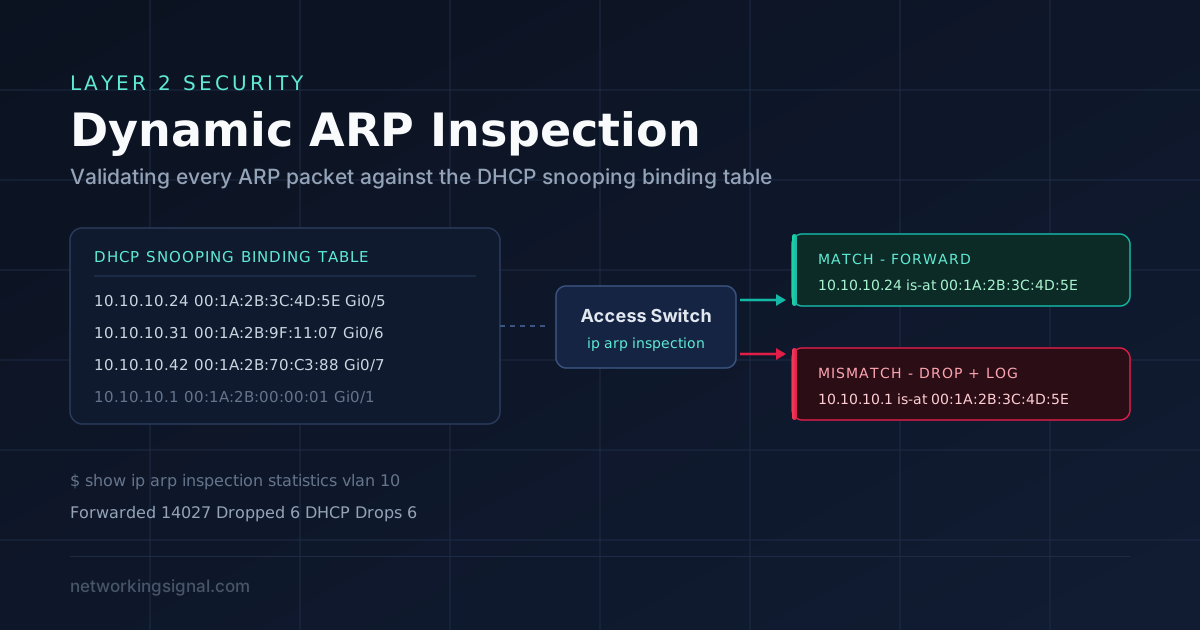
Dynamic ARP Inspection (DAI) is a switch security feature that inspects every ARP packet arriving on an untrusted port, checks the sender’s IP-to-MAC pairing against a trusted binding table, and drops the packet if the pairing does not match. It is the standard defence against ARP poisoning and the man-in-the-middle attacks built on top of it.
The critical thing to understand before configuring it: DAI does not build its own table. It reads the binding table that DHCP snooping maintains. If DHCP snooping is not enabled and working, DAI has nothing to validate against and will drop legitimate traffic. These two features are deployed together, always.
ARP has no authentication. When a host asks “who has 192.168.1.1?”, any device on the segment can answer, and the asking host will believe it. Worse, most operating systems accept unsolicited ARP replies (gratuitous ARP) and update their cache without ever having asked.
An attacker exploits this by telling the victim “192.168.1.1 is at my MAC” and telling the gateway “the victim is at my MAC”. Both now send their traffic to the attacker, who forwards it on. Neither notices. From that position the attacker can read unencrypted traffic, capture credentials, strip TLS, or simply drop packets.
This is not a theoretical attack, tools that automate it have existed for over two decades and require no privilege beyond being plugged into the same VLAN.
| Untrusted (default) | Trusted | |
|---|---|---|
| Where | Access ports facing user devices | Uplinks, trunks, ports to routers and DHCP servers |
| ARP handling | Validated against the binding table | Forwarded without inspection |
| Rate limiting | Applied (15 pps default on Cisco) | Not applied |
Getting this backwards is the most common DAI deployment mistake. If you leave an uplink untrusted, every ARP arriving from the rest of the network fails validation and the port shuts down.
Switch(config)# ip dhcp snooping
Switch(config)# ip dhcp snooping vlan 10,20
Switch(config)# no ip dhcp snooping information option

Switch(config)# interface GigabitEthernet0/1
Switch(config-if)# description Uplink to core
Switch(config-if)# ip dhcp snooping trustSwitch(config)# ip arp inspection vlan 10,20
Switch(config)# interface GigabitEthernet0/1
Switch(config-if)# ip arp inspection trustServers, printers and network devices with static IP addresses never appear in the DHCP snooping table, so DAI would drop their ARP. Give them an explicit ARP ACL:
Switch(config)# arp access-list STATIC-HOSTS
Switch(config-arp-nacl)# permit ip host 192.168.10.50 mac host 0011.2233.4455
Switch(config-arp-nacl)# permit ip host 192.168.10.51 mac host 0011.2233.4466
Switch(config-arp-nacl)# exit
Switch(config)# ip arp inspection filter STATIC-HOSTS vlan 10Switch(config)# ip arp inspection validate src-mac dst-mac ipThis checks the Ethernet header MAC addresses against the ARP body and rejects invalid or unexpected IP addresses (0.0.0.0, 255.255.255.255, multicast). Note that all three keywords must be entered on a single line, issuing them as separate commands replaces the previous setting rather than adding to it.
Switch(config)# interface range GigabitEthernet0/2 - 24
Switch(config-if-range)# ip arp inspection limit rate 20 burst interval 2

Switch(config)# errdisable recovery cause arp-inspection
Switch(config)# errdisable recovery interval 300
DAI rate-limits ARP on untrusted ports (default 15 packets per second) and err-disables a port that exceeds it. Enabling automatic recovery avoids a truck roll every time a busy host trips the limit.
Switch# show ip arp inspection
Switch# show ip arp inspection vlan 10
Switch# show ip arp inspection interfaces
Switch# show ip arp inspection statistics vlan 10
Switch# show ip dhcp snooping binding
The last one is the most useful when something breaks: if a host is not in the binding table, DAI will drop its ARP, and the fix is either an ARP ACL or getting DHCP snooping working on that VLAN.
| Feature | What it blocks | Depends on |
|---|---|---|
| DHCP snooping | Rogue DHCP servers handing out addresses and gateways | — |
| Dynamic ARP Inspection | ARP poisoning / MITM | DHCP snooping binding table |
| IP Source Guard | IP address spoofing from a host | DHCP snooping binding table |
| Port security | Unauthorised MAC addresses, MAC flooding | — |
| BPDU Guard | Rogue switches injecting STP | — |
Deployed together on access ports, these close most of the Layer 2 attack surface. DAI on its own only covers ARP.
Enabling DAI without DHCP snooping. The binding table is empty, nothing validates, and every client loses connectivity. Always enable and verify DHCP snooping first.
Forgetting to trust the uplinks. Trunks and router-facing ports must be trusted for both DHCP snooping and DAI, and they are separate commands.
Ignoring static-IP devices. Servers, printers, APs and cameras with static addressing need ARP ACLs or they will be silently dropped.
Mismatched VLAN lists. DAI and DHCP snooping should be enabled on the same set of VLANs. A VLAN with DAI but no snooping is broken.
Yes, for any dynamically addressed host. DAI validates against the DHCP snooping binding table. Statically addressed hosts can be covered by ARP ACLs instead, but a real network needs both.
No. ARP is the protocol; DAI is a switch feature that inspects and filters ARP packets. They are not two variants of the same thing.
ARP inspection is handled in the CPU rather than the forwarding ASIC, which is exactly why the rate limiter exists. At normal ARP volumes the impact is negligible; the rate limit protects the CPU from an ARP flood.
The ARP packet is discarded and a log message is generated identifying the port, VLAN, sender IP and sender MAC. If drops exceed the configured rate, the port is placed in err-disabled state.
Trunk ports are normally configured as trusted, so ARP crossing them is not inspected. Inspection belongs on the access ports where untrusted hosts connect.
No. If both attacker and victim sit behind an unmanaged switch hanging off one access port, their traffic never reaches the managed switch’s inspection point. DAI protects at the port it inspects, which is why access-layer switches should be managed.
Hand-picked articles you might also find useful.
 Routing & Switching
 Ping sends ICMP Echo Requests and times the replies. Here is what each part of the output means,…
 Routing & Switching
 What is Multicast in Networking? Multicast is a networking protocol that allows for the efficient delivery of data…
 Routing & Switching
 What is Packet Flow? Packet flow (also called IP routing ) is the process of forwarding data packets…