
7 Best WiFi Routers Under $100 in 2026 (Tested and Compared)
The best WiFi routers under $100 in 2026. The TP-Link Archer AX55 at $75 is the sweet spot;…
When it comes to setting up a new wireless network, there can be several steps involved. From configuring the network settings to choosing a secure password, it can be a daunting task, especially for those who are not tech-savvy.
Fortunately, most routers come equipped with a feature known as the WPS button that can make the setup process much simpler. In this article, we will explore what the WPS button on the router is and how you can use it to set up your network in no time.
WPS stands for Wi-Fi Protected Setup, and it is a standard wireless network security protocol that allows you to easily connect your devices to a secure network without having to enter a password. The WPS button on the router is a physical button that can be found on most modern routers. It is typically located on the back or side of the router and is labeled as “WPS.”
When you press the WPS button on the router, it initiates a pairing process between the router and the device you want to connect. The process varies depending on the device, but generally, you will need to follow these steps:
Once the pairing process is complete, your device will be connected to the network without the need for a password.
The WPS button on a router can make setting up a new wireless network much simpler, especially for those who are not tech-savvy. Here are some of the advantages of using the WPS button:
By pressing the WPS button on the router, you can set up your network in a matter of minutes, without having to enter a password or manually configure network settings.
The WPS protocol uses advanced security measures to protect your network from unauthorized access. This ensures that your network remains secure and prevents unauthorized users from accessing your personal data.
The WPS protocol is compatible with a wide range of devices, including smartphones, tablets, laptops, and gaming consoles. This means that you can easily connect all your devices to your network without having to manually configure each one.
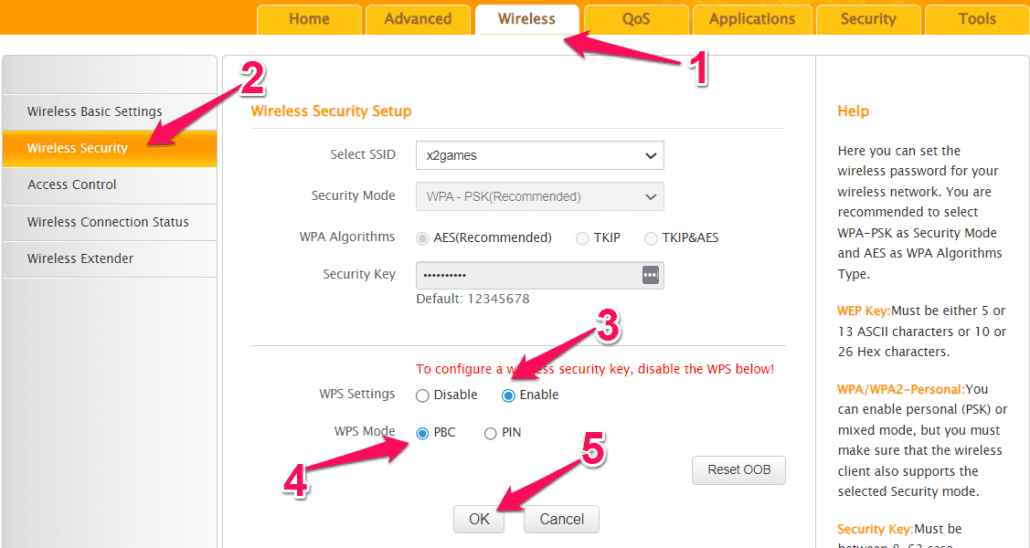
Before you can use the WPS button on router, you need to make sure it is enabled on your router. Here are the steps to enable the WPS button on the router:
Once you have enabled the WPS button on router, you can use it to easily connect your devices to your network.
While the WPS button on router can make setting up a wireless network much simpler, there are some common issues that you may encounter. Here are some of the most common issues:
Not all devices are compatible with the WPS protocol, and some devices may require additional setup steps to connect to your network.
While the WPS protocol is designed to enhance security, there are still some security risks involved. Hackers can potentially exploit the WPS vulnerability to gain access to your network.
If you encounter any issues while using the WPS button on router, here are some troubleshooting steps that you can try:
Make sure that the device you are trying to connect is compatible with the WPS protocol. If it is not, you may need to manually configure the network settings or use an alternative method to connect.
Try restarting your router and the device you are trying to connect. Sometimes, this can resolve any connection issues.
If none of the above steps work, you may need to reset your router to its default settings. This will erase all your network settings, so make sure to back up your settings before resetting.
In conclusion, the WPS button on router can be a useful tool for simplifying the network setup process. By following the steps outlined in this article, you can easily connect your devices to a secure network without having to enter a password.
However, it is important to be aware of the potential security risks and compatibility issues associated with using the WPS protocol. As always, make sure to take appropriate security measures to protect your network and personal data.
Hand-picked articles you might also find useful.
 Routers
 The best WiFi routers under $100 in 2026. The TP-Link Archer AX55 at $75 is the sweet spot;…
 Networking Gears
 The best gaming routers in 2026, ranked on latency handling rather than headline speed. The ASUS RT-BE86U at…
 Networking Gears
 The best mesh WiFi systems for Starlink in 2026. The TP-Link Deco X55 three-pack at $150 covers 6,500…