
Flat Ethernet Cable vs Round: Which to Use and When
When setting up a wired local area network , one of the most basic but important decisions is…

The Cable Matters USB-C to 2.5Gb Ethernet with 100W charging ($14.99) is the best adapter for almost everyone. It does 2.5 Gigabit, passes 100 W through to charge your laptop from the same port, and supports Wake-on-LAN and PXE boot, for less than most gigabit-only adapters cost.
Do not buy a gigabit adapter in 2026. The price gap has closed: 2.5G adapters now start at $15, roughly what gigabit ones cost. A 2.5G adapter falls back to gigabit automatically on old equipment, so buying gigabit only caps you for no saving.
Check one thing first: a 2.5G adapter needs a USB 3.0 or faster port. USB 2.0 tops out at 480 Mbps, so plugged into an old port even the best adapter cannot reach gigabit. Blue or teal ports are USB 3.0; black ones usually are not.
| Product | Adapter | Speed | Connector | Charging | Price |
|---|---|---|---|---|---|
 | Cable Matters 2.5Gb + 100WBest overall | 2.5 Gbps | USB-C | 100W PD | $14.99 |
 | uni USB-C 2.5 GbpsBudget pick | 2.5 Gbps | USB-C | No | $18.99 |
 | Plugable 2.5G 2-in-1Best 2-in-1 | 2.5 Gbps | USB-C + USB-A | No | $24.95 |
 | UGREEN 2.5G AluminumBest build | 2.5 Gbps | USB-C | No | $25.99 |
 | TP-Link UE302CMost portable | 2.5 Gbps | USB-C | No | $25.46 |
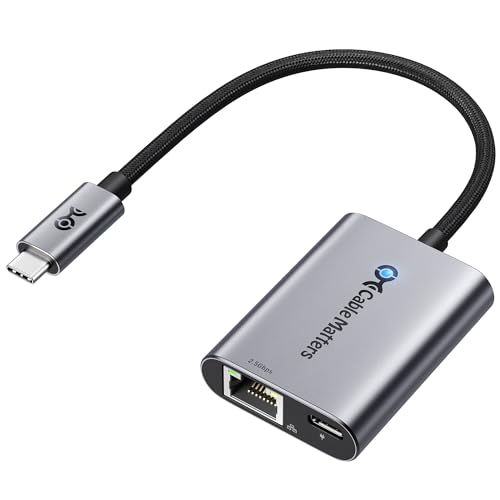 | Cable Matters 2.5Gb + 140WFor MacBook Pro 16 | 2.5 Gbps | USB-C | 140W PD 3.1 | $35.00 |
Two years ago a 2.5 Gigabit USB adapter cost $40 and a gigabit one cost $15, so gigabit was the obvious buy for most people. That gap has closed. 2.5G adapters now start at $14.99, and gigabit adapters have not got cheaper, so there is no longer a reason to cap yourself.
They fall back automatically. A 2.5G adapter negotiates down to 1000, 100 or 10 Mbps depending on what it is plugged into. Buying 2.5G costs you nothing on an old network and gains you everything on a new one.
2.5G runs on the cable you already have. This is the part people miss. 2.5GBASE-T was specifically designed to work over existing Cat 5e, which means you do not need to rewire anything. That is why 2.5G has spread so quickly through routers and switches while 10G has not.
And the equipment is arriving. Most WiFi 7 routers and many WiFi 6E ones now include 2.5 Gbps ports, cable modems support multi-gig plans, and 2.5G switches have fallen under $60. If your router already has a 2.5G port, a gigabit adapter is leaving half the speed unused.
The one requirement is USB 3.0. USB 2.0 has a theoretical maximum of 480 Mbps and a real-world throughput near 300 Mbps, so it cannot even sustain gigabit. Look for a blue or teal port, or a port marked SS (SuperSpeed). Plugging a 2.5G adapter into USB 2.0 is not harmful, it simply runs slowly, and people often blame the adapter.
Almost every 2.5G adapter here uses a Realtek RTL8156 family chip, the RTL8156B or the newer RTL8156BG. That is not a criticism; it is a genuinely good chipset and the reason these adapters are cheap and broadly compatible.
The practical consequence is that raw performance between adapters is close to identical. What actually differs is the housing, the cable, the extra features, and driver support on unusual operating systems.
The BG revision is worth having. It runs cooler and draws less power at full 2.5G throughput than the older B. Sustained transfers are where adapters get hot, and heat causes throttling and intermittent disconnects, the most common complaint about cheap adapters.
Driver support: Windows 11, macOS and ChromeOS all recognise these chips out of the box. Linux support depends on kernel version, recent kernels include the r8152 driver, older ones may need it installed. If you run an unusual distribution or an older kernel, check before buying.
What is genuinely different between models: aluminium versus plastic housing (heat dissipation), braided versus plain cable (durability), power delivery passthrough, USB-A compatibility, and folding designs for travel. Choose on those, not on the speed figure, they all hit the same number.
This is the best adapter here and also the cheapest, which does not happen often enough to pass up.
Power delivery passthrough is the feature that matters on a modern laptop. Thin laptops have two or three USB-C ports, and one is usually occupied by the charger. An adapter that also passes 100 W of charging through means you get wired Ethernet without giving up a charging port, which on a MacBook Air or an XPS 13 is the difference between usable and irritating.
It is bus-powered, so it works without a charger connected. The PD port is there when you want it, not required.
The feature list goes well beyond a typical consumer adapter: Wake-on-LAN, PXE boot via UEFI, MAC address pass-through, auto MDI-X crossover detection, and full/half duplex support. Wake-on-LAN and PXE are genuinely useful if you manage machines remotely or image them over the network, capabilities normally found in $40 business adapters.
The folding tether design collapses flat for a pocket or a laptop sleeve. Driver-free on Windows 11/10, macOS 10.8+, ChromeOS and Linux kernels up to 4.15.
The trade for the price is a plastic housing rather than aluminium, so it runs warmer than the UGREEN under sustained load. For normal use that is not a problem; for hours of continuous multi-gig transfer, the aluminium options dissipate heat better.
Buy it if you have a modern laptop with few USB-C ports, the passthrough charging is why.
If you do not need power passthrough, the uni is a straightforward, well-built 2.5G adapter that does one job properly.
The RTL8156B chipset gives the same 2.5 Gbps throughput as everything else here, with backward compatibility down to 10 Mbps. uni specifically notes the chip’s lower power draw and reduced heat, which is the right thing to care about in an adapter that will run for hours.
The braided nylon cable is longer than most, and uni makes a point about why: distance from the laptop body reduces interference with Bluetooth peripherals. That is a real effect, USB 3.0 signalling generates noise in the 2.4 GHz band, and a USB 3 device right next to a Bluetooth receiver can cause mouse stutter and audio dropouts. A longer cable genuinely helps.
The rounded housing has no sharp edges to scratch a laptop in a bag, and the 18-month warranty with 24/7 support is longer than most at this price.
The gap against the Cable Matters is $4 more for no power passthrough, no Wake-on-LAN and no PXE. What you get in return is a better cable and a nicer physical design. For a desk-bound adapter that stays plugged into a dock, that trade is reasonable; for a laptop you carry, the Cable Matters is the better buy.
Buy it for a desk setup where the adapter stays put and cable quality matters more than features.
The hybrid connector is the whole point: it converts between USB-C and USB-A, so one adapter works with a new MacBook and a five-year-old ThinkPad without carrying two.
That matters more than it sounds in a household or an office with mixed hardware. A single-connector adapter becomes useless the moment you need it on the other machine, and USB-C-to-A dongles introduce their own compatibility problems.
Plugable is a US company with a genuine support operation, a 2-year warranty against defects, lifetime support, and a North American team you can contact before you buy to check compatibility. For an adapter that has to work with an unusual machine or an old OS, that is worth more than a specification.
2.5 Gbps over Cat 5e or better, supporting Windows, macOS, ChromeOS and iOS including recent iPhones on iOS 17+. USB 3.0 required for full speed, as with all of these.
It has no power passthrough, and at $24.95 it is $10 more than the Cable Matters. You are paying for the dual connector and the support, both of which are legitimate reasons, just not universal ones.
Buy it if you need one adapter across USB-C and USB-A machines, a mixed office or family.
If the adapter will run at full speed for hours, moving a NAS library, backing up a machine, editing off network storage, this is the one to buy, and the reason is thermal.
The RTL8156BG is the newer revision of the Realtek chip, drawing less power and producing less heat at sustained 2.5G than the RTL8156B used in cheaper adapters. Combine that with an aluminium housing that acts as a heatsink and you get an adapter that holds full throughput indefinitely rather than throttling after twenty minutes.
That throttling is the single most common complaint about cheap 2.5G adapters, and it presents confusingly, fast at first, then slow, then sometimes a dropped link. It is almost always heat.
The connector is reinforced against repeated plugging and unplugging, and status LEDs show link and activity at a glance, genuinely useful for telling “no cable” from “no DHCP” without opening network settings.
Compatibility is broad, including iPhone 15 and later and iPad Pro, so it works as a wired connection for an iPad used as a work machine.
At $25.99 it is $11 more than the Cable Matters and has no power passthrough. Buy it specifically for sustained transfers; for intermittent use the cheaper adapter performs identically.
Buy it for sustained multi-gig transfers, NAS work, backups, editing off network storage.
The UE302C folds into itself, which makes it the one to keep permanently in a laptop bag or a jacket pocket without it snagging on everything.
Travel is where a USB Ethernet adapter earns its keep. Hotel WiFi is frequently unusable and hotel Ethernet frequently is not, many rooms still have a wall port that works far better than the wireless. Conference venues, serviced offices and rented desks are the same. An adapter that lives in your bag and takes no space is the one you actually have when you need it.
2.5 Gbps with plug-and-play operation and no driver install, across Windows 11 through 7, macOS, iPadOS, ChromeOS, Linux and iOS. The aluminium alloy case handles heat and survives being carried loose.
TP-Link is a large manufacturer with proper firmware and driver support, which matters when a new macOS release breaks compatibility with anonymous adapters, TP-Link updates, many sellers do not.
At $25.46 it is $10 more than the Cable Matters with no power passthrough and no Wake-on-LAN. You are paying for the folding design and the brand’s support longevity. If the adapter lives in a bag, that is worth it; if it lives on a desk, it is not.
Buy it if it will live in a laptop bag for hotels, conferences and rented desks.
There is exactly one reason to pay $35 instead of $14.99 for the sibling model, and it is a specific one: the 16-inch MacBook Pro charges at 140 W.
Passing 100 W through the cheaper adapter to a 16-inch MacBook Pro works, but it charges slowly, and under heavy load it may not keep up with consumption at all, so the battery drains while plugged in. USB PD 3.1 at 140 W passes the full charging rate through, so the laptop behaves exactly as it would on its own charger.
The same applies to other high-draw laptops: some gaming laptops and mobile workstations negotiate above 100 W over USB-C, and they have the same problem with a 100 W passthrough.
The rest of the specification is a step up too: aluminium housing rather than plastic, so better heat dissipation on sustained transfers, and a braided pigtail cable rather than plain PVC.
Be clear about who this is for. If your laptop charges at 100 W or less, which covers the MacBook Air, the 14-inch Pro, and most ultrabooks, the $14.99 model does the identical job. This is the answer to a specific charging requirement, not a general upgrade.
Buy it only if your laptop charges above 100W, a 16-inch MacBook Pro or a mobile workstation.
Not if the USB port is fast enough. On USB 3.0 or later, a 2.5G adapter delivers close to its full rated speed. On USB 2.0 the port itself caps you at roughly 300 Mbps real-world, well below gigabit, which is the usual explanation when an adapter seems slow. Check for a blue or teal port, or one marked SS.
For consistency, yes. Ethernet has no airtime contention, no interference and no wireless retransmissions, so latency stays flat and packet loss is effectively zero. For raw speed it depends: a good WiFi 6 connection can exceed gigabit in the same room, but it will not hold that steadily the way a wired link does.
Buy 2.5G. The price difference has essentially disappeared, 2.5G adapters start at $15, and they fall back to gigabit automatically on older equipment. 2.5GBASE-T also runs over existing Cat 5e cable, so there is nothing to rewire. Buying gigabit in 2026 caps you for no saving.
Yes, on recent models. iPhone 15 and later and iPad Pro/Air with USB-C support wired Ethernet on iOS 17 and above, useful for tethered photo transfers or a reliable connection at a venue. Older Lightning devices need a Lightning-to-USB camera adapter and often a powered hub, which is rarely worth the complication.
Usually not. Windows 11, macOS and ChromeOS recognise the Realtek RTL8156 chips these adapters use out of the box. Linux support depends on kernel version, recent kernels include the r8152 driver, older ones may need it added. Installing the current Realtek driver can improve stability on older Windows versions.
An adapter connects a computer to a network, it is not a router or a switch and cannot share a connection between devices. To add ports, buy a switch. To connect one laptop, tablet or desktop to a wired network, an adapter is exactly the right tool.
The Cable Matters USB-C to 2.5Gb with 100W charging at $14.99 is the adapter to buy. It is the cheapest here and the most capable, 2.5 Gigabit, power passthrough so you do not lose a charging port, plus Wake-on-LAN and PXE boot that normally cost three times as much.
Spend more only for a specific reason: the UGREEN if you run hours-long transfers and need its aluminium housing to avoid thermal throttling, the Plugable if you need one adapter across USB-C and USB-A machines, or the 140W Cable Matters if your laptop charges above 100 W. And do not buy a gigabit-only adapter in 2026, it costs the same and caps you at half the speed.
Disclosure: Networking Signal is a participant in the Amazon Services LLC Associates Program. We earn a commission on qualifying purchases made through links on this page, at no additional cost to you. Prices shown were accurate at the time of writing and may change. Achieving 2.5 Gbps requires a USB 3.0 or faster port and 2.5G-capable network equipment at the other end.
Hand-picked articles you might also find useful.
 Cables
 When setting up a wired local area network , one of the most basic but important decisions is…
 Cables
 The best bulk Ethernet cable for 2026. trueCABLE Cat6 Riser at $214 per 1000 ft is Fluke tested…
 Cables
 The best RJ45 connectors for 2026. Cable Matters pass through connectors at $14.39 per 100 are the pick,…