
Best Stackable Switches (2026): 7 Picks & Alternatives
Compare the best stackable switches for SMB networks, including 10GbE, PoE, stack size and when cloud-managed switches are…
Network-attached storage is a file-dedicated storage device that makes data continuously available for employees to collaborate effectively over a network. The unique thing about NAS devices is that they handle data storage and file-sharing requests only and offer fast, secure, and reliable storage services to private networks.
The devices are built with a processor and operating system allowing them to run applications as well as provide the required intelligence for sharing files to authorized people.
NAS devices are a revolutionary way to handle and share data and permit accessibility by multiple people, computers, and mobile devices. Besides, they offer better data security, and data recovery for Mac offers a better performance with them.
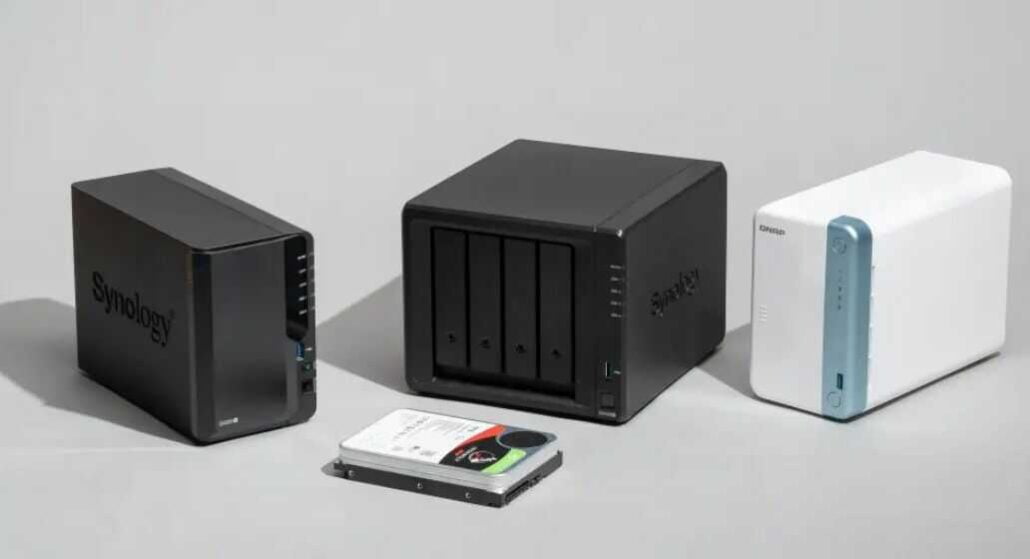
Below are some of the common variations:
Many people use this form of connection especially when requiring more storage space than what their computers can offer. With a USB cable, you connect a hard drive to your computer. For Mac users, Thunderbolt cables are used to facilitate the connections.
Of course, there are available ways to safely share your hard drive with others and even permit access to your data.
This is however not always the case as many people exclusively use the hard drive on the computer it is physically attached to. This is generally referred to as Direct-attached storage (DAS).
You could be using your local network, which could be a hard-wired ethernet or a WiFi-enabled network. Generally, NAS devices are used internally for sharing data through networks and granted permissions.
This makes their data security stronger and you can easily recover data from NAS without having to get paid professional service. They are referred to as network-attached and can also be accessed through the internet if you choose so.
There are several forms of network-attached storage today. Some of these include Azure, iCloud, Amazon Web Services, etc. many people however opt to attach storage devices to private networks to be able to monitor their costs, control data access even during internet outages, and take control of their data security and privacy.
Although they may look similar, Nas and other network drives are different. Below are some of the striking differences.
CPU or no CPU
Network drives do not have CPUs. Like Seagate hard drives, they are good alternatives for backup systems and provide a better user experience as support devices rather than stand-alone devices.
Generally, they are set up and controlled through apps that are downloaded to the PC or mobile device such as Seagate file recovery software.
Connection
While NAS can be connected to any device on your network, Network drives can be connected through routers.
Operating System
While network drives do not have built-in management software, NAS devices are built with internal operating systems that make it possible to be configured for the different applications.
Security
NAS comes with configurable security while network drives do not have them.
Depending on the size and type of files you are dealing with, your computer generally takes a shorter time to read and write data to DAS devices compared to network devices.
Some of the tasks you can perform faster include working with complex design documents, editing large photos and videos, and transferring very large files.
Although NAS write and read speed is much lower than DAS, NAS devices are more sophisticated. This means they are designed and built to support multiple functionalities that you will not get with DAS.
Below are some of the components that are integrated into the architecture of every NAS device.
As storage devices, NAS devices come with augmented storage space. Ideally, the most popular enterprise NAS devices used in homes, small businesses, offices, and small groups come with between two to five hard drives.
As opposed to DAS devices which have literally one hard drive, multiple hard drives offered by NAS devices will provide added storage space to users. As a result, they also offer faster file storage and access.
Their hard drives are also a special type category of 3.5-inch hard drives suitable for devices that are constantly running.
NAS devices come with multiple networking components making them available for connecting (networking) to several other components.
For instance, they contain multiple USB ports that can be used to connect other devices for different purposes including data transfer and even charging.
NAS devices are built with some form of CPU allowing them to adequately read and write data, process multimedia files, manage file systems, run applications, integrate with the cloud on demand, manage multiple users, and take computing intelligence.
Tasks that would otherwise require a computer to manage DAS devices are successfully managed by NAS. This is because NAS devices come with some form of operating system.
The operating system helps run several functions and supports the various applications available on NAS devices. Some of these applications include:
For better functionality, you must properly evaluate the storage capacity requirements for NAS. It is advisable not to let your storage on NAS get used up to 75% as this will greatly impact its performance.
Also evaluate available application packages, the power of the processor required, and the popularity of the operating system of your desired NAS devices before adoption.
Configuring NAS devices is simple and easy. Begin by connecting the NAS device to your LAN (Local Area network). If you are using a WiFi router, you could connect the device to an available ethernet port.
While some NAS systems are plug-and-play, you still need to perform some system configuration to get the best performance and experience. Connect to the NAS OS via a browser.
The operating system will come with some form of setup wizard to help you through the configuration process. Some critical settings include setting up a firewall, restricting access, and configuring secure passwords.
You can always limit network congestion on your router by upgrading to Gigabit internet (1,000 Mbps), or simply migrating to WiFi 5 or 6 routers.
Backups remain a valuable means of securing data especially when you want to restore lost data. Luckily, even with NAS, there are multiple backup options available. NAS devices that are built with RAID 1, 3, 5, and 6 can rebuild data especially if one drive fails.
However, if your NAS is RAID 0, 2, or 4, you will need an external drive or a second NAS to backup data. This makes it easier to perform NAS data recovery in case something happens causing data loss.
The answer to this question depends on the network size as well as how you use it. For instance, if you use the network together with other team members and want a secure place to store data, NAS would be a good option.
There are several benefits of using NAS storage. Below are some of the top benefits:
On the other hand, the downsides of NAS storage include:
Deciding whether to use NAS or DAS solely relies on your intended use, the size of the team, and data integrity needs. Although NAS offers a better bargain overall, you should consider a wholesome approach to costs, sustainability, and data security before deciding to upgrade.
Hand-picked articles you might also find useful.
 Networking Gears
 Compare the best stackable switches for SMB networks, including 10GbE, PoE, stack size and when cloud-managed switches are…
 Networking Gears
 The best outdoor NVR camera systems in 2026. Wireless does not mean no cables, because every camera still…
 Networking Gears
 The best outdoor WiFi extenders for 2026. The TP-Link EAP650-Outdoor at $134.99 is the pick. Includes why you…