
7 Best WiFi Routers That Look Like a PS5 in 2026
The routers that actually match a PS5 in 2026. The TP-Link Archer BE550 at $200 is the closest…
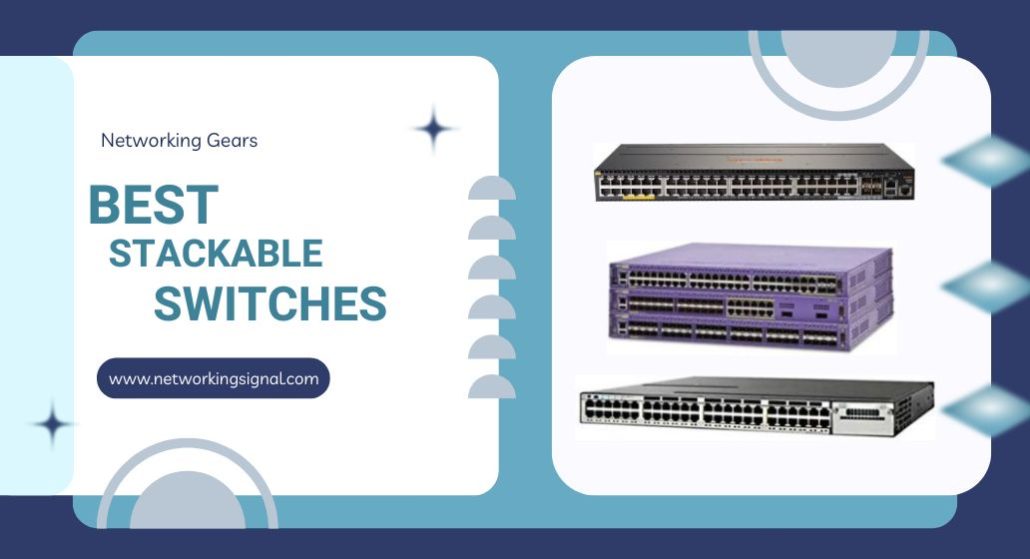
The HPE Instant On 1960 24G ($749.99) is the best stackable switch for most businesses. Four units stack into one IP address, it has 10G uplinks, and management needs no subscription.
Before spending that, be clear on what stacking is, because it is not what most people want.
True stacking merges several physical switches into one logical switch. One IP, one configuration, and a link aggregation group can span two chassis, so a failed switch does not take a server offline.
Controller management puts many separate switches on one dashboard. Convenient, much cheaper, but they stay separate devices and a LAG cannot cross between them.
If you want one place to manage everything, the TP-Link SG2452LP at $359.99 does that with 48 ports. Buy real stacking only when you need a link that survives losing a whole switch.
| Product | Switch | Ports | Stacking | PoE | Price |
|---|---|---|---|---|---|
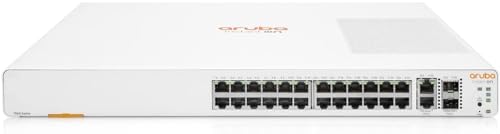 | HPE Instant On 1960 24GBest overall | 24 + 4 uplink | True, 4 units | No | $749.99 |
 | HPE Instant On 1960 24G PoEBest with PoE | 24 + 4 uplink | True, 4 units | 370W | $1,199.99 |
 | Aruba Instant On 1960 48GMost ports | 48 + 4 uplink | True, 4 units | No | $981.90 |
 | Netgear GS752TX (Renewed)Budget stacking | 48 + 4 uplink | True stacking | No | $199.49 |
 | TP-Link SG2452LPBest value alternative | 48 ports | Omada controller | Partial | $359.99 |
 | TP-Link TL-SG3452PBest PoE value | 48 + 4 SFP | Omada controller | 384W | $542.99 |
 | Cisco C9200-STACK-KITFor Cisco stacks | Module only | StackWise-80 | n/a | $321.75 |
These get confused constantly, and the confusion is expensive because true stacking carries a large price premium.
True stacking joins switches over a dedicated high speed link so they behave as a single device. There is one IP address, one configuration file, one firmware image, and one switch acts as the master while the others are members. Port numbering runs continuously across the whole stack.
Controller or cloud management keeps switches as separate devices but presents them in one interface. You configure each one, but you do it from a single place and settings can be pushed out in bulk.
Day to day, both feel similar. Three things only true stacking can do.
A link aggregation group across two chassis. Connect a server with two cables into two different physical switches, bond them as one link, and losing an entire switch does not drop the server. This is the real reason stacking exists.
One configuration rather than several. Add a VLAN once and it exists on 96 ports. On separately managed switches you push it to each device, and drift between them is the usual cause of a mysterious VLAN problem.
Continuous port numbering. Port 1/0/24 and 2/0/24 in one configuration file, rather than logging into two devices.
If none of those matter to you, controller management is the better buy. A pair of TP-Link Omada switches gives you 96 ports on one dashboard for less than a single stackable HPE.
A stack has one control plane, which means one point of failure for configuration. A bad firmware update or a corrupted config affects every member at once. Separately managed switches fail one at a time, which is sometimes preferable.
Stack members also usually have to be the same model and firmware version, so mixing a 24 port and a 48 port from different ranges will not work.
This catches people out on enterprise gear. On the HPE Instant On 1960 range, stacking runs over the normal 10G ports and costs nothing extra.
On Cisco Catalyst, it does not. The switch has an empty slot, and the stacking module and cables are a separate purchase, which is what the Cisco entry below actually is. Budget for it, because a Catalyst without the kit will not stack at all.
Real stacking, no subscription, and a lifetime warranty. For a growing business this is the right balance of the three things that matter.
Four units stack behind a single IP address, giving up to 96 access ports managed as one switch. Stacking works at both 1G and 10G speeds, so you can start with cheap copper links between units and move to 10G when traffic justifies it.
Twenty eight active ports: 24 gigabit access ports, two 10GBase-T copper and two 1G/10G SFP+. Having both copper and fibre 10G matters, because copper handles a short hop to a server in the same rack while SFP+ takes fibre to another floor.
Management is through a mobile app or a browser with no subscription, which is unusual at this level. Aruba and Cisco equivalents commonly want a licence to keep features working, and over five years that changes the total cost significantly.
Two stacking modes are offered: local stacking over direct cables between units in the same rack, and cloud managed stacking through the Instant On portal, which allows a stack to span locations.
Layer 2+ means static routing is included, so traffic between VLANs can be routed on the switch rather than sent up to a router and back.
The pull out tag with a QR code sounds trivial and is not. Identifying a specific switch in a full rack without unplugging anything saves real time.
No PoE, so access points and cameras need injectors or the PoE model.
Buy this if you need genuine stacking without a licence and expect to add switches.
The same switch with 370 watts of PoE, for $450 more. Whether that is worth it comes down to how many powered devices you have.
The port split is thought through. Twenty ports at Class 4, which is 802.3at at up to 30 watts, covers access points, IP phones and standard cameras. Four ports at Class 6, up to 60 watts, handles the devices that a normal PoE switch cannot: pan tilt zoom cameras with heaters, video conferencing units, high power outdoor access points.
Those four high power ports are the reason to choose this over a cheaper PoE switch. Most switches in this price band stop at 30 watts per port, and a heated outdoor camera in winter will exceed that.
Three hundred and seventy watts across 24 ports averages about 15 watts each, which is realistic. If you plan 24 devices at 25 watts, you will exceed the budget and the switch will start refusing power to lower priority ports.
Everything else matches the non PoE model: four unit stacking at one IP, 10GBase-T and SFP+ uplinks, subscription free management, Layer 2+ static routing, lifetime warranty.
Do the arithmetic before buying. Individual PoE injectors cost $15 to $30 each. Under about ten powered devices, the cheaper switch plus injectors wins. Above that, this does.
Buy this if you have ten or more powered devices, especially high draw cameras.
The 48 port version of the same platform. Forty eight gigabit access ports plus two 10GBase-T and two SFP+ uplinks, 52 active ports in one unit.
The cost per port is the argument. This works out around $20 per access port against roughly $31 on the 24 port model, so if you know you need more than 24 ports, buying one 48 rather than two 24s is cheaper and uses half the rack space.
Stacked four deep it reaches 192 access ports under one IP address, which covers a mid sized office floor entirely.
The same flexible stacking at 1G and 10G applies, and Aruba positions the 1960 as a business core switch rather than an access layer switch, which is fair given the 10G uplinks and Layer 2+ routing.
Management is identical: mobile app or browser, no subscription, and stacking through either local cables or the cloud portal.
One consideration on density. Forty eight ports in one chassis means one failure takes out 48 connections. Two 24 port switches stacked cost more and use more space, but halve that exposure. For a business where downtime is expensive, that is worth thinking about.
No PoE on this model. A PoE 48 port version exists at a significantly higher price.
Buy this when you need more than 24 ports and want the lowest cost per port with real stacking.
Two hundred dollars for a 52 port stackable switch with 10G uplinks. That is a fifth of the Aruba, and the catch is that it is Amazon Renewed.
Renewed means professionally inspected and tested, covered by the Amazon Renewed Guarantee, but it is used hardware from an older generation. For a lab, a second site or a non critical part of the network, the value is hard to argue with.
Specification is genuinely capable: 48 gigabit ports, two 10G Ethernet and two 10G SFP+, with stacking supported and smart managed software with SNMP for monitoring through NMS 300.
It is 802.3az compliant, Energy Efficient Ethernet, which reduces power draw on idle ports. On a 52 port switch running continuously that is a measurable saving over a year.
Netgear lists quiet operation, and the switch mounts in a rack or sits on a desk with the hardware included.
Be clear on what you give up. Older silicon, so lower switching capacity than current models. No lifetime warranty as it is renewed. And the smart managed software is a generation behind the Instant On app in usability.
For a business relying on this switch daily, buy new. For a lab, a workshop or a warehouse, it is the best value on this page.
Buy this for a lab, workshop or secondary site where value beats warranty.
This is not a stackable switch, and it is on this page because for most people it is the better purchase.
Omada puts every TP-Link switch, access point and gateway on one dashboard, configured from one place, with remote access and zero touch provisioning. That is what most people picture when they say they want stacking, and it costs a third as much.
What you do not get is a link aggregation group spanning two physical switches. If a server needs to survive losing an entire switch, buy the HPE. If it does not, this covers the rest.
Forty eight gigabit ports for $359.99 works out at $7.50 per port, less than half the Aruba’s cost per port.
The fanless design is worth noting. Forty eight port switches usually have fans, which are audible and are the most common mechanical failure. Passive cooling means silence and one less part to fail, which makes this practical for an office or a conference room rather than a comms cupboard.
Security is comprehensive: 802.1X, IP-MAC-Port binding, DHCP snooping, ACLs, DoS and DDoS protection, flood control, STP and SSHv2. Plus 802.1Q VLAN segmentation, port isolation, loop detection and IGMP for IPTV.
It can also run standalone through a web interface, CLI over Telnet or SSH, SNMP and RMON, so Omada is optional rather than required.
Buy this if you want one dashboard rather than one logical switch, which is most people.
Forty eight PoE+ ports for $542.99, which is less than half what the 24 port HPE PoE costs. If PoE port count is your problem, this is the answer.
Every one of the 48 ports supplies 802.3at PoE+ at up to 30 watts, with a 384 watt total budget. That budget is the real limit: 48 ports at 30 watts would need 1,440 watts, so in practice you can run about 12 devices at full draw, or all 48 at around 8 watts each. Access points and IP phones fit comfortably; high draw cameras do not.
PoE Auto Recovery is the feature that earns its place. The switch pings each powered device and, if one stops responding, power cycles that port automatically. A frozen camera or access point in a ceiling void recovers itself instead of needing a ladder.
Four gigabit SFP slots for fibre uplinks, and L2+ static routing so inter VLAN traffic is routed on the switch rather than hairpinned through a router.
Omada integration is the same as the SG2452LP, with a hardware or software controller, or standalone operation. Check the firmware is the SDN version, because non SDN firmware will not join an Omada controller.
Security matches: 802.1Q VLAN, IP-MAC-Port binding, ACLs, port security, DoS defence, storm control, DHCP snooping and 802.1X RADIUS.
Limited lifetime protection. It has fans, unlike the SG2452LP, so it belongs in a rack rather than an office.
Buy this for many low draw PoE devices such as access points and IP phones.
Not a switch. This is the stacking module kit that Catalyst 9200 series switches need before they can stack at all, and it exists here as a warning about how Cisco prices this.
A Catalyst 9200 out of the box has an empty module slot. Without this kit, two of them are two separate switches. The kit ships as two modules, one per switch, plus the cable.
StackWise-80 gives 80 Gbps of stacking bandwidth, which is a genuine step above what the HPE and Netgear switches manage over standard 10G ports. On a stack carrying heavy traffic between members, that headroom is real and it is what you are paying for.
At $321.75 for the renewed kit, the stacking hardware alone costs about half of an entire HPE Instant On 1960 24G. Add the Catalyst switches themselves, plus DNA licensing, and a Cisco stack runs to several times the price of the alternatives here.
That is sometimes correct. If you already run Cisco, your team knows IOS, and you need TAC support with guaranteed response times, staying on the platform is worth it.
If you are choosing a platform fresh for a small or mid sized business, the HPE Instant On gives you real stacking without licensing and with a lifetime warranty.
These units are Amazon Renewed, and Cisco stacking modules are simple hardware with no firmware of their own, so renewed carries less risk here than it would on a switch.
Buy this only if you already run Catalyst 9200 switches and need them stacked.
Stacking merges switches into one logical device with one IP and one configuration, and allows a link aggregation group to span two chassis. Cloud management keeps them separate but shows them on one dashboard. Only stacking survives losing a whole switch on a bonded link.
Only if you need a bonded link that stays up when an entire switch fails, or you are managing enough switches that configuration drift is a real risk. For most small businesses, controller managed switches on one dashboard cost a third as much and do the job.
No. Stacking uses proprietary protocols, so every member must be the same brand and usually the same model range and firmware version. Mixing a 24 port and a 48 port from different families will not form a stack even within one brand.
It depends on the platform. The HPE and Aruba Instant On 1960 range stacks four units, giving up to 192 ports. Enterprise Cisco StackWise supports eight or more. Adding members beyond the supported limit will not work rather than degrading gracefully.
Sometimes. The Instant On 1960 stacks over its ordinary 10G ports with standard cables, so there is nothing extra to buy. Cisco Catalyst needs a stacking module and proprietary cable per switch, which costs several hundred dollars on top.
Another member is elected master and the stack keeps running, though there is a brief interruption during the election. Ports on the failed unit go down, so anything connected only to that switch is offline until it is replaced.
For genuine stacking, buy the HPE Instant On 1960 24G at $749.99. Four units under one IP, 10G uplinks both copper and fibre, subscription free management and a lifetime warranty. If you need more than 24 ports, the Aruba 1960 48G at $981.90 halves the cost per port.
But be honest about whether you need stacking. If what you actually want is one place to manage everything, the TP-Link SG2452LP at $359.99 gives you 48 fanless ports on the Omada dashboard for half the cost per port, and the TL-SG3452P at $542.99 adds 48 PoE+ ports.
Buy true stacking when a bonded link has to survive losing a whole switch. Everything short of that, controller management handles for far less.
Disclosure: Networking Signal is a participant in the Amazon Services LLC Associates Program. We earn a commission on qualifying purchases made through links on this page, at no additional cost to you. Prices shown were accurate at the time of writing and may change. Renewed items are sold under the Amazon Renewed Guarantee and are not new. Verify stacking compatibility and licensing requirements with the manufacturer before purchasing for a production network.
Start with the failure scenario you need to handle. True stacking lets compatible switches operate as one logical system, often with a shared management address and the ability to distribute a link aggregation group across chassis. Cloud management centralizes visibility and configuration, but the switches remain separate devices. Do not pay for stacking if a shared dashboard is the real requirement.
No. Stacking is vendor- and model-specific. A pair may require matching hardware, a licensed feature, dedicated modules or particular stacking cables.
It is better when you need one logical control plane, cross-stack aggregation or defined failover behavior. Two independent switches can be the better value when simple segmentation and central monitoring are enough.
Continue with our walkthrough of switch stacking and setup, plan network segments with the VLAN calculator, and size your installation using this guide to server racks.
Hand-picked articles you might also find useful.
 Networking Gears
 The routers that actually match a PS5 in 2026. The TP-Link Archer BE550 at $200 is the closest…
 Networking Gears
 The best outdoor NVR camera systems in 2026. Wireless does not mean no cables, because every camera still…
 Switching
 What is Switch Stacking? Switch Stacking is a new type of switch that allows you to stack multiple…