
6 Best Patch Panels in 2026 (Punch Down vs Keystone vs Coupler)
The best patch panels for 2026. The Cable Matters Cat6 punch down panel at $44.99 is the pick…

The Tecmojo 12U wall mount rack ($129.90) is the one to buy for most home and small office setups. It has a 24 inch depth that actually fits real equipment, a 180 degree swing gate for rear access, and both square and threaded mounting holes.
Depth is the specification people get wrong. Almost everyone shops on height, counts their devices, buys a 12U rack and finds their switch is two inches too deep for it. Measure your deepest device including the cables plugged into the back, then add three inches. An 18 inch rack fits patch panels and switches. A UPS or a small server needs 24 inches or more.
And check which load figure you are reading. The same rack is often rated 150 lbs on a wall and 500 lbs on the floor. Those are not typos. A wall mounted rack is held by the screws you drive into your studs, and that is the real limit.
| Product | Rack | Depth | Wall load | Mounting | Price | |
|---|---|---|---|---|---|---|
 | Tecmojo 12U 24 inchBest overall | Wall or floor | 24 in | 110 lbs | Square and tapped | $129.90 |
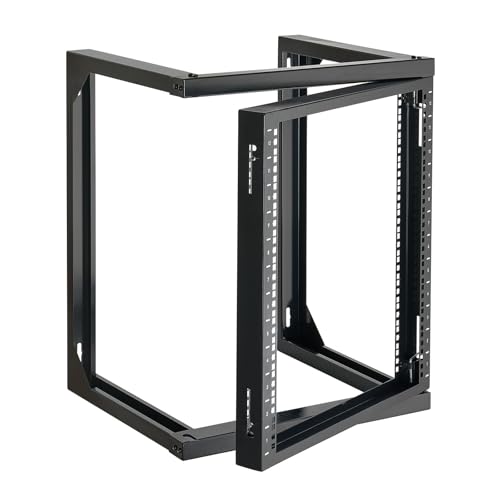 | VEVOR 12U Open FrameBudget pick | Wall or floor | 18 in | 150 lbs | Square and threaded | $58.49 |
 | VEVOR 12U Four PostBest four post | Floor, casters | 23 to 40 in | 500 lbs floor | Cage nuts | $75.99 |
 | RackPath 12U with ShelvesBest for non rack gear | Wall or floor | 14 in shelves | 150 lbs | 10-32 screws | $85.58 |
 | StarTech RK12WALLOABest build | Wall, two post | Compact | 200 lbs | Standard 19 in | $178.99 |
 | Tecmojo 12U ShallowBest for tight spaces | Wall or floor | 15.8 in | 110 lbs | Square and 12-24 | $89.90 |
U is a height unit. One rack unit is 1.75 inches, so a 12U rack gives you 21 inches of vertical mounting space. A patch panel is 1U, most network switches are 1U, a small UPS is 1U or 2U, and a rack shelf is 1U or 2U.
Count your gear, then add half again. A typical home setup is a patch panel, a switch, a router shelf and a UPS, which is five or six U. Buy 12U anyway. Racks fill up, spare units cost almost nothing at purchase, and adding a second rack later means finding wall space and drilling again.
Leave gaps between hot devices. A 1U space above a switch that runs warm costs you nothing and materially helps convection. In a 12U rack with six U of equipment you have the room, so use it.
The width is always 19 inches. That is the EIA/ECA-310-E standard and it is why any rack takes any rack mount device. What varies is depth, and depth is where purchases go wrong.
Measure depth properly. Take your deepest device, measure front to back, then add roughly three inches for the cables plugged into the rear. Patch panels are shallow, switches are typically 10 to 14 inches, and a UPS or a short depth server can easily exceed 18 inches. If your deepest item is a switch, an 18 inch rack is fine. If you have a UPS, buy 24 inches.
Look carefully at the two load numbers manufacturers publish, because they describe completely different situations.
The VEVOR four post rack is rated 500 lbs standing on the floor and 150 lbs mounted on a wall. Tecmojo quotes 260 lbs on the ground and 130 lbs on a wall for one of its models. Those gaps are not marketing inconsistency. A floor standing rack transfers weight straight down through its own frame. A wall mounted rack hangs entirely from the fixings you drive into the building.
So the wall figure is really a statement about your wall. The rack can take it; the question is whether your fixings can. That means:
Find the studs. Wall mounting into plasterboard alone will fail, and it will fail suddenly with several hundred dollars of equipment attached. Use a stud finder, mark the centres, and drive the mounting screws into solid timber. Most of these racks use 16 inch spacing on their mounting holes precisely because that is standard stud spacing in the United States.
On masonry, use proper anchors. The VEVOR four post kit includes M10 by 50 mm expansion screws for exactly this. Do not substitute plastic wall plugs.
Add up the real weight. A switch is 5 to 10 lbs, a patch panel loaded with cable is 5 lbs, but a UPS is 30 to 60 lbs on its own. A UPS is also the item most likely to push you past a wall rating, which is a good argument for putting it on the floor beneath the rack rather than in it.
The swing gate is worth paying for. Several racks here hinge and swing 180 degrees away from the wall. Without that, the back of a wall mounted rack is inaccessible, and every cable change means unbolting the whole assembly.
This trips up first time buyers, and the fix costs a few dollars.
Threaded holes are tapped directly into the rail, usually 10-32 or 12-24. You screw equipment straight in. Simple, but the thread strips if you overtighten, and once stripped that position is gone.
Square holes take cage nuts, small square clips you snap into the hole to create a threaded point wherever you need one. This is what commercial racks use, because a damaged cage nut is replaced in seconds rather than ruining the rail.
Several racks here, including both Tecmojo models, offer both, so you can use whichever suits each device.
If you buy a square hole rack, check whether cage nuts are included. VEVOR supplies ten M6 cage nuts with its four post rack. Ten is enough for two or three devices, so buy a bag of fifty separately. Running out mid installation is a common and entirely avoidable annoyance.
The 24 inch depth is why this is the recommendation, because it is the difference between a rack that fits your equipment and one that does not.
Most wall mount racks are 18 inches or less, which handles patch panels and switches but not a UPS, a short depth server or anything with bulky rear cabling. Twenty four inches accommodates essentially anything you would put in a home or small office rack, with room behind for cables to turn without being crushed against the wall.
The 180 degree swing gate solves the other wall mount problem. The frame hinges away from the wall so you can work on the back of your equipment with both hands. Anyone who has tried to reseat a cable behind a fixed wall rack understands why this matters. It opens from either side, and Tecmojo notes the gate can be removed entirely during installation.
Mounting holes are on 16 inch centres, matching standard US stud spacing, so the fixings land in timber rather than plasterboard.
You get both square holes and tapped holes, switchable, so equipment with either mounting style fits without adapters.
Load capacity is 110 lbs static and 55 lbs sliding, which is modest against the VEVOR options. The sliding figure is the one to watch if you plan to use pull out shelves. Cold rolled steel with an electrostatic powder coat, compliant with EIA/ECA-310-E.
Buy this if your deepest device is more than 15 inches and the rack goes on a wall.
Fifty eight dollars for a 12U rack that holds 150 lbs and includes the mounting hardware is remarkable value, and the compromises are ones many people can live with.
The capacity is the headline. At 150 lbs wall mounted it exceeds the Tecmojo’s 110 lbs despite costing less than half as much, built from Q235 carbon steel. For a patch panel, a switch, a router and a small UPS that is comfortable headroom.
It has the 180 degree hinged door for rear access, fully removable during assembly, which is the feature that makes a wall mounted rack workable.
Pre drilled square holes, threaded holes and wall mounting holes come with scale markings on the rails, which is a small detail that makes lining up equipment across multiple U positions much faster.
Screws and cage nuts are included, so you can mount switches and firewalls straight out of the box.
The depth is 18 inches. That covers patch panels and most switches but will not take a deep UPS or server, which is the main reason to spend more on the Tecmojo. Shelves are also sold separately here, where the RackPath includes two.
Buy this if your gear is patch panels and switches only and you want maximum capacity per dollar.
If you have floor space, this changes the calculation entirely. Seventy six dollars buys a four post rack holding 500 lbs, more than three times what any wall mount here manages.
Four posts matter for anything heavy. A two post rack supports equipment at the front only, which is fine for a switch but puts real strain on the front ears of a deep, heavy device. Four posts support front and rear, which is why data centres use them and why a server belongs in one.
The 23 to 40 inch adjustable depth is the standout feature. You set the rear posts to match your equipment rather than buying a rack sized for it, and you can readjust when your gear changes. Nothing else here offers that.
Casters are included, which is more useful than it sounds. Being able to roll the rack away from the wall to work on the back, then roll it back, is better access than any swing gate provides.
The kit is complete: two pallets, 145 screws, four casters, four M10 expansion screws, ten M6 cage nuts and a grounding wire. The grounding wire is a detail cheaper racks omit and a properly earthed rack is genuinely safer.
It can also wall mount at 150 lbs, though buying a four post rack to hang on a wall wastes its main advantage.
The trade is floor space. A four post rack occupies real footprint, which is why the wall mount options exist.
Buy this if you have floor space and heavy equipment, particularly a server or large UPS.
Most of what a home network rack holds was never designed to be racked. A cable modem, a consumer router, a NAS and a Raspberry Pi all have no mounting ears, and they end up stacked on top of each other or balanced on the frame.
This rack includes two 1U vented shelves at 14 inch depth, each with rear support brackets. That last detail is the important one. A cantilever shelf supported only at the front sags under a heavy modem or UPS and eventually deforms. Rear brackets carry the load at both ends.
The shelves are vented, which matters because consumer gear is designed to sit in open air and vents through its base. A solid shelf traps that heat.
Bought separately, two vented shelves with rear support run $30 to $50, so the effective rack price here is closer to $40.
The frame is reinforced cold rolled steel with a black powder coat, rated at 150 lbs, and it mounts on a wall or stands on the floor. Thirty 10-32 mounting screws and eight M5 wood screws are included.
The depth is the limitation. The shelves are 14 inches, so deep equipment overhangs. For modems, routers and small NAS units that is fine, and those are exactly what shelves are for.
Buy this if most of your kit is consumer gear without mounting ears, which for home setups it usually is.
At $178.99 this costs three times the VEVOR, and what you are buying is the thing that does not appear on a specification sheet.
StarTech is a long established brand supplying commercial installers, with documented technical support, a proper warranty and consistent manufacturing. The generic racks on this page are good value and many are perfectly well made, but there is real variation between production runs, and if one arrives with misaligned rails your recourse is a return.
The 200 lbs wall mounted capacity is the highest here by a clear margin, exceeding the VEVOR’s 150 lbs and nearly double the Tecmojo’s 110 lbs. On a wall mount that headroom is worth having, because the consequence of overloading is not degraded performance but a rack on the floor.
It is a two post open frame design in standard 19 inch format, supporting equipment at the front rails.
The listing is unusually sparse, which is a genuine drawback at this price. Confirm the depth and mounting hole specification with StarTech before ordering, because the product page gives little away.
The honest position: for a home lab, the VEVOR at $58.49 does the same job and the $120 difference buys you switches. Buy the StarTech for a commercial installation, a client site, or anywhere the rack must simply not be a problem.
Buy this for a commercial or client installation where support and consistency matter more than price.
Sometimes the constraint is not weight or budget but the physical space available, and 15.8 inches is genuinely shallow.
A rack this depth fits inside a standard closet, in an alcove, under a stairwell, or on a wall in a corridor where a 24 inch rack would protrude into the walkway. That is a real planning constraint in apartments and older houses, where there simply is no deep space near where the cable enters.
It takes patch panels, switches, and most 1U network equipment comfortably. It will not take a UPS, a NAS or a server, so check your deepest item first.
Rear brackets enhance stability, which matters more on a shallow rack because there is less leverage available to resist equipment weight pulling forward.
You get both 12-24 threaded holes and square holes, so equipment with either mounting style fits. Cold rolled steel with an electrostatic powder coat, 110 lbs capacity, compliant with EIA/ECA-310-E.
Tecmojo offers this frame in 6U, 9U, 12U and 15U, and in both 15.8 inch and 24.8 inch depths, so if this is close but not right there is likely a variant that fits.
At $89.90 it costs more than the deeper VEVOR, which is worth understanding: you are paying for a specific dimension, not for capability.
Buy this when the space dictates the rack, such as a closet or a corridor wall.
12U suits almost every home setup. A typical build of patch panel, switch, router shelf and UPS uses five or six U, and the spare space costs very little at purchase while giving you room to grow and to leave gaps between hot devices. Depth matters more than height: measure your deepest device and add three inches for rear cabling.
Not into drywall alone. A loaded rack weighs 50 to 150 lbs and the fixings must go into studs or, on masonry, into proper expansion anchors. Most of these racks use 16 inch mounting hole spacing to match standard stud centres. Use a stud finder and mark the centres before drilling.
A two post rack supports equipment at the front rails only, which is fine for patch panels and switches. A four post rack supports front and rear, which is necessary for heavy deep equipment such as servers and large UPS units. Four post racks are floor standing and carry far higher loads, typically 500 lbs against 150 lbs for a wall mount.
Open frame is better for most home and small office use. It cools passively, costs far less, and gives you access from every side. Enclosed cabinets are for dusty environments, places where equipment noise needs containing, or where physical security matters. They also need active ventilation, which adds noise of its own.
Cage nuts are small square clips that snap into square rack holes to create a threaded mounting point. They are the commercial standard because a damaged one is replaced in seconds, where a stripped threaded hole ruins that rail position permanently. If your rack has square holes you need them, and most kits include far fewer than a full build requires.
Typically 110 to 200 lbs depending on the rack, which is often less than half its floor standing rating. The real limit is your wall and your fixings rather than the rack itself. Add up your equipment honestly, remembering that a UPS alone can be 30 to 60 lbs, and consider putting heavy items on the floor beneath the rack instead.
For a wall mounted setup, buy the Tecmojo 12U at 24 inch depth for $129.90. The depth is what stops you discovering your UPS does not fit, and the swing gate is what stops rear access becoming a two person job.
If your equipment is only patch panels and switches, the VEVOR 12U at $58.49 holds more weight for less than half the money. And if you have floor space, the VEVOR four post at $75.99 is the better buy outright: 500 lbs capacity, adjustable depth from 23 to 40 inches, and casters so you can roll it out instead of reaching around it.
Disclosure: Networking Signal is a participant in the Amazon Services LLC Associates Program. We earn a commission on qualifying purchases made through links on this page, at no additional cost to you. Prices shown were accurate at the time of writing and may change. Wall mounting must be into structural studs or masonry anchors. Verify your wall construction and load before installing.
Hand-picked articles you might also find useful.
 Networking Gears
 The best patch panels for 2026. The Cable Matters Cat6 punch down panel at $44.99 is the pick…
 Networking Gears
 The best routers with parental controls and time limits in 2026. The ASUS RT-BE58U at $143 is the…
 Cables
 The best Starlink Ethernet adapters for 2026. The LUCMO Gen 2 adapter at $17.99 does the job. Most…