
Modem vs Router: You Should Read Amazing Things
Do you know the difference between a modem and a router? Many people don’t, but it’s an important…
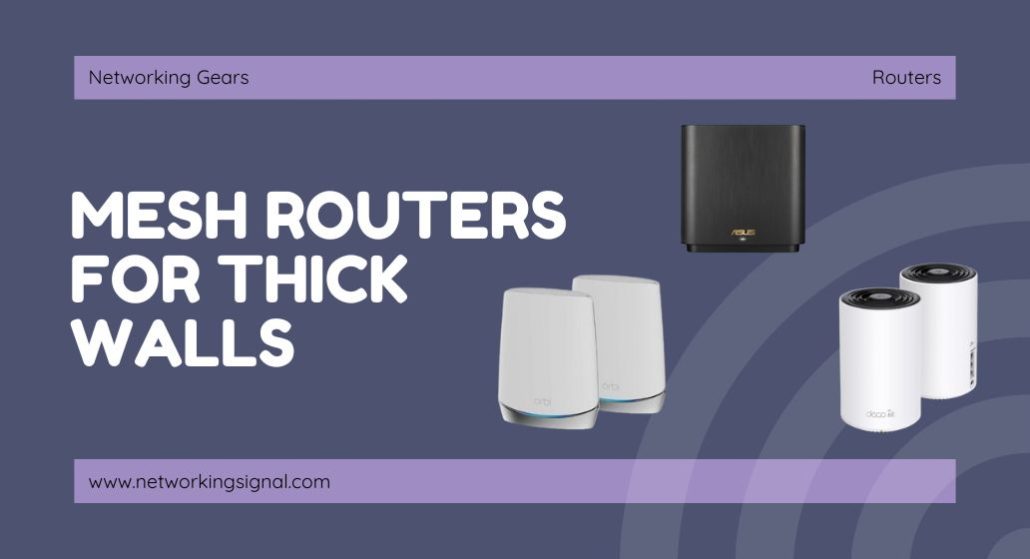
The TP-Link Deco X55 three-pack ($150) is the best mesh system for thick walls, not because its radios are strongest, but because every node has three Ethernet ports and supports wired backhaul. Through brick, stone or concrete, a wired link between nodes beats any wireless one, every time.
The counterintuitive part: for thick walls, do not buy the system with 6 GHz backhaul. Higher frequencies are absorbed more heavily by dense material, 6 GHz barely survives one solid wall. A tri-band system that uses 5 GHz for backhaul, like the ASUS ZenWiFi XT8, penetrates far better than a newer 6E or WiFi 7 system does.
| Product | System | Backhaul | 2.4 GHz | Ports per unit | Price |
|---|---|---|---|---|---|
 | TP-Link Deco X55 (3-pack)Best overall | Wired or 5 GHz | 574 Mbps | 3 × 1G | $149.97 |
 | ASUS ZenWiFi XT8 (2-pack)Best backhaul | Dedicated 5 GHz | 574 Mbps | 3 × 1G + 2.5G | $249.99 |
 | TP-Link Deco X20 (3-pack)Best value | Wired or 5 GHz | 574 Mbps | 2 × 1G | $129.97 |
 | TP-Link Deco X15 (3-pack)Budget pick | Wired or 5 GHz | 300 Mbps | 2 × 1G | $105.91 |
 | ASUS ZenWiFi BD5 OutdoorBest for exterior walls | PoE wired | WiFi 7 MLO | 2 × 2.5G PoE | $149.99 |
 | Amazon eero 6+ (3-pack)Easiest setup | Wired or 5 GHz | TrueMesh | 2 × 1G | $299.99 |
 | ASUS ZenWiFi BT10 (2-pack)Premium pick | Tri-band AI | 10 power modules | 2 × 10G | $563.32 |
Radio signals lose energy passing through material, and how much they lose depends on both the material and the frequency. This is physics, not a product problem, and it is why the usual “buy the fastest mesh” advice fails badly in a solid-walled house.
Rough attenuation through a single wall: drywall costs you around 3 dB, wood about 5 dB, brick 10 to 15 dB, reinforced concrete 20 to 30 dB, and foil-backed insulation or a mirror can exceed 30 dB. Every 3 dB is half the signal power. A single reinforced concrete wall can therefore cut your signal to a small fraction of what left the antenna.
Higher frequencies lose more. This is the part that overturns normal buying advice. Through the same brick wall, 2.4 GHz might lose 10 dB, 5 GHz around 15 dB, and 6 GHz over 20 dB. So the newest, fastest band is the one that fails first in your house.
That has a direct consequence for what to buy. Tri-band WiFi 6E and WiFi 7 systems typically use the 6 GHz band as their dedicated backhaul, the link between nodes. Through thick walls that link degrades badly, the system falls back to a shared 5 GHz link, and you have paid a premium for a feature that stopped working. A tri-band system that uses 5 GHz for backhaul, like the ZenWiFi XT8, keeps its advantage.
The real answer is wired backhaul. An Ethernet cable does not care what your walls are made of. If you can run a cable between nodes, do it, and buy the system that makes that easy, which means Ethernet ports on every unit, not just the main one. That single decision matters more than every specification on the box.
Move your existing router. Routers end up wherever the cable enters, which is often a corner, a cupboard or a basement, the worst possible position. A router in the centre of the house, at head height, in open air, will sometimes solve the whole problem for the cost of a longer cable.
Try powerline adapters. If running Ethernet is impractical, a pair of powerline adapters sends network traffic over your existing electrical wiring, straight through the walls that are blocking you. Performance depends heavily on your wiring, same circuit and modern wiring do well, old wiring across two consumer units does not, but for around $60 it is worth testing before spending $300 on mesh.
Check the 2.4 GHz band is enabled. Some routers hide 2.4 GHz behind band steering, or push everything onto 5 GHz for speed. In a thick-walled house, 2.4 GHz is the band that reaches. Separating the SSIDs so you can force a device onto 2.4 GHz costs nothing and sometimes fixes a “dead zone” entirely.
If none of that works, then mesh is the right answer, and the list below is ordered for your specific problem.
The X55 wins this category on port count, which sounds like a dull reason until you understand that wired backhaul is the only thing that reliably defeats a solid wall. Three gigabit Ethernet ports on every node, nine across the three-pack, means you can wire any node to any other and still have ports left for a TV or a desktop at each location.
Compare that with systems that give you two ports on the main unit and one on each satellite: wire the backhaul and you have consumed the only port that node had. On a thick-walled house, where wiring is the strategy rather than a bonus, that difference decides the purchase.
The 2.4 GHz radio runs at 574 Mbps, which is high for a dual-band system and matters here more than the 5 GHz figure. Through brick, 2.4 GHz is often the only band that arrives with usable signal, and having real throughput on it rather than a token 300 Mbps is the difference between a room that works and one that limps.
Three nodes also let you do what thick walls demand: place them closer together than the coverage rating suggests. The 6,500 sq ft figure assumes open space. In a stone house you might use all three nodes across 1,800 sq ft, and that is the correct way to use them.
Buy it if you can run Ethernet between nodes, or might later, this is the system that makes wiring easiest.
If you cannot run Ethernet, the XT8 is the best wireless answer for a thick-walled house, and the reason is a design choice that looks dated on paper and turns out to be exactly right here.
The XT8 is tri-band, but its third radio is a second 5 GHz band used as dedicated backhaul, not a 6 GHz band. Newer 6E and WiFi 7 systems moved backhaul to 6 GHz for the extra bandwidth, and through open air that is better. Through brick or concrete, 6 GHz loses roughly 5 to 10 dB more than 5 GHz over the same path. In a solid house, the XT8’s “older” 5 GHz backhaul stays connected where a 6 GHz one has already collapsed.
The antenna design helps too. ASUS positions the antennas specifically to broaden coverage rather than to hit peak same-room throughput, and the units are physically larger than a Deco, which gives the antennas more separation and, in practice, better performance at distance.
You also get AiMesh, so you can add any AiMesh-compatible ASUS router as an extra node rather than buying a matched third unit. On a big stone house that flexibility is genuinely useful. Lifetime AiProtection from Trend Micro is included with no subscription.
The catch is that this is a two-pack covering 5,500 sq ft in open space, through thick walls, plan on needing a third node.
Buy it if you cannot run Ethernet and need the strongest wireless link between nodes through solid walls.
The X20 keeps the specification that matters for thick walls, 574 Mbps on 2.4 GHz, and gives up 5 GHz throughput you were unlikely to get through the wall anyway. For $20 less than the X55 that is a sensible trade in a solid house.
Think about it in terms of what actually reaches the far room. On the near side of a brick wall you might see full 5 GHz speeds; on the far side, 5 GHz may be marginal and 2.4 GHz carries the traffic. In that scenario the X55’s higher 5 GHz ceiling never gets used, while the identical 2.4 GHz radio does all the work in both systems.
You get two gigabit ports per unit rather than three. Wire the backhaul and one port remains free at each node, enough for a TV or a games console, not enough for a small switch’s worth of equipment.
Coverage is 5,800 sq ft in open space with a 150-device ceiling matching the X55. Alexa integration is built in.
Buy it if 2.4 GHz will be doing the work in your house and you would rather not pay for 5 GHz headroom you cannot use.
At $106, the X15 is the cheapest way to get three nodes with wired backhaul support, and if you are going to wire them, three nodes matters far more than what each radio can do.
The compromise sits on 2.4 GHz, where the X15 runs at 300 Mbps against the X20 and X55’s 574. In a thick-walled house that is the band under most pressure, so it is not a trivial difference. On a wired backhaul it matters much less, because each node is serving only its own room rather than relaying for others.
That gives a clear rule: if you can wire the nodes, the X15 is excellent value. If the nodes will link wirelessly through solid walls, spend the extra $24 on the X20 for the stronger low band.
Two gigabit ports per unit, wired backhaul, the same Deco app and mesh firmware as TP-Link’s expensive models. The savings are in radio capacity, not in software or reliability.
Buy it if you are definitely wiring the backhaul and want three nodes for the lowest possible price.
This is the answer to a problem the other systems cannot solve: a detached garage, an annexe, or a wing of the house separated by an exterior stone wall that no indoor node will ever penetrate.
The trick is to stop fighting the wall and go around it. Mount the BD5 outside, run a single PoE cable to it, power and data on one line, no separate power supply at the mounting point, and let it serve the far side of the wall directly. One cable through one wall replaces an impossible wireless path.
It is built for the job: IP65 water and dust resistance, ESD and surge protection, and a minus 30 °C to 60 °C operating range, with wall, pole and flat-surface mounting included. Two 2.5 Gbps PoE-in ports mean you can also daisy-chain to another outdoor node.
It joins any AiMesh network, so it works alongside a ZenWiFi XT8 or an ASUS router you already own, you do not need a matched set. As WiFi 7 with MLO it is also genuinely modern hardware rather than an outdoor afterthought.
You will need a PoE injector or PoE switch, and the ability to get a cable outside. That is more work than plugging in another indoor node, but it is the only approach that reliably works through an exterior masonry wall.
Buy it if the wall you are fighting is an exterior one, a garage, an annexe, or a separate wing.
eero’s TrueMesh routing is unusually good in a difficult building, and that is worth more here than in an open-plan house. In a solid-walled home the best path from a device to the internet is often not the obvious one, sometimes a hop through a second node beats a direct link to the main unit. TrueMesh works that out continuously and re-routes without being told.
The app also does something practical: it reports link quality between nodes during setup and warns you when a node is too far away. In a thick-walled house, where “too far” might be two rooms rather than two floors, that feedback saves a lot of guesswork.
eero supports wired backhaul and will use it automatically when you connect nodes with Ethernet, no setting to change, it simply detects the wired path and prefers it.
Two things to weigh. Coverage is 4,500 sq ft, the narrowest here, and thick walls reduce that further, so plan on a fourth node for a large stone house. And the parental controls and content filtering people expect are behind the eero Plus subscription.
Buy it if you want the system that figures out a difficult layout itself rather than being tuned.
The BT10 is the one system here where raw transmit hardware genuinely helps against thick walls. Eight internal antennas and ten high-power front-end modules, the amplifiers that drive the antennas, mean more energy actually leaves the unit, and against 20 dB of concrete attenuation that is not marketing. It is the difference between a marginal link and a working one.
The heat dissipation design deserves a mention for the same reason. Running amplifiers hard produces heat, and thermal throttling is a real and badly documented cause of mesh systems that work well for ten minutes and then degrade. ASUS engineered around it here.
Dual 10 Gbps ports on each unit make it the best system on this list for wired backhaul at scale, you can wire the backhaul at 10 Gbps and still have a 10 Gbps port free at each node for a NAS or a switch.
The honest assessment: at $563 for two nodes it is roughly four times the Deco X55, and if you can wire the backhaul the X55 will deliver a very similar experience. Buy the BT10 when you cannot wire, the walls are severe, and you want the most capable wireless hardware available rather than the best value.
Buy it if the walls are severe, wiring is impossible, and you want the strongest transmit hardware on the market.
Ignore the coverage rating. The square-footage number on the box assumes open space. In a stone or concrete house, treat it as roughly a third of that. Three nodes across 1,800 sq ft is normal and correct, not overkill.
Place nodes in doorways and hallways, not in rooms. The single most effective trick in a solid house is to put a node where the signal has a clear path rather than where you want coverage. A node in a hallway serves three rooms through open doorways; the same node inside one of those rooms serves one room well and the others badly.
Chain the nodes rather than fanning them out. Each node needs a strong link to the previous one. In a long stone house, main unit → node 2 → node 3 in a line usually beats placing both satellites at the extremes and hoping they reach the middle unit directly.
Check the link quality reading, not the coverage. Deco, eero and ASUS all report node-to-node connection quality in the app. Aim for “good” or better. If a node reports “fair” or “weak”, move it closer, a node with a poor uplink makes the network worse, because devices connect to it and then get a bad path.
Keep nodes away from metal, mirrors and foil insulation. A node next to a large mirror or on a metal shelf loses much of its output in one direction. Foil-backed insulation is close to a solid metal barrier and is a common hidden cause of a dead room in an otherwise well-covered house.
Yes, but only if you place the nodes correctly. A mesh system does not push a signal through a wall any harder than a single router does; it works by putting another transmitter on the far side. That means nodes must be spaced closer than the coverage rating suggests, often one node per room or per pair of rooms in a stone or concrete house.
2.4 GHz. Lower frequencies are absorbed less by dense material, so through brick or concrete 2.4 GHz reaches noticeably further than 5 GHz, and much further than 6 GHz. It is slower, but a slow connection that works beats a fast one that does not arrive.
Usually not, if the reason is the 6 GHz band. Most 6E and WiFi 7 mesh systems use 6 GHz as their dedicated backhaul, and that band is heavily attenuated by dense walls, so the feature you are paying for is the first thing to fail. A tri-band system with a dedicated 5 GHz backhaul, such as the ASUS ZenWiFi XT8, performs better in this specific situation.
In a thick-walled house it is the single most effective upgrade available. Ethernet is unaffected by what your walls are made of, so a wired node performs as though it were the main router. If you can run cable, do, and choose a system with Ethernet ports on every node, not just the main unit.
Poorly, in this situation. A traditional extender receives a weak signal and rebroadcasts it, through thick walls it is amplifying an already-degraded signal, and it typically halves throughput. It also usually creates a second network name you have to switch between manually. Mesh systems relay more intelligently and keep one network name.
Plan on roughly one node per 600 to 800 sq ft in a solid-walled house, against 1,500 to 2,000 sq ft in a drywall house. A three-node system typically covers a 1,800 to 2,400 sq ft stone or concrete home. Buy the three-pack rather than a two-pack; adding a matching node later usually costs more than the original saving.
The TP-Link Deco X55 three-pack at $150 is the right buy for most thick-walled homes, because three Ethernet ports on every node make wired backhaul practical, and wired backhaul is the only approach that reliably defeats masonry. Its strong 574 Mbps 2.4 GHz radio does the rest.
If you genuinely cannot run cable, the ASUS ZenWiFi XT8 is the best wireless answer, precisely because its dedicated backhaul is on 5 GHz rather than 6 GHz. And if the wall in your way is an exterior one, the ZenWiFi BD5 Outdoor solves it by going around the wall rather than through it, which, for a stone or concrete exterior, is the only thing that actually works.
Disclosure: Networking Signal is a participant in the Amazon Services LLC Associates Program. We earn a commission on qualifying purchases made through links on this page, at no additional cost to you. Prices shown were accurate at the time of writing and may change. Attenuation figures quoted are typical published ranges; actual performance depends on wall thickness, construction and the specific materials in your building.
Hand-picked articles you might also find useful.
 Networking Gears
 Do you know the difference between a modem and a router? Many people don’t, but it’s an important…
 Networking Gears
 The best outdoor WiFi extenders for 2026. The TP-Link EAP650-Outdoor at $134.99 is the pick. Includes why you…
 Modems
 The best Cox approved modems for 2026. The Motorola MB8611 at $130 suits most plans and pays back…