
[Easy Way] How to Reset Your Xfinity Router?
Resetting your Xfinity router is a simple process that can solve a lot of internet connectivity issues you…
The NETGEAR Nighthawk CAX30 at around $156 is the one to buy, DOCSIS 3.1, WiFi 6, and it pays for itself against Xfinity’s rental fee in roughly ten months. On a plan under 400 Mbps the Motorola MG7550 at $70 does the same job for less.
One thing to check before you order: the CAX30S is the same hardware as the CAX30 at more than twice the price. The only difference is a bundled security subscription.
Xfinity charges a monthly fee for the gateway they supply, around $15 a month, or roughly $180 a year. Buying your own modem router combo removes that permanently, which is why these devices pay for themselves faster than almost any other networking purchase.
The trap is buying the wrong standard. A DOCSIS 3.0 combo on a gigabit plan will throttle you, and no amount of WiFi specification fixes it. The picks below are sorted by the plan speed they actually suit.
| Model | DOCSIS | WiFi | Best plan | Price | |
|---|---|---|---|---|---|
 | NETGEAR Nighthawk CAX30Best choice | DOCSIS 3.1 · 32×8 | WiFi 6 AX2700 | Up to 1 Gbps | $156.00 |
 | Motorola MG7550Budget friendly | DOCSIS 3.0 · 16×4 | WiFi 5 AC1900 | Up to 375 Mbps | $69.99 |
 | ARRIS Surfboard G34Best value | DOCSIS 3.1 | WiFi 6 AX3000 | Up to 2.5 Gbps | $180.00 |
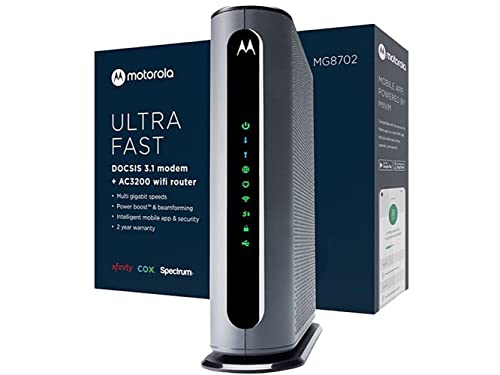 | Motorola MG8702Best coverage | DOCSIS 3.1 | WiFi 5 AC3200 | Up to 1 Gbps | $299.99 |
 | NETGEAR CAX30SSecurity bundle | DOCSIS 3.1 · 32×8 | WiFi 6 AX2700 | Up to 1 Gbps | $349.99 |
This is the sensible buy for the large majority of Xfinity customers. DOCSIS 3.1 with 32×8 channel bonding handles gigabit plans properly, and WiFi 6 with OFDMA means it copes with a house full of devices rather than just one fast laptop.
The economics are the real argument. At $156 against Xfinity’s roughly $15 monthly rental, it pays for itself in about ten months and saves you around $180 every year after that. Very little networking hardware has a payback period that short.
Coverage is quoted at 2,000 sq ft and 25 devices, which is honest for a flat or a small-to-mid house. Four gigabit ports with port aggregation and a USB 3.0 port cover wired devices and a shared drive. NETGEAR Armor is included as a 30-day trial and then becomes a paid subscription, you can simply not renew it without losing anything else.
Worth being clear on the limit: like every combo here it replaces both your modem and your router, so when you eventually want a better router you have to replace the modem too. See the section below on whether that trade is right for you.
Buy it if you are on an Xfinity plan up to 1 Gbps and want to stop paying the rental fee.
At $70 this is the fastest payback on the list, under five months against the rental fee. If you are on Xfinity’s 200 or 300 Mbps tier, it does everything the expensive models do for a fraction of the money.
The constraint is DOCSIS 3.0 with 16×4 channel bonding, which Motorola sensibly rates for real-world speeds up to about 375 Mbps. Do not buy this for a gigabit plan, the modem becomes the ceiling and you will not get what you are paying Comcast for.
Two features stand out at this price. DFS channel support is unusual on budget hardware and genuinely useful: it opens 5 GHz channels most neighbouring routers cannot use, which matters in a block of flats. Power Boost pushes the transmitter to the legal limit for extra range.
No phone jack, so this is not the model to buy if you have Xfinity Voice.
Buy it if your plan is 400 Mbps or slower and you want the fastest possible payback.
The G34 is rated for cable plans up to 2.5 Gbps, beyond what the CAX30 targets, and pairs that with a faster AX3000 radio, for $24 more. If you are on Xfinity’s higher tiers, or expect to upgrade, this is the better long-term buy.
ARRIS makes a large share of the gateways cable companies supply in the first place, so provider compatibility tends to be well handled and activation is usually painless.
The compact vertical design with simple LED indicators is a small practical win: the lights tell you whether the problem is power, downstream, upstream or the internet, which saves time when something goes wrong. Four gigabit LAN ports, which is the one place it does not lead, a 2.5 Gbps-capable modem with 1G LAN ports means no single wired device can use the full plan.
Buy it if you are on a gigabit-plus plan or want headroom for a future upgrade.
The MG8702 pairs DOCSIS 3.1 with a tri-band AC3200 radio plus Power Boost, Range Boost and AnyBeam beamforming, the most coverage-focused unit here. In a larger or awkwardly shaped house it reaches further than the CAX30.
The honest problem is the standard. AC3200 is WiFi 5, not WiFi 6, and it costs nearly twice the CAX30. WiFi 5 lacks OFDMA, which is the feature that keeps a network responsive when twenty devices are connected. You are trading device-density performance for raw range.
That is a reasonable trade in a big house with few devices, and a poor one in a busy flat. If coverage is the problem, a cheaper combo plus a second access point usually beats one powerful unit anyway, putting a radio closer to the dead zone works better than shouting louder from the same spot.
Buy it if you have a large house, few devices, and cannot run Ethernet for a second access point.
Include it for completeness, with a clear warning: this is the same hardware as the CAX30. Same DOCSIS 3.1 with 32×8 bonding, same AX2700 WiFi 6, same 2,000 sq ft and 25-device rating, same four gigabit ports and USB 3.0. The “S” denotes a bundled NETGEAR Armor security subscription.
At $349.99 against $156, you are paying roughly $194 extra for a subscription you can buy separately, and one you may not want, since it is an annual renewal. Compare the two listings carefully, because the model numbers differ by a single letter and it is easy to order the wrong one.
If you specifically want Armor and the maths works out against buying it standalone, this is a legitimate purchase. Otherwise buy the CAX30 and spend the difference on a mesh node or a switch.
Buy it if you definitely want NETGEAR Armor and have checked it is cheaper than buying it separately.
Xfinity’s gateway rental is around $15 a month. Here is when each option turns a profit:
| Model | Price | Pays back in | Saved over 3 years |
|---|---|---|---|
| Motorola MG7550 | $69.99 | ~5 months | ~$470 |
| NETGEAR CAX30 | $156.00 | ~10 months | ~$384 |
| ARRIS Surfboard G34 | $180.00 | ~12 months | ~$360 |
| Motorola MG8702 | $299.99 | ~20 months | ~$240 |
| NETGEAR CAX30S | $349.99 | ~23 months | ~$190 |
Figures assume a $15 monthly rental; check your own bill, because Comcast’s equipment charge varies by plan and region.
Xfinity maintains a list of devices approved for their network. A modem that is not on it may activate and then behave unpredictably, or may not activate at all. Every model here is a widely used Xfinity-compatible device, but confirm against Comcast’s current list before ordering, approvals change.
| DOCSIS 3.0 | DOCSIS 3.1 | |
|---|---|---|
| Realistic ceiling | ~375 to 600 Mbps | 1 to 2.5 Gbps |
| Suits | Plans up to 400 Mbps | Gigabit and above |
| Future-proof | No | Yes |
The rule: match the modem to the plan, not the other way round. DOCSIS 3.1 on a 200 Mbps plan wastes money; DOCSIS 3.0 on a gigabit plan wastes the plan.
If you have Xfinity’s home phone service, you need an eMTA device with a telephone port. None of the models above include one, you would have to keep renting Comcast’s gateway or drop the voice line.
A combo is simpler, cheaper and takes one power socket instead of two. A separate modem and router is the better long-term choice, because you can upgrade the router, where almost all the useful improvements happen, without replacing a modem that was working perfectly well. If you already own a router you like, buy a standalone modem and keep it. If you are starting fresh and want one box, a combo is a perfectly reasonable call.
The NETGEAR Nighthawk CAX30 at around $156 for most people, DOCSIS 3.1, WiFi 6, and about a ten-month payback against Comcast’s rental fee. On a plan under 400 Mbps, the Motorola MG7550 at $70 does the same job for far less.
Around $15 a month, or roughly $180 a year, though it varies by plan and region. Check the equipment line on your own bill, that figure is what determines how quickly buying your own pays back.
Only if your plan is faster than about 400 Mbps. DOCSIS 3.0 with 16×4 bonding realistically tops out around 375 Mbps, so it suits the lower tiers. Gigabit plans need DOCSIS 3.1.
No. Comcast maintains an approved device list, and a modem that is not on it may fail to activate or behave unreliably. Check the current list before ordering.
Simpler and cheaper, but less flexible. With separate units you can upgrade the router, where the meaningful improvements happen, without replacing a modem that still works. Combos force you to replace both at once.
Not the models here. Xfinity Voice needs an eMTA device with a telephone jack, and none of these include one. You would need to keep renting Comcast’s gateway or drop the phone line.
The hardware is identical, same DOCSIS 3.1, same AX2700 WiFi 6, same ports and coverage rating. The S adds a bundled NETGEAR Armor security subscription, for roughly $194 more. Unless you specifically want Armor, buy the CAX30.
Disclosure: we earn a commission on purchases made through the links above, at no extra cost to you. Prices are those shown at the time of writing and change frequently, check the current price on Amazon before buying. Specifications are taken from manufacturer listings.
Hand-picked articles you might also find useful.
![[Easy Way] How to Reset Your Xfinity Router?](https://www.networkingsignal.com/wp-content/uploads/2026/09/auto/art-how-to-reset-your-xfinity-router.svg) Routers
Routers Resetting your Xfinity router is a simple process that can solve a lot of internet connectivity issues you…
 Modems
 What is DOCSIS? DOCSIS (Data Over Cable Service Interface Specification) is an international telecommunications standard published by CableLabs…
 Networking Gears
 The best gaming routers in 2026, ranked on latency handling rather than headline speed. The ASUS RT-BE86U at…