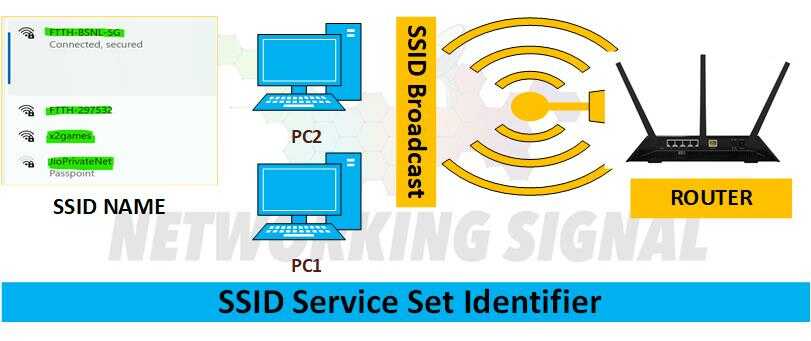
An SSID (Service Set Identifier) is a unique identifier used to identify a particular wireless network. It is typically used in combination with a security protocol such as WPA or WEP, to ensure that only users who know the SSID have access to the network.
The SSID is usually broadcast by the router and can be found in the router’s settings. It is also possible to hide the SSID from being broadcast, making it difficult for someone to connect to the network without knowing the SSID.
What are the Advantages of SSID?
There are several advantages to using an SSID.
It provides an extra layer of security for your network. By requiring users to enter an SSID in order to gain access, you can be sure that only those who know the network are allowed to connect.
As a unique identifier, it helps devices on the same network identify each other.
SIDs can be used to create separate networks within the same space, allowing multiple devices to connect without interfering with each other.
What is Multi SSID?
Multi SSID is a feature of some routers that allows users to create multiple wireless networks, each with its own unique SSID. This can be useful for creating separate guest and business networks, or for separating different types of traffic over the same network.
The Multi SSID feature also supports the use of multiple authentication methods, allowing for increased security on each network.
Multi SSID can also be used to allow multiple users to connect to the same router while keeping each user’s data private and secure. By assigning a unique SSID for each user, it is possible to control who has access to certain areas of the network or which devices are allowed on the network.
How do I find my SSID?
Here are the steps to finding your SSID:
Log into the router’s settings page by typing its IP address into a web browser.
Look for an option that says “SSID” or “wireless network name”. It may also be labeled as something like “Wireless Settings” or “Wireless Security”.
Your SSID will be listed in this section of the router settings page.
If you can’t find it there, check your router’s user manual for instructions on how to locate the SSID.
Some routers also allow users to hide their SSID, which means it won’t appear in the router settings. If this is the case, you can try resetting your router to its default settings and then finding the SSID.
FAQs
Is the SSID the same as the password?
No. The SSID is a unique identifier used to identify the network, while the password is used to gain access to it.
Do I need to change my router’s SSID?
You don’t have to change your router’s SSID, but it can help increase security by making it difficult for anyone to guess the network name.
What is the difference between an SSID and a BSSID?
An SSID (Service Set Identifier) identifies a particular wireless network, while a BSSID (Basic Service Set Identifier) identifies a specific access point on that network. The BSSID can be found in the router’s settings, while the SSID is usually broadcast by the router.
Can I hide my SSID?
Yes, some routers allow users to hide their SSID from being broadcast. This can help protect your network by making it difficult for someone to connect without knowing the SSID. To hide an SSID, look for a setting in the router’s settings page that says “Broadcast SSID”. If you are unable to find this setting, check your router’s user manual for instructions on how to do this.
Yes, using an SSID for your home network is recommended as it provides an extra layer of security. It also helps devices on the same network identify each other and can be used to create separate networks within a single space. Additionally, some routers offer the ability to hide the SSID from broadcasting, further increasing the security of your network.
GU
Written by
Gurpreet Singh
Hey! I"m Gurpreet Singh and I Have 7+ Years of experience in the Network & Security Domain as well as the Cloud Infra Domain. I am Certified with Cisco ( CCNA ), CheckPoint ( CCSA ), 1xAWS, 3xAZURE, and 3xNSE. So I love to share my tech knowledge with you.

 Wireless
  Wireless
  Wireless