
7 Best WiFi Routers That Look Like a PS5 in 2026
The routers that actually match a PS5 in 2026. The TP-Link Archer BE550 at $200 is the closest…
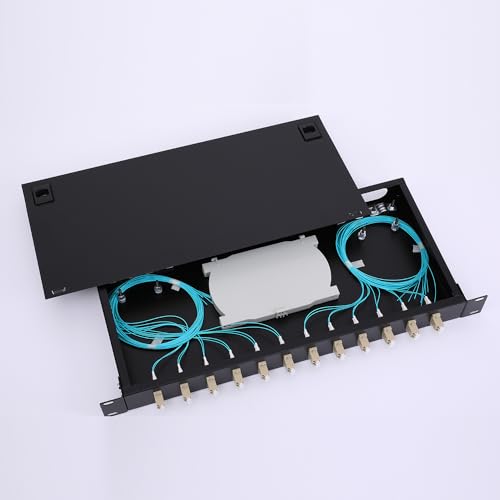
The ICC ICFORE31RM 1U enclosure ($149.54) is the best fiber patch panel for a rack. Three LGX slots, up to 72 LC connections, a slide out tray and a splice tray included.
Before you buy anything, know that three different products are all sold as a “fiber patch panel” and they are not interchangeable:
An LGX adapter panel is just the metal plate holding the couplers. From about $18. It does nothing on its own and must slot into an enclosure.
An enclosure is the box that holds those panels, protects the splices and manages slack. From about $44.
A complete kit is an enclosure plus a loaded panel plus pigtails, ready to splice. From about $77, and this is what most people actually need.
Also check whether your fiber is single mode or multimode before ordering, because the two do not mix.
| Product | Item | Type | Capacity | Mount | Price |
|---|---|---|---|---|---|
 | ICC ICFORE31RM 1U EnclosureBest overall | Enclosure only | 72 LC / 36 SC | 19 inch rack | $149.54 |
 | 24-Port LC-OS1 Rack KitBest value kit | Complete kit | 24 fibers | 19 inch rack | $77.41 |
 | 24-Port LC-OM3 Rack KitBest multimode | Complete kit | 24 fibers | 19 inch rack | $84.41 |
 | VFLTOOL 12-Port Wall Mount KitBest for no rack | Complete kit | 12 fibers | Wall | $54.41 |
 | Xunsomten 12-Port OS2 BoxBudget kit | Complete kit | 12 fibers | Wall or desk | $43.99 |
 | VFLTOOL LGX Panel, 6 Duplex LCPanel only | Adapter panel | 12 fibers | LGX slot | $17.71 |
This is where the money gets wasted. Someone orders a $17 “fiber patch panel”, it arrives as a bare metal plate with couplers and nothing to mount it in, and the job stops.
The LGX adapter panel. A metal plate, roughly 5 inches by 3, carrying couplers. LGX is a standard footprint, so any LGX panel drops into any LGX enclosure regardless of brand. Buy one of these only when you already have an enclosure with a free slot, or when you want to change connector type later.
The enclosure. A steel box with slots for LGX panels, plus room inside for splice trays and slack fiber. It has three jobs: hold the panels, protect the splices from being knocked, and stop the fiber bending tighter than it can survive. A 1U enclosure fits a standard 19 inch rack and typically takes three LGX panels.
The complete kit. Enclosure, loaded panel and a set of pigtails in one box. The pigtails matter more than they sound: they are short lengths of fiber with a factory made connector on one end and a bare end for splicing. You splice your incoming cable to the bare end and plug the connector into the back of the panel.
Buy the complete kit unless you already own an enclosure. Bought separately, the same three items usually cost more.
Get this wrong and the link either fails or runs far below what it should.
Single mode, called OS1 or OS2, has a 9 micron core and a yellow jacket. It is used for anything long, and for every internet service fed by fibre to the premises.
Multimode, called OM1 through OM5, has a 50 or 62.5 micron core with an orange or aqua jacket. It is used for short runs inside a building, mostly between switches in a data centre.
Mixing them is not a small compromise. Sending single mode light into a multimode core scatters it, and sending multimode into single mode loses most of the power at the boundary. Check the printing on your existing cable jacket before ordering.
The connector matters less. LC is the small one, roughly the size of an RJ45 tab, and is now the default. SC is the older square one, and ST is the round bayonet type on legacy runs. Everything below is LC unless stated.
Bend radius. Fiber has a minimum bend radius, usually around ten times the cable diameter. Bend it tighter and light escapes at the curve, which shows up as loss rather than a clean failure, so it is hard to diagnose. Enclosures with a spool or a managed slack area exist entirely to prevent this.
Dust caps. A single speck on a connector end face can wipe out a link. Leave the caps on until the moment you plug in, and keep a cleaning pen next to the rack.
This is what a fiber enclosure is supposed to be, and the difference against the cheap boxes is in the build rather than the specification sheet.
20 gauge cold rolled steel with folded edges and a black powder coat. The folded edges are the detail worth noting: they reinforce the panel so it does not flex when you pull a cable, and flex is what shifts splices inside a thin walled box.
The slide out tray is the feature you will thank yourself for. Terminating fiber inside a fixed 1U box with a rack above and below is genuinely difficult. Sliding the tray forward gives you room to work and means adding a strand later does not mean unracking the whole unit.
Three LGX compatible slots take adapter panels or MPO cassettes, supporting up to 72 LC, 36 SC or 18 ST connections. That is enough for a small business or a serious home lab with room left to grow.
One 24 fiber splice tray is included and it takes a second, so 48 splices can be managed properly inside.
Cable tie points and pre mounted fasteners for spools keep the pathways organised, and the front cover has transparent windows so you can see connections without opening it. Both covers use push and pull pins rather than screws.
EIA-310 compliant, so it fits any standard 19 inch rack. Grommets for the rear cable entry are sold separately.
Buy this for a permanent install you will add to later, where build quality earns its price.
Everything you need to terminate 24 single mode fibers, for half the price of the ICC enclosure alone. For most people this is the right purchase.
The box contains a 1U rack enclosure, splice trays and a spool, a loaded 12 duplex LC LGX panel, and 24 one metre LC-UPC pigtails. Open it, splice the incoming cable to the pigtails, lay the slack in the tray, close it up.
Single mode 9/125, which is what fibre to the premises services and any run over a few hundred metres uses. If your cable jacket is yellow, this is the one.
The pigtails are individually colour coded. On a 24 strand splice that is not a nicety, it is the difference between an hour and an afternoon, because you can trace a specific strand back without a light source.
UPC polish, the standard blue connector, with low insertion loss and high return loss, each pigtail individually tested. Zirconia ceramic ferrules, which is the correct material and not always what you get at this price.
Conforms to TIA/EIA-568-B and ISO/IEC 11801, so it is compatible with structured cabling elsewhere in the building.
The build is lighter than the ICC. Thinner steel and less refined cable management, which is exactly where the money was saved. For a rack that gets installed and left alone, it is a reasonable trade.
Buy this for a single mode run into a rack. It is the most complete package for the money.
The same kit built for multimode. If your existing fiber has an aqua jacket, buy this rather than the single mode version above.
OM3 is the aqua multimode grade that carries 10 Gbps to 300 metres and 40 or 100 Gbps to shorter distances. It is the standard for links between switches inside a building, and it is what most in building backbone installed in the last fifteen years actually is.
A 1U enclosure with two splice trays, a loaded 12 duplex LC LGX panel and 12 strands of one metre OM3 pigtail. Note the pigtail count: 12 strands for a 24 port panel, so half the ports are ready to use and the rest are there for expansion. Order more pigtails if you need all 24 now.
Colour coded strands, same as the single mode kit, and the same zirconia ceramic ferrules and 100 percent optical testing.
The seven dollar premium over the single mode kit is normal. Multimode fiber and connectors cost slightly more to produce because of the tighter alignment tolerances a larger core demands.
Same standards compliance, and the same removable outer jacket on the pigtails for tighter bend radius situations in a dense install.
The build is identical to the single mode kit, so the same caveat applies: lighter steel and basic cable management.
Buy this for a multimode backbone between switches where the jacket is aqua.
Most homes and small offices have no rack. This is the same idea in a box that screws to a wall.
Twelve strands is the right number for that situation. A house being fed by fibre needs two, maybe four with a spare pair. Twelve gives you room for a second building or a future upgrade without paying for capacity you will never use.
The built in spool is the important part. Wall mount installs almost always end up with more slack fiber than the box was designed for, and slack fiber left loose gets bent past its radius the first time someone reaches behind it. A spool gives that slack somewhere legitimate to live.
The kit includes the enclosure, a 6 port duplex LGX loaded panel and 12 strands of one metre LC-UPC single mode pigtail, colour coded.
Zirconia ceramic ferrules and 100 percent optical testing, same as the rack kits, and it meets the same TIA/EIA-568-B and ISO/IEC 11801 standards.
The protective outer jacket on the pigtails is removable for tighter bends, which is more useful here than in a rack because a wall box has less room to route.
Single mode only. Check the jacket colour before ordering.
Buy this for a house or small office with no rack and a fibre service coming in.
The cheapest complete kit here at $44, and for a single fibre service into a house it is enough.
OS2 rather than OS1 is worth noting. OS2 is the newer single mode specification with lower attenuation, particularly around the 1383 nm water peak, and it is what modern fibre to the premises deployments use. On short runs the difference is academic, but OS2 is the more future proof grade and you are not paying extra for it.
The snap on cover is a genuine convenience. No screws to lose, no screwdriver needed in a cramped cupboard, and reopening it to add a strand later takes seconds.
Each pigtail has its own winding channel inside, which is a better approach than a single shared spool because strands cannot cross and pull on each other when you move one.
Built from 1.0 mm cold rolled steel with a corrosion resistant coating. Thinner than the ICC enclosure, adequate for a wall box that gets mounted once.
Twelve pigtails and six LC duplex single mode couplers are included. It mounts on a wall or sits on a desk.
The limits are what you would expect at this price: no splice tray as such, less room inside, and no capacity to grow beyond twelve strands.
Buy this for a single fibre service into a home where twelve strands is plenty.
Read this one carefully. It is the panel alone, with no enclosure, no pigtails and nothing to mount it in. Buy it only if you already have an enclosure with a free LGX slot.
When that is your situation, it is exactly right. Six duplex LC couplers giving twelve fiber ports, in a steel plate with a powder coated finish, that snaps into any LGX slot without tools.
LGX is a genuine standard footprint, so this fits the ICC enclosure above and almost every other fiber enclosure sold. That interchangeability is the reason enclosures use slots rather than fixed panels: you can change connector type or fiber grade later by swapping a $18 plate instead of the whole unit.
The mating sleeves are ceramic rather than plastic, which is the specification to check on any coupler. Ceramic holds alignment tightly enough to keep insertion loss low, while plastic sleeves drift and cost you signal.
The blue housings mark these as UPC polish. Compatible with both single mode and multimode fiber, OS1, OS2, OM1 and OM3, at 1.25 Gbps or 10 Gbps.
Complies with IEC 61754-4, IEC 60784-14 and TIA 604-3, and it is RoHS compliant.
A four pack is available at $54.41 if you are loading a three slot enclosure with a spare in hand.
Buy this only if you already have an enclosure with a free LGX slot to fill.
The patch panel, properly an LGX adapter panel, is the plate holding the couplers. The enclosure is the box that holds panels, protects splices and manages slack fiber. A panel on its own has nothing to mount to, which is the most common ordering mistake in this category.
Match whatever is already installed. Single mode has a yellow jacket and is marked OS1 or OS2, used for fibre to the premises and long runs. Multimode is orange or aqua and marked OM1 to OM5, used for short in building links. The two do not interoperate.
A pigtail is a short fiber with a factory made connector on one end and a bare end for splicing. You splice your incoming cable to the bare end and the connector plugs into the panel. You need them unless your incoming cable is already terminated with connectors.
Count your current strands and double it. A house needs two to four and a 12 port box is plenty. A small business rack usually wants 24. The cost per port drops as capacity rises, and adding a second enclosure later costs more than buying one large enough now.
Splicing needs a fusion splicer, which is expensive to buy and usually hired. Mechanical splices and field terminated connectors avoid that but have higher loss. For a single home service, most people fit the enclosure themselves and pay a technician for the splice.
Check the end faces first, because dust is the most common cause and a cleaning pen fixes it. Then check for a tight bend anywhere in the run, which leaks light without failing outright. Then confirm the fiber grade and the transceiver wavelength actually match.
For a rack you will add to over time, the ICC ICFORE31RM at $149.54 is worth its price for the slide out tray and the steel alone.
For most people the 24-Port LC-OS1 kit at $77.41 is the better buy, because it is complete: enclosure, panel, trays and 24 colour coded pigtails, ready to splice. If your fiber is aqua, take the OM3 version at $84.41 instead.
With no rack, the VFLTOOL 12-port wall mount kit at $54.41 handles a home or small office properly, and the Xunsomten OS2 box at $43.99 does the same job for less. Buy the bare LGX panel only when an empty slot is already waiting for it.
Disclosure: Networking Signal is a participant in the Amazon Services LLC Associates Program. We earn a commission on qualifying purchases made through links on this page, at no additional cost to you. Prices shown were accurate at the time of writing and may change. Fiber termination involves specialist tools and, in commercial installations, may need to be carried out by a qualified technician.
Hand-picked articles you might also find useful.
 Networking Gears
 The routers that actually match a PS5 in 2026. The TP-Link Archer BE550 at $200 is the closest…
 Networking Gears
 The best PoE switches for 2026, compared on power budget rather than port count. Includes how to size…
 Networking Gears
 Compare the best stackable switches for SMB networks, including 10GbE, PoE, stack size and when cloud-managed switches are…